CSS animationdelay Property (original) (raw)
CSS animation-delay Property
Last Updated : 12 Jun, 2026
The CSS animation-delay property specifies the amount of time to wait before an animation starts. It allows you to delay the beginning of an animation after it is applied to an element.
- Controls when an animation starts.
- Accepts time values in seconds (s) or milliseconds (ms).
- A positive value delays the animation, while 0s starts it immediately.
**Syntax:
animation-delay: time | initial | inherit;
Property Values
- **time: Specifies the delay before the animation starts in seconds (s) or milliseconds (ms). Negative values are allowed and start the animation as if it has already been running for that duration.
- **initial: Sets the property to its default value (0s).
- **inherit: Inherits the animation-delay value from the parent element.
Example: Demonstrates the animation-delay property, where the second animation starts 10 seconds after the page loads.
html `
CSS animation-delay Property<style>
.geeks {
font-size: 40px;
text-align: center;
font-weight: bold;
color: #090;
padding-bottom: 5px;
font-family: Times New Roman;
}
.geeks1 {
font-size: 17px;
font-weight: bold;
text-align: center;
font-family: Times New Roman;
}
#one {
animation-name: example;
animation-duration: 10s;
}
#two {
animation-name: example;
animation-duration: 10s;
animation-delay: 10s;
}
@keyframes example {
from {
background-color: orange;
}
to {
background-color: white;
}
}
</style>
GeeksforGeeks
<div class="geeks1">
    A computer science portal for geeks
</div>

<!-- Animation of below h2 tag is not delayed
        and begins as soon as the page is loaded
        in the browser -->
<h2 id="one">
    Text animation without delayed.
</h2>

<!-- The animation of below h2 tag is delayed for 10s
        That is, it begins after 10s of successfully
        loading of the current page -->
<h2 id="two">
    Text animation with 10 second delay.
</h2>
`
**Output:
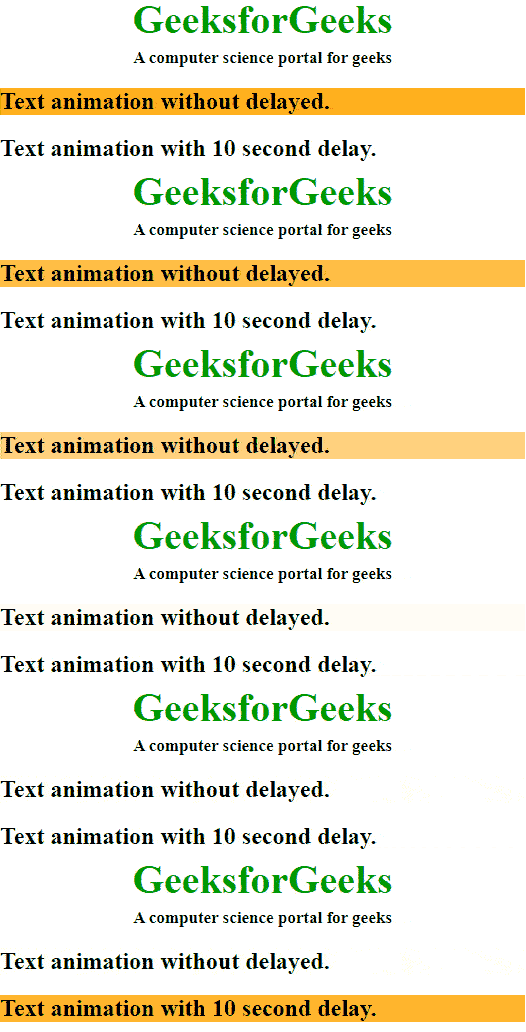
CSS animation-delay Property Example Output