CSS backgroundclip Property (original) (raw)
CSS background-clip Property
Last Updated : 23 Aug, 2024
The background-clip property in CSS controls how a background (color or image) extends within an element, allowing you to dictate the reach of your background.
**Syntax:
background-clip: border-box | padding-box | content-box | text | initial | inherit;
**Property value:
- **border-box: The border-box property is used to set the background color spread over the whole division.
- **padding-box: The padding-box property is used to set the background inside the border.
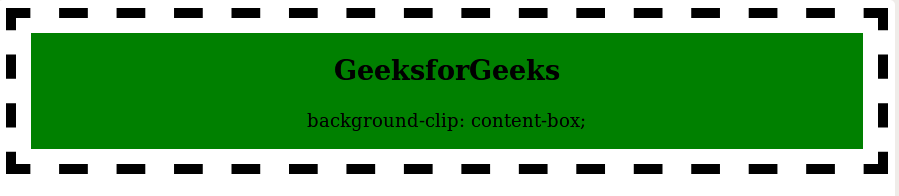
- **content-box: The content-box property is used to set the background color up to the content only.
- **initial: It is the default value. It is used to set the background color spread over the whole division.
Examples of CSS background-clip Property
**Example: In this example, we are using the background-clip: border-box property.
html `
Border BoxGeeksforGeeks
background-clip: border-box;
`
**Output: 
**Example: In this example, we are using the background-clip: padding-box property.
html `
padding-box property<div class="gfg">
<h2>
GeeksforGeeks
</h2>
<p>
background-clip: padding-box;
</p>
</div>`
**Output: 
**Example: In this example, we are using the background-clip: content-box property.
html `
content-box property<div class="gfg">
<h2>
GeeksforGeeks
</h2>
<p>
background-clip: content-box;
</p>
</div>`
**Output:
**Example: In this example, we are using the background-clip: initial-box property.
html `
Initial<div class="gfg">
<h2>
GeeksforGeeks
</h2>
<p>
background-clip: initial;
</p>
</div>`
**Output: 
**Supported Browsers:
- Google Chrome 1.0 and above
- Edge 12.0 and above
- Internet Explorer 9.0 and above
- Firefox 4.0 and above
- Opera 10.5 and above
- Safari 14.0 and above