CSS borderbottomleftradius Property (original) (raw)
CSS border-bottom-left-radius Property
Last Updated : 23 Aug, 2024
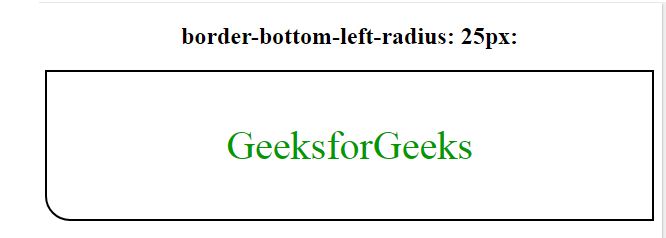
The border-bottom-left-radius property is used to define the radius of the bottom left corner of the border i.e. it makes the bottom-left of the border rounded.
**Syntax:
border-bottom-left-radius: length|% [length|%]|initial|inherit;
**Default Value: its default value is 0.
**Property Value:
- **Length: This property is used to specify the radius of the border in length(eg. px). Its default value is 0.
- **Inherit: By using inherit property, it inherits the properties of the parent element and uses it for the current bottom-left-radius of the border.
- ****(Percentage)%**: It defines the radius of the bottom-left corner of the border in percentage.
- **Initial: Initial sets the default property of the bottom-left-radius i.e. 0 which results in a square border.
**Note: If we set two values for radius then the first value is assigned to the bottom border and the second value is assigned to the left border.
**Examples: In this example, we are using the border-bottom-left-radius: 20px 50px; property.
HTML `
CSS border-bottom-left-radius Propertyborder-bottom-left-radius: 25px:
GeeksforGeeks
`
**Output:
**Examples: In this example, we are using the border-bottom-left-radius: % [length|%]; property.
HTML `
CSS border-bottom-left-radius Propertyborder-bottom-left-radius: 50%:
GeeksforGeeks
`
**Output:

**Examples: In this example, we are using the border-bottom-left-radius: initial; property.
HTML `
CSS border-bottom-left-radius Propertyborder-bottom-left-radius: initial
GeeksforGeeks
`
**Output:

**Supported Browsers: The browser supported by _CSS border-bottom-left-radius Property are listed below:
- Google Chrome 4 and above
- Edge 12 and above
- Internet Explorer 9 and above
- Firefox 4 and above
- Opera 10.5 and above
- Safari 5 and above