CSS Padding vs Margin (original) (raw)
Last Updated : 9 Jun, 2026
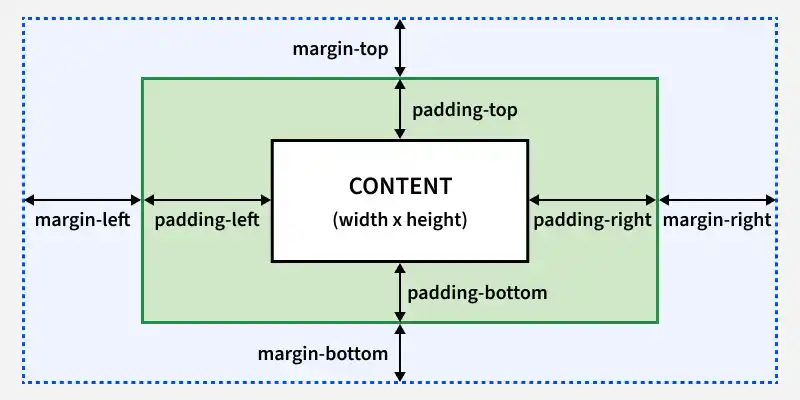
CSS padding creates space between an element's content and its border, while CSS margin creates space outside the element, separating it from other elements.
- **Padding: Adds space inside an element, between its content and border.
- **Margin: Adds space outside an element, creating gaps between elements.
Margin
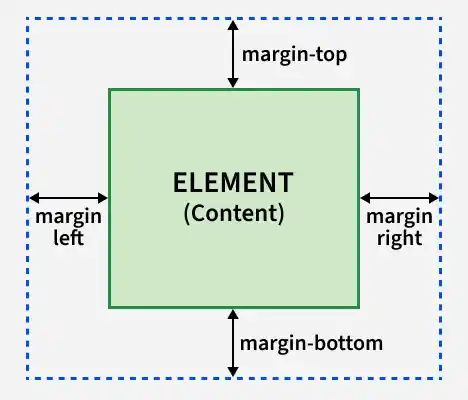
Margin is the space outside an element’s border that separates it from surrounding elements, ensuring proper spacing within the layout.
**Syntax: margin: top right bottom left;
- **top: Margin at the top of the element.
- **right: Margin at the right side of the element.
- **bottom: Margin at the bottom of the element.
- **left: Margin at the left side of the element.
Padding
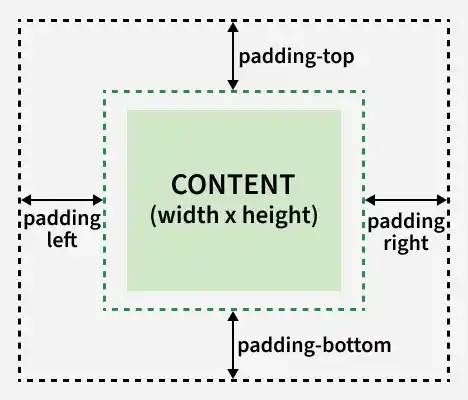
Padding is the space between an element's content and its border, creating inner space that keeps the content away from the edges.
**Syntax : padding: top right bottom left;
- **top: Padding on the top of the element.
- **right: Padding on the right side of the element.
- **bottom: Padding on the bottom of the element.
- **left: Padding on the left side of the element.
Choosing Between Margin and Padding
1. Margin
Margins are essential for adjusting the spacing between elements in web design. Here are two common use cases:
- **Centering an Element Horizontally: To center a block-level element within its container, you can set its left and right margins to auto. This tells the browser to distribute the remaining horizontal space equally on both sides.
- **Spacing Between Adjacent Elements: Margins are ideal for setting the distance between elements, ensuring they don't overlap and maintaining a clean layout. HTML `
<style>
    .centered-box {
        width: 50%;
        margin: 0 auto;
        background-color: lightblue;
    }
</style>`
- **width: 50%; to set the element's width to 50% of its container.
- **margin: 0 auto; to center the element horizontally. The 0 sets the top and bottom margins to zero, while auto distributes the left and right margins equally, centering the element.
2. Padding
Padding is used to create space between an element's content and its border, enhancing readability and visual appeal. Here are two common use cases:
- **Increasing Clickable Area: Adding padding to buttons or links enlarges their clickable area without affecting the layout, improving user experience.
- **Improving Readability: Applying padding to text containers ensures that text doesn't touch the borders, making it more legible. HTML `
<style>
    .padded-box {
        padding: 20px;
        border: 1px solid black;
        background-color: lightyellow;
    }
</style>`
- **padding: 20px; which adds 20 pixels of space inside the element on all sides, between its content and its border.
- **border: 1px solid black; to make the border visible, highlighting the effect of the padding.
Differences Between Padding and Margin
| Margin | Padding |
|---|---|
| The outer space of an element, outside the border | The inner space of an element, inside the border |
| Not affected by the background color of the element | Affected by the background color of the element |
| Can be negative | Cannot be negative |
| Can be set to auto | Cannot be set to auto |
| Creates space outside the element to move it relative to adjacent elements | Creates space inside the element to control the content spacing |
Best Practices for Using CSS Padding and Margin
- **Use Padding for Inner Spacing: Add padding to create space inside elements, ensuring content doesn't touch the edges.
- **Use Margin for Outer Spacing: Use margin to control the space between elements, keeping them well-aligned.
- **Avoid Fixed Values for Responsiveness: Use relative units like em, rem, or percentages for better adaptability.
- **Use Flexbox or CSS Grid for Alignment: Avoid overusing margins for alignment; instead, use modern layout techniques like Flexbox or Grid.
- **Prevent Margin Collapse: To avoid margin collapse, use padding, borders, or overflow: hidden on parent elements.