CSS Padding (original) (raw)
Last Updated : 11 May, 2026
CSS Padding property is used to create space between the element's content and the element's border. It only affects the content inside the element.
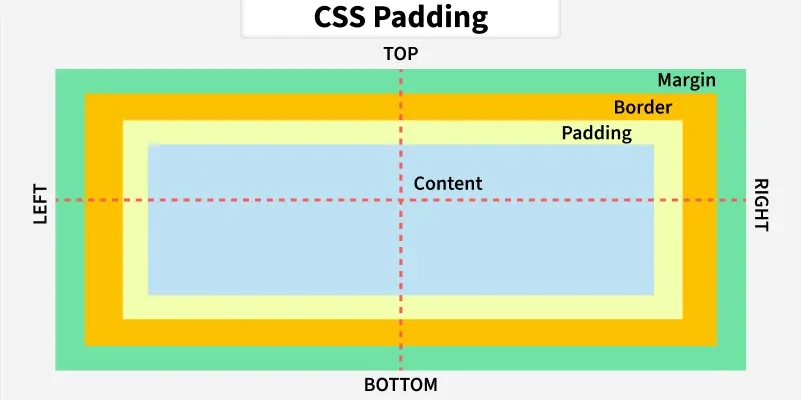
- CSS padding is different from CSS margin as the margin is the space between adjacent element borders and padding is the space between content and element's border.
- We can independently change the top, bottom, left, and right padding using padding properties.
CSS padding properties
CSS provides properties to specify padding for individual sides of an element which are defined as follows:
- **Padding: The overall space inside an element can be set using padding, which applies to all four sides at once.
- **Padding-top: The space on the top side of an element is set using padding-top.
- **Padding-right: The space on the right side of an element is controlled by padding-right.
- **Padding-bottom: The space at the bottom of an element is determined using padding-bottom.
- **Padding-left: The space on the left side of an element is set using padding-left.
**Padding properties can have the following padding values:
- **Length: in cm, px, pt, etc.
- **Width: % width of the element.
- **inherit: inherit padding from the parent element.
**Example: To demonstrate using the padding property in which we apply padding to each side of the div individually.
HTML `
Padding Example<style>
body {
margin: 0;
padding: 20px;
width: 50%;
}
h2 {
color: green;
}
.myDiv {
background-color: lightblue;
border: 2px solid black;
/* Applying padding to each side individually */
padding-top: 80px;
padding-right: 100px;
padding-bottom: 50px;
padding-left: 80px;
}
.inner {
background-color: pink;
border: 2px solid black;
width: 70px;
height: 50px;
display: flex;
align-items: center;
justify-content: center;
}
</style>`
**Syntax:
/* Applying padding to each side individually */
.myDiv
{ padding-top: 80px;
padding-right: 100px;
padding-bottom: 50px;
padding-left: 80px;
}
Shorthand Property for Padding in CSS
The Shorthand Padding Property in CSS allows you to set the padding on all sides (top, right, bottom, left) of an element in a single line with some combinations, so we can easily apply padding to our targeted element.
**There are four cases while using shorthand property:
- If the padding property has one value.
- If the padding property contains two values.
- If the padding property contains three values.
- If the padding property contains four values.
CSS Shorthand Padding Property for One Value
If the padding property has one value, then it applies padding to all sides of an element. For example padding: 20px applies 20 pixels of padding to all sides equally.
**Syntax:
.element {
/* Applies 20px padding to all sides */
padding: 20px;
}
**Example: To demonstrate applying 20px padding to all sides of div.
HTML `
Padding Property has One Value<style>
body {
margin: 0;
padding: 20px;
}
h2 {
color: green;
}
.myDiv {
background-color: gray;
border: 2px solid black;
text-align: center;
width: 40%;
/* Applies 10px padding to all sides */
padding: 20px;
}
.inner {
height: 70px;
width: 70px;
background-color: pink;
display: flex;
align-items: center;
justify-content: center;
}
</style>`
Padding Property for Two Values
If the padding property contains two values, then the first value applies to the top and bottom padding, and the second value applies to the right and left padding. For Example - padding: 10px 20px i.e. top and bottom padding are 10px while right and left padding is 20px.
**Syntax:
.element {
/* Applies 10px padding to top and bottom,
20px padding to right and left */
padding: 10px 20px;
}
**Example: To demonstrate using a padding property with two values.
HTML `
Padding Property Contains Two Value<style>
body {
margin: 0;
padding: 20px;
}
h2 {
color: green;
}
.myDiv {
background-color: gray;
border: 2px solid black;
text-align: center;
width: 40%;
padding: 10px 20px;
/* Applies 10px padding to top and bottom,
20px padding to right and left */
}
.inner {
height: 70px;
width: 70px;
background-color: pink;
}
</style>`
Padding Property for Three Values
If the padding property contains three values, then the first value sets the top padding, the second value sets the right and left padding, and the third value sets the bottom padding.
For Example - padding: 10px 20px 30px;
- top padding is 10px.
- right and left padding is 20px.
- bottom padding is 30px.
**Syntax:
.element {
/* Applies 10px padding to top,
20px padding to right and left,
30px padding to bottom */
padding: 10px 20px 30px;
}
**Example: Here, we are using padding with three values.
HTML `
<title>Padding Property Contains Three Values</title>

<style>
    body {
        margin: 0;
        padding: 20px;

    }

    h2 {
        color: green;
    }

    .myDiv {
        background-color: yellowgreen;
        border: 2px solid black;
        text-align: center;
        width: 40%;

        padding: 10px 20px 30px;
        /* Applies 10px padding to top,
           20px padding to right and left,
           30px padding to bottom */
    }

    .inner {
        height: 70px;
        width: 70px;
        background-color: grey;
    }
</style>`
Padding Property Having Four Values
If the padding property contains four values, then the first value sets the top padding, the second value sets the right padding, the third value sets the bottom padding, and the fourth value sets the left padding.:
For Example - padding: 10px 20px 15px 25px;
- top padding is 10px
- right padding is 5px
- bottom padding is 15px
- left padding is 20px
**Syntax:
.element {
/* Applies 10px padding to top,
20px padding to right,
15px padding to bottom,
and 25px padding to left */
padding: 10px 20px 15px 25px;
}
**Example: To demonstrate using a padding property with four values.
HTML `
Padding Property Contains Four Values<style>
body {
margin: 0;
padding: 20px;
}
h2 {
color: green;
}
.myDiv {
background-color: cyan;
border: 2px solid black;
text-align: center;
width: 40%;
padding: 10px 20px 15px 25px;
/* Applies 10px padding to top,
20px padding to right,
15px padding to bottom,
and 25px padding to left */
}
.inner {
height: 70px;
width: 70px;
background-color: black;
color: white;
display: flex;
align-items: center;
justify-content: center;
}
</style>`
All CSS Padding Properties
Combining individual side properties and shorthand properties, there are 5 total properties of CSS padding:
| Property | Description |
|---|---|
| padding | shorthand property for setting all the padding properties in one declaration |
| padding-bottom | Sets the bottom padding of an element |
| padding-left | Sets the left padding of an element |
| padding-right | Sets the right padding of an element |
| padding-top | Sets the top padding of an element |