Design Meet the Team Page using HTML and CSS (original) (raw)
Last Updated : 13 Apr, 2026
A Meet the Team page is built using HTML to define semantic structure (sections, headings, images, and content blocks) and CSS to control layout, styling, and responsiveness for different screen sizes.
- Uses semantic HTML elements like
, ,, and
to organize team member data.
- Applies CSS (Flexbox/Grid) for layout alignment, spacing, and responsive design across devices.
- Enhances UI with styling properties such as colors, typography, hover effects, and media queries.
1. Creating Structure
In this section, we will create a basic structure for the meet the team page. We will attach the icon and put the text that will be placed on the card of members will add button.
- **CDN links for the Icons from the Font Awesome:
- **HTML code: The HTML code is used to create a structure of meet the team page. Since it does not contain CSS so it is just a basic structure. We will use some CSS property to make it attractive. HTML `
<!-- linking font awesome for icons -->
<link rel="stylesheet"
href=Meet The Team Page
    <!-- First member of the team -->
    <div class="row">
        <div class="column"
             id="gfg">
            <div class="card">
                <i class="fa fa-user-circle"
                   style="font-size:68px;">
                  </i>

                <div class="container">
                    <h2>Mike Tyson</h2>
                    <p>CEO & Founder</p>
                    <p>
                        Feel your customer make
                        them happy
                    </p>

                    <button class="button">
                        View
                    </button>
                </div>
            </div>
        </div>
    </div>

    <!-- Other members of the team -->
    <div class="row">
        <div class="column">
            <div class="card">
                <i class="fa fa-user-circle"
                   style="font-size:68px;"></i>
                <div class="container">
                    <h2>Ching Lee</h2>
                    <p>Developer Head</p>
                    <p>
                        A website should be user-friendly
                        and attractive
                    </p>

                    <button class="button">
                        View
                    </button>
                </div>
            </div>
        </div>

        <div class="column">
            <div class="card">
                <i class="fa fa-user-circle"
                   style="font-size:68px;"></i>
                <div class="container">
                    <h2>Hashim Ahmed</h2>
                    <p>Content Head</p>
                    <p>
                        Content should be popular
                        and trending
                    </p>

                    <button class="button">View</button>
                </div>
            </div>
        </div>
        <div class="column">
            <div class="card">
                <i class="fa fa-user-circle"
                   style="font-size:68px;"></i>
                <div class="container">
                    <h2>Rihana Gomez</h2>
                    <p>Marketing Head</p>
                    <p>
                        Sell the product like
                        Greatest Mary Kay Ash
                    </p>
                    <button class="button">
                        View
                    </button>
                </div>
            </div>
        </div>
    </div>
</center>
`
2. Designing Structure
In the previous section, we have created the structure of the basic structure of the team page and already added the icons for the members. In this section, we will add CSS property to design the card as required.
- **CSS code: CSS code is used to make an attractive team page. This CSS property is used to make the cards stylish and responsive. CSS `
`
3. Combining the HTML and CSS Code
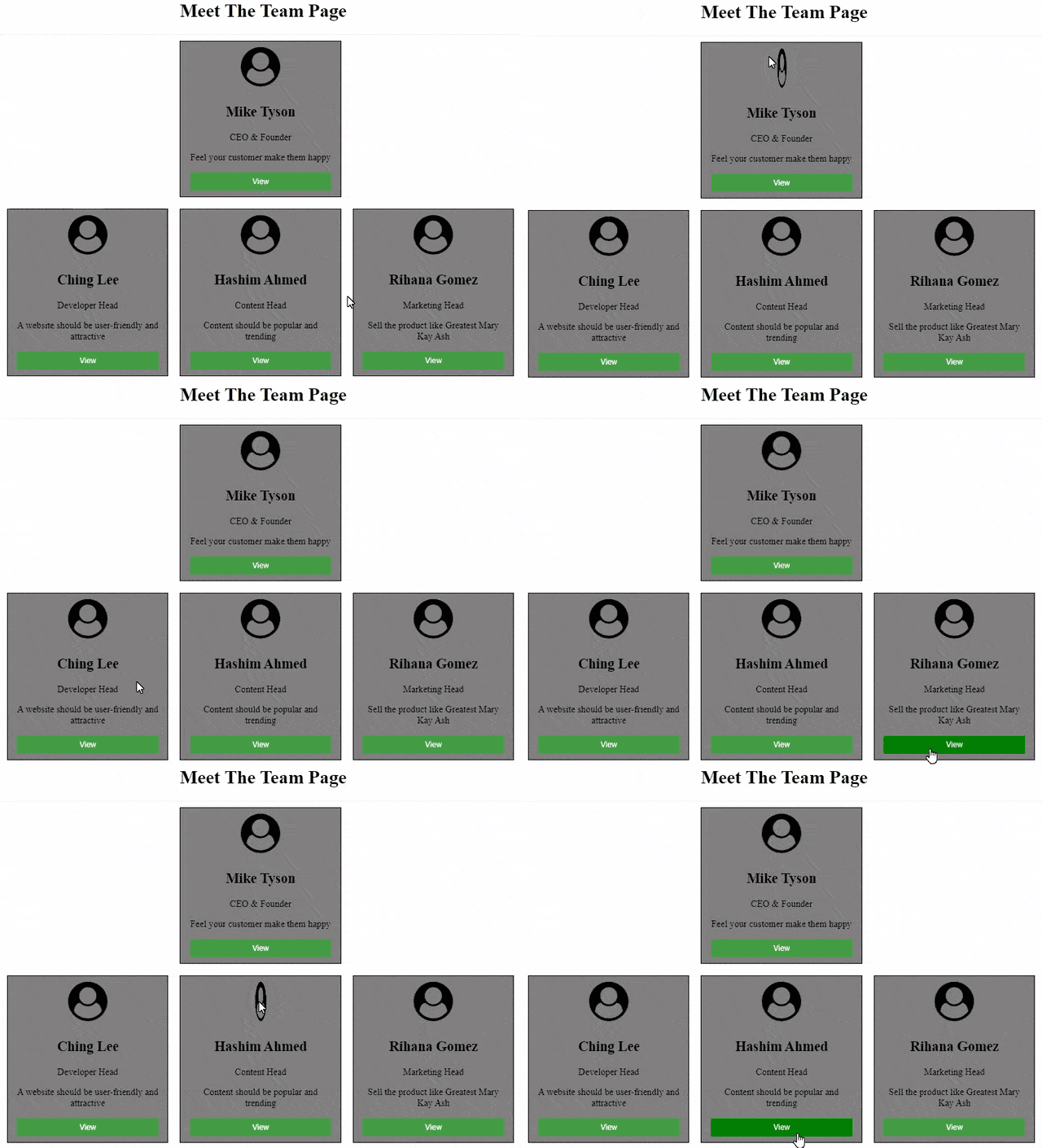
This example combines both HTML and CSS code to design the meet the team page.
HTML `
<!-- linking font awesome for icons -->
<link rel="stylesheet" href=Meet The Team Page
    <!-- First member of the team -->
    <div class="row">
        <div class="column"
             id="gfg">
            <div class="card">
                <i class="fa fa-user-circle"
                   style="font-size:68px;"></i>
                <div class="container">
                    <h2>Mike Tyson</h2>

                    <p>CEO & Founder</p>

                    <p>
                        Feel your customer make
                        them happy
                    </p>

                    <button class="button">
                          View
                      </button>
                </div>
            </div>
        </div>
    </div>

    <!-- Other members of the team -->
    <div class="row">
        <div class="column">
            <div class="card">
                <i class="fa fa-user-circle"
                   style="font-size:68px;"></i>
                <div class="container">
                    <h2>Ching Lee</h2>

                    <p>Developer Head</p>

                    <p>
                        A website should be user-friendly
                        and attractive
                    </p>


                    <button class="button">
                          View
                      </button>
                </div>
            </div>
        </div>

        <div class="column">
            <div class="card">
                <i class="fa fa-user-circle"
                   style="font-size:68px;">
                  </i>
                <div class="container">

                    <h2>Hashim Ahmed</h2>
                    <p>Content Head</p>
                    <p>
                        Content should be popular
                        and trending
                    </p>

                    <button class="button">
                          View
                      </button>
                </div>
            </div>
        </div>
        <div class="column">
            <div class="card">
                <i class="fa fa-user-circle"
                       style="font-size:68px;">
                  </i>
                <div class="container">

                    <h2>Rihana Gomez</h2>
                    <p>Marketing Head</p>
                    <p>
                        Sell the product like
                        Greatest Mary Kay Ash
                    </p>

                    <button class="button">
                          View
                      </button>
                </div>
            </div>
        </div>
    </div>
</center>
CSS
    /* Whole html box designing */
    html {
        box-sizing: border-box;
    }

    /* Body width fixing */
    body {
        max-width: 100%
    }

    /* Box sizing depending on parent */
    *,
    *:before,
    *:after {
        box-sizing: inherit;
    }

    /* Styling column */
    .column {
        float: left;
        width: 33%;
        margin-bottom: 16px;
        padding: 5px 10px;
    }


    /* Column width change depends on screen size */
    @media screen and (max-width: 670px) {
        .column {
            width: 100%;
            text-align: none;
        }
    }

    /* Card designing */
    .card {
        background-color: gray;
        border: 1px solid black;
    }

    .container {
        padding: 0 16px;
    }

    /* Icon styling */
    .fa {
        margin: 10px;
        font-size: 68px;

    }

    .fa:hover {
        transform: rotateY(180deg);
        transition: transform 0.8s;
    }

    .container::after,
    .row::after {
        content: "";
        clear: both;
        display: table;
    }

    /* Button designing */
    .button {
        border: none;
        padding: 8px;
        color: white;
        background-color: #449D44;
        text-align: center;
        cursor: pointer;
        width: 100%;
        margin-bottom: 10px;
    }

    /* Hover effect on button */
    .button:hover {
        background-color: green;
    }

    /* Margining first member of team */
    #gfg {
        float: none;
        margin: auto;
    }
`
**Output: