Ordinary Least Squares (OLS) using statsmodels (original) (raw)
Last Updated : 15 Jul, 2025
Ordinary Least Squares (OLS) is a widely used statistical method for estimating the parameters of a linear regression model. It minimizes the sum of squared residuals between observed and predicted values. In this article we will learn how to implement **Ordinary Least Squares (OLS) regression using Python's statsmodels module.
Overview of Linear Regression Model
A **linear regression model establishes the relationship between a dependent variable (_y) and one or more independent variables (_x):
\hat{y} = b_1 x + b_0
Where:
- \hat{y} : Predicted value of _y
- __b_1: Slope of the line (coefficient of _x)
- __b_0: Intercept (value of _y when __x_=0)
The **OLS method minimizes the total sum of squares of residuals (_S) defined as:
S = \sum_{i=1}^{n} \epsilon_i^2 = \sum_{i=1}^{n} (y_i - \hat{y}_i)^2
To find the optimal values of __b_0 and __b_1 partial derivatives of _S with respect to each coefficient are taken and set to zero.
**Implementation OLS Regression Using Statsmodels
**Step 1: Import Required Libraries
Before starting, we need to import necessary libraries like pandas , numpy and matplotlib.
Python `
import statsmodels.api as sm
import pandas as pd
import matplotlib.pyplot as plt
import numpy as np
`
**Step 2: Load and Prepare the Data
We load the dataset from a CSV file using pandas. You can download dataset from here. The dataset contains two columns:
x: Independent variable (predictor).y: Dependent variable (response). Python `
data = pd.read_csv('train.csv')
x = data['x'].tolist()
y = data['y'].tolist()
`
**Step 3: Add a Constant Term
In linear regression the equation includes an intercept term (__b_0). To include this term in the model we use the add_constant() function from statsmodels.
Python `
x = sm.add_constant(x)
`
**Step 4: Perform OLS Regression
Now we fit the OLS regression model using the OLS() function. This function takes the dependent variable (_y) and the independent variable (_x) as inputs.
Python `
result = sm.OLS(y, x).fit()
print(result.summary())
`
**Output :
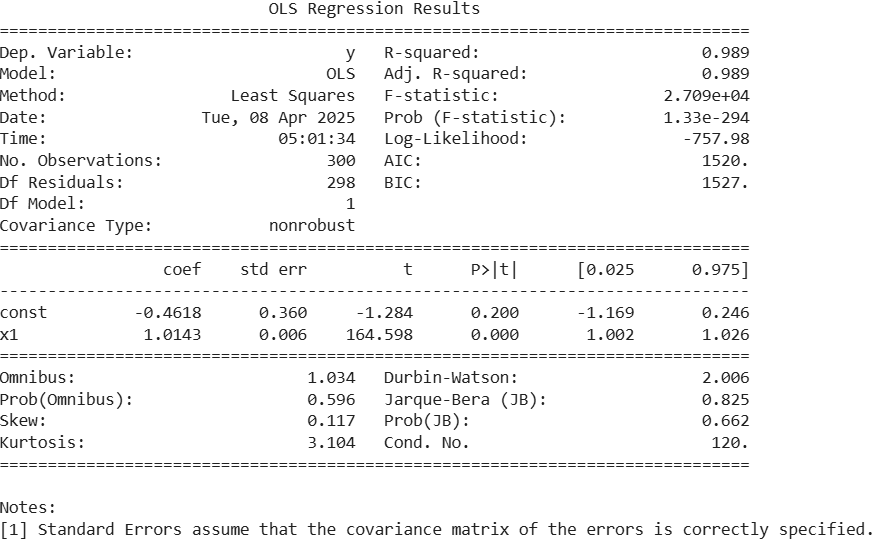
- The output shows that the regression model fits the data very well with an R-squared of 0.989.
- The independent variable
x1is highly significant (p < 0.001) and has a strong positive effect on the target variable. - The intercept (const) is not statistically significant (p = 0.200) meaning it may not contribute meaningfully.
- Residuals are normally distributed as indicated by the Omnibus and Jarque-Bera test p-values (> 0.05).
- The Durbin-Watson value is ~2 indicating no autocorrelation in residuals.
- The overall model is statistically significant with a very high F-statistic and a near-zero p-value
**Step 5: Visualize the Regression Line
To better understand the relationship between _x and _y we plot the original data points and the fitted regression line.
Python `
plt.scatter(data['x'], data['y'], color='blue', label='Data Points')
x_range = np.linspace(data['x'].min(), data['x'].max(), 100) y_pred = result.params[0] + result.params[1] * x_range
plt.plot(x_range, y_pred, color='red', label='Regression Line') plt.xlabel('Independent Variable (X)') plt.ylabel('Dependent Variable (Y)') plt.title('OLS Regression Fit') plt.legend() plt.show()
`
**Output:

Regression Line
The above plot shows a strong linear relationship between the independent variable (X) and the dependent variable (Y). Blue dots represent the actual data points which are closely aligned with the red regression line indicating a good model fit.