What is Interactive Data Visualization? (original) (raw)
Last Updated : 19 Jul, 2025
**Interactive data visualization refers to the graphical representation of data that allows users to interact directly with the visual elements. This includes features like hovering, clicking, filtering, zooming and drilling down to gain deeper insights. It turns passive viewing into active exploration, helping users discover hidden trends, patterns and correlations.
Examples of interactions include:
- Hovering to display tooltips
- Filtering data using dropdowns or sliders
- Clicking to drill into subcategories
- Dynamically adjusting time ranges
Importance of Interactive Data Visualization
Interactive visualizations go beyond traditional data representation. They:
- Allow users to explore multiple scenarios
- Simplify complex datasets
- Provide contextual understanding
- Facilitate real-time decision-making
Key Advantages:
- **Enhanced Data Understanding: Interactivity brings data to life, helping users understand relationships, patterns, and anomalies.
- **Improved Exploration: Users can explore various subsets of the data, zoom into areas of interest, and generate new questions from the visuals.
- **Effective Communication: Visuals act as a universal language. Dynamic dashboards help present insights to a wide audience clearly and convincingly.
- **Faster and Better Decision-Making: Real-time updates and drill-down options help users identify KPIs, outliers and trends instantly.
Modern Trends in Interactive Data Visualization
With advancements in technology, data visualization has evolved from basic 2D charts to immersive, interactive, and real-time dashboards.
- **From Static to Dynamic: Traditional charts show a fixed view. Modern tools allow users to manipulate data views and receive immediate visual feedback.
- **2D to 3D Immersion: 3D visualizations such as interactive maps, VR dashboards and holograms offer realistic views, especially useful for simulations and geographic data.
- **Single to Multi-Layered Views: Interactive dashboards combine multiple charts, filters, and KPIs in one place, giving users a comprehensive understanding of the data.
- **Data Storytelling: Modern visualizations allow users to build guided narratives where visuals evolve with the story, keeping audiences engaged and informed.
Features and Benefits of Modern Interactive Visualizations
Numerous elements that increase data analysis and user experience are available in modern interactive data visualizations:
- **Filtering and Slicing: By allowing users to compare different segments, concentrate on certain data subsets, or examine data from many dimensions, interactive filters and slicing tools may uncover hidden patterns.
- **Updates in real time: By connecting visualizations to real-time data sources, users can keep an eye on changes and respond to them as they happen.
- **Customizable Views: Users may rearrange dashboard components for individualized insights, choose certain metrics, or change the style of graphic to better suit their needs.
- **Collaborative Features: A lot of modern technologies come with collaborative features that let teams debate findings, share and annotate visualizations, and make choices based on data and tactics in tandem.
- **Advanced Analytics: By combining statistical models, machine learning algorithms, and predictive analytics, one may better detect patterns, correlations, and anomalies, which facilitates more precise forecasting and decision-making.
- **Data Integration: With the help of modern platforms, disparate data sources may be integrated to provide a single picture of the data and make it easier to conduct thorough analyses that take into account a variety of aspects.
Better data interpretation, a quicker time to insight, more teamwork, and more efficient communication are some advantages of these qualities, which improve decision-making and business results.
Advantages in Spotting Trends and Assessing KPIs
The capacity of interactive data visualization to assist users in recognizing patterns and more efficiently monitoring key performance indicators (KPIs) is one of its main benefits:
- **Trend Identification: Interactive visualizations help users explore data over time, making it easier to spot patterns and trends that static charts may miss. Users can adjust time ranges, compare periods, and zoom into details to make informed predictions.
- **KPI Monitoring: Dashboards can show key performance indicators (KPIs) in real time. By displaying multiple metrics, users can track progress, identify issues quickly, and take timely action to stay on track.
- **Correlation Analysis: By exploring relationships between data variables, users can uncover patterns and dependencies. This helps identify what factors influence KPIs, allowing for more targeted and effective strategies.
Additional Benefits of Interactive Data Visualization
In addition to trend identification and KPI evaluation, dynamic data visualization has other benefits.
- **Simplified Complex Data: Visualizations help a wider audience grasp abstract topics by turning complex facts into easily consumable images.
- **Faster Insights: Users can see patterns, anomalies, and opportunities more quickly because to the interactive visualizations, which speeds up the exploration process and improves time-to-market and decision-making.
- **Better Data Quality: Inconsistencies or outliers in the data may be found more easily via interactive exploration, which makes data cleaning easier and boosts overall data quality.
- **Engaging Communication: Data presentations become more memorable and captivating when they include dynamic and engaging images that hold the audience's attention and help them comprehend the message.
- **Self-Service Analytics: Encouraging users to investigate data on their own lightens the workload for IT teams and data analysts while promoting an organizational culture that relies heavily on data to make decisions.
Examples of Interactive Data Visualization
**Example 1: Using Plotly
Python `
import plotly.express as px df = px.data.iris() fig = px.line(df, y="sepal_width") fig.show()
`
**Output
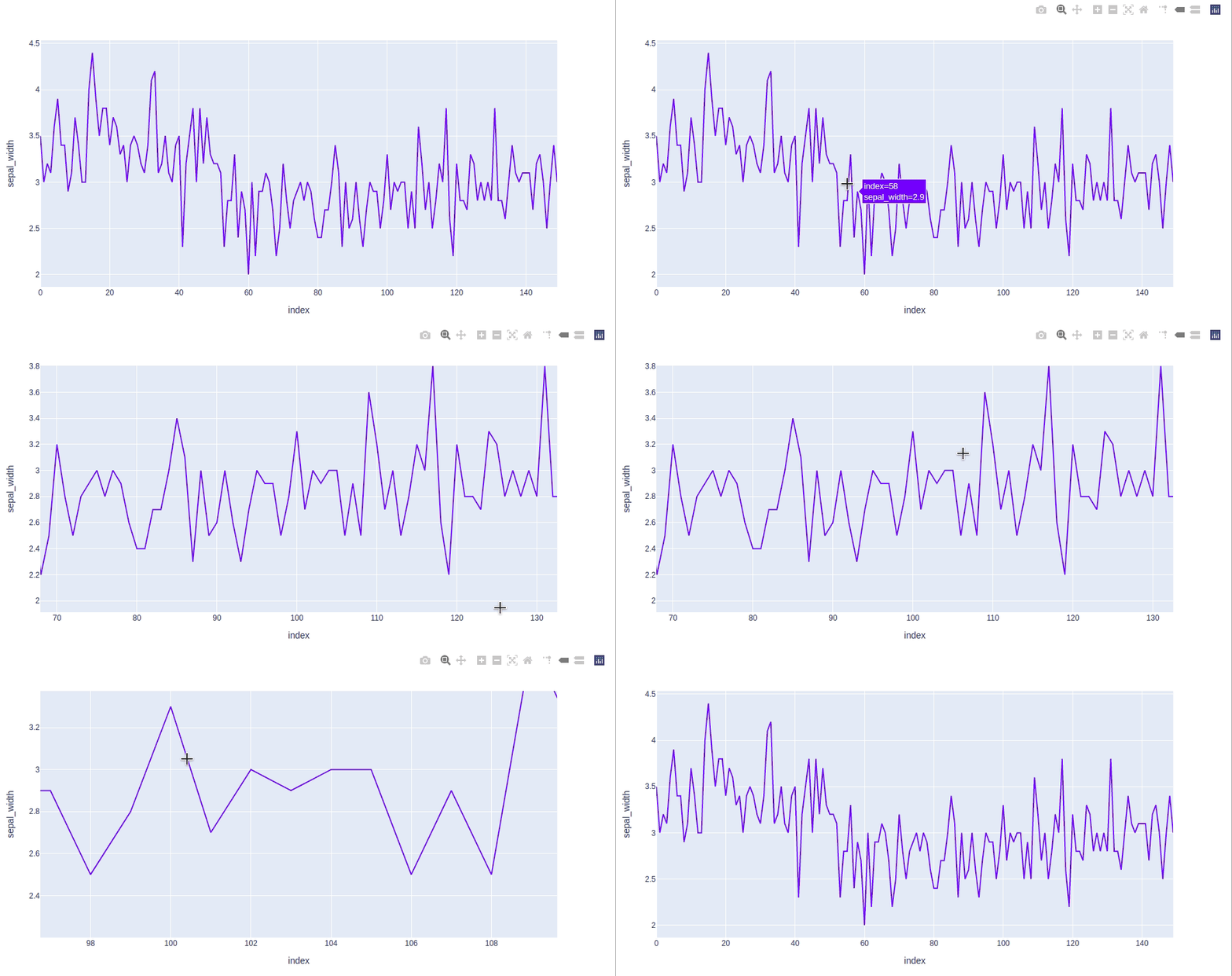
**Explanation: plotly.express create an interactive line chart from the Iris dataset. **px.line() plots **sepal_width on the y-axis with the DataFrame index as the x-axis. **fig.show() displays the chart, enabling interactive features like zooming and hovering to explore the data trend.
**Example 2: Using Bokeh
Python `
from bokeh.plotting import figure, show x = [1, 2, 3, 4, 5] y = [6, 7, 2, 4, 5]
fig = figure() fig.step(x, y, line_width=2) show(fig)
`
**Output

**Explanation: The **x and y lists define the data points. **figure() initializes the plot and **fig.step() draws a step line with specified thickness (line_width=2). **show(fig) displays the interactive chart with zoom and pan functionality.
**Related articles