Backup vs Recovery (original) (raw)
Last Updated : 28 Apr, 2026
As technology evolves, continuous data generation from work and personal use makes data protection essential. Proper backup and recovery methods help prevent permanent loss and ensure data can be restored during unexpected events.
- Safeguards data against loss, corruption or system failures
- Enables recovery after accidental deletion or cyber incidents
- Ensures business continuity and minimal downtime
- Supports secure and reliable data management
Backup
Copy of original data stored for recovery in case of data loss. Backup serves as a key method for data protection and ensures the availability of important information during system failure or accidental deletion.
- Important data of the organization needs efficient storage of copies to protect valuable data.
- Copy can be stored separately or in a database on storage devices.
- Types include full copy, incremental copy, local copy and mirror copy.
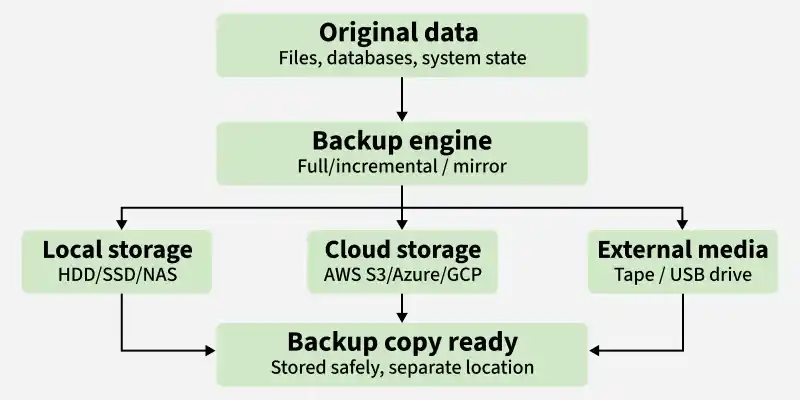
Backup Process
**Example: Modern backup solutions include cloud-based tools such as Google Drive, Microsoft OneDrive and AWS Backup, which automatically store and manage data backups.
Differential Backup
- Stores all changes made since the last full backup.
- It requires more storage than incremental backup but allows faster recovery.
Cloud Backup
- Data is stored on remote cloud servers instead of local devices.
- It ensures accessibility, scalability and protection against physical damage.
Advantages
- Protection against data loss.
- Ensuring smooth workflow.
- Enables recovery of previous data.
- Users can back up the data and delete it from their system to free up space or memory.
Disadvantages
- Hardware and software expenses are higher.
- Maintenance cost of hardware and software increases.
- Failure to properly backup critical data can result in irreversible loss.
- Storage space requirements increase over time due to continuous data copies.
Recovery
Recovery refers to restoring lost data by following some processes. Even if the data was backed up still lost so it can be recovered by using/implementing some recovery techniques. When a database fails due to any reason then there is a chance of data loss, so in that case recovery process helps in improve the reliability of the database.
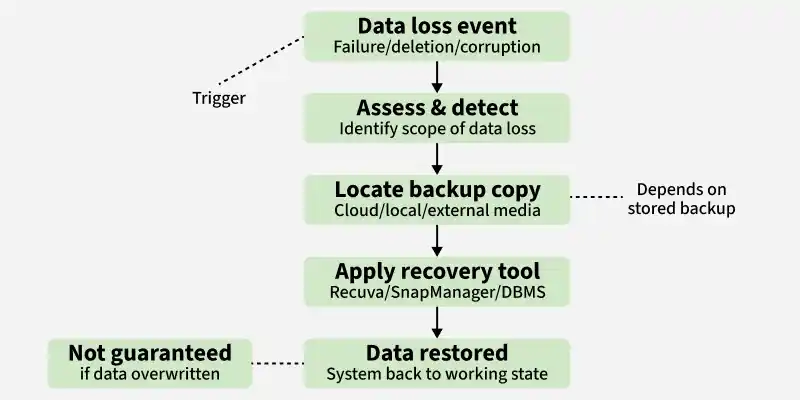
Recovery Process
**Example: Recuva is a data recovery tool. Using Recuva you can restore lost and deleted files.
Disaster Recovery Planning
Disaster recovery planning involves preparing strategies to restore systems, data and operations after major failures such as cyberattacks, hardware crashes or natural disasters.
- Defines recovery time objectives (RTO)
- Ensures business continuity
- Includes backup and recovery strategies
- Minimizes downtime and financial loss
Advantages
- Prevents permanent loss of data by restoring important information after unexpected system failures or accidental deletion.
- Use of recovery tools remains cost-effective as it reduces need for expensive manual data reconstruction methods.
- Helps in disaster recovery by enabling quick restoration of systems and minimizing downtime during critical situations.
- Restores system operations quickly after failure, ensuring continuity of services and reducing operational disruption.
Disadvantages
- Restoration process cannot be guaranteed in all cases, especially after severe corruption or overwrite.
- Restoration tools may involve high cost, depending on complexity and features offered.
- Using untrustworthy or poorly developed data recovery software increases security risk.
- Recovery process may require significant time, causing delays in system restoration.
Backup vs Recovery
| Backup | Recovery |
|---|---|
| Replication of data for safety purpose. | Recovery of usable data from stored copies. |
| Maintain extra copy for future safety and protection. | Bring system back to working state after data loss or failure. |
| Improves data protection and reduces risk of permanent loss. | Ensures continuity by restoring missing or corrupted information. |
| Supports data safety and acts as foundation for data protection. | Depends on stored copies to reconstruct system data. |
| Common in daily business and system operations. | Used during failure, corruption or data loss situations. |
| Snapshot or database copy stored using backup tools. | System data restored from saved restore points or snapshots. |
| Stored externally on separate storage devices or cloud. | Performed internally using stored data copies. |
| Requires additional storage space. | Does not require extra storage beyond existing backups |
| Can be manual or scheduled automatically. | Often supported through automatic restore points. |
| Makes restoration process possible and easier. | Ensures system and data usability after failure. |
Real-World Scenarios
Scenario 1: Ransomware Attack
A company’s systems are encrypted by ransomware, making all files inaccessible.
- Backup helps restore clean copies of data
- Recovery ensures systems return to normal operations
Scenario 2: Accidental File Deletion
An employee deletes important project files.
- Backup allows retrieval of previous versions
- Recovery restores files quickly without rework
Scenario 3: Hardware Failure
A hard drive crashes unexpectedly.
- Backup stored on cloud or external device prevents permanent loss
- Recovery restores system functionality