Difference between Shared Lock and Exclusive Lock (original) (raw)
Last Updated : 4 Dec, 2025
Ensuring Data Integrity and Isolation is essential when numerous transactions are accessing a database at once to avoid conflicts and preserve correctness. Locks are a typical way to manage access to data elements in a transaction, thereby guaranteeing the isolation characteristic. Locks are systems that stop many transactions from making changes to the same data at once, protecting the data's integrity. Shared Lock (S) and Exclusive Lock (X) are the two primary kinds of locks. The distinctions between shared and exclusive locks, as well as their uses, will all be covered in this article.
A data item is locked for reading using a Shared Lock (S), sometimes referred to as a read lock. Other transactions can get a shared lock on a data item that a transaction is holding, but they are not able to obtain an exclusive lock to alter it.
Key Characteristics of Shared Lock
- **Read-Only Operation: A shared lock prevents conflicts between several transactions reading the same data item at the same time.
- **In favor of Read Integrity: Guarantees that a read-only request does not result in the updating of a record.
- **Stop Updates: Until the shared lock is released, stop any transactions from making changes to the data item.
- **Requested via Lock-S Instruction: A Lock-S instruction requests the shared lock.
Example of Shared Lock
Take into consideration two transactions that want to read A = 100, the same data item. Inconsistencies may arise if one transaction tries to change A while the other is still reading it. A shared lock, however, stops updates until every transaction has completed reading.
Advantages of Shared Lock
- **Concurrency: Boosts performance by enabling many transactions to read data at once.
- Data integrity protects the correctness of the information by making sure the data doesn't change while it is being read.
- **Decreased Lock Conflict: Compared to exclusive locks, shared locks result in less conflict for resources since they are non-exclusive.
- **Scalability: By allowing concurrent access, it improves scalability for tasks that involve a lot of reading.
Disadvantages of Shared Lock
- **Blocking: This might cause delays since it stops other transactions from updating until the shared lock is released.
- **Deadlock Risk: If several shared locks held by various transactions are not appropriately handled, deadlock scenarios may result.
- **Enhanced Complexity: Keeping track of many shared locks might make the transaction control system more complex.
- **Performance cost: In high-load situations, maintaining and arranging many shared locks may result in performance cost.
Locks are essential in maintaining consistency in databases. Shared and exclusive locks play key roles in concurrent transactions.
**What is an Exclusive Lock?
A data item is locked for writing using an Exclusive Lock (X), sometimes referred to as a write lock. No other transaction is able to access or alter a data item that it has an exclusive lock on until the lock is released.
Key Characteristics of Exclusive Lock
- **Read and Write Operation: A transaction that has an exclusive lock is able to read and change data items.
- **Avoid Allowing Other Transactions to Access: Stops another transaction from obtaining an exclusive or shared lock on the same piece of data.
- **Kept Until Commit or Rollback: Until the transaction commits or rolls back, the exclusive lock is kept in place.
- **Requested Using Lock-X Instruction: A Lock-X instruction is used to request the exclusive lock.
Example of Exclusive Lock
An example of an exclusive lock is when a transaction obtains an exclusive lock (X-lock) in order to update a value, such as A = 100, by subtracting 50. As a result, until the update is finished and the lock is released, no other transaction is allowed to read from or write to A.
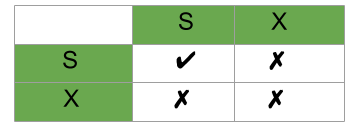
Compatibility matrix for locks
- If the transaction T1 is holding a shared lock in data item A, then the control manager can grant the shared lock to transaction T2 as compatibility is TRUE, but it cannot grant the exclusive lock as compatibility is FALSE.
- In simple words if transaction T1 is reading a data item A, then same data item A can be read by another transaction T2 but cannot be written by another transaction.
- Similarly if an exclusive lock (i.e. lock for read and write operations) is hold on the data item in some transaction then no other transaction can acquire Shared or Exclusive lock as the compatibility function denoted FALSE.
Advantages of Exclusive Lock
- Data consistency is ensured by making sure that subsequent transactions cannot access or change the updated data.
- **Isolation: Offers total seclusion to the lock-holding transaction, avoiding any disruption from other transactions.
- **Controlled Modifications: Guarantees that alterations to the data are implemented securely and devoid of simultaneous changes.
- **Conflict Prevention: Guarantees reliable transaction results by averting conflicts that may result from concurrent data modifications.
Disadvantages of Exclusive Lock
- **Decreased Concurrency:Concurrency may be decreased by allowing just one Reduced Concurrency. This technique reduces performance by limiting concurrency to one operation holding the lock.
- **Possibility of Deadlock: There is a higher chance of deadlock, particularly in systems with complicated locking specifications and many transactions.
- **Resource Contention: In write-intensive contexts, this may result in increased competition for resources, which might impact performance.
- **Blocking Other Transactions: This stops other transactions from using the data that has been locked, which might cause delays and lower productivity overall.
| Shared Lock | Exclusive Lock |
|---|---|
| Lock mode is read only operation. | Lock mode is read as well as write operation. |
| Shared lock can be placed on objects that do not have an exclusive lock already placed on them. | Exclusive lock can only be placed on objects that do not have any other kind of lock. |
| Prevents others from updating the data. | Prevents others from reading or updating the data. |
| Issued when transaction wants to read item that do not have an exclusive lock. | Issued when transaction wants to update unlocked item. |
| Any number of transaction can hold shared lock on an item. | Exclusive lock can be hold by only one transaction. |
| S-lock is requested using lock-S instruction. | X-lock is requested using lock-X instruction. |
| **Example: Multiple transactions reading the same data | **Example: Transaction updating a table row |