Transaction in DBMS (original) (raw)
Last Updated : 23 Sep, 2025
A transaction refers to a sequence of one or more operations (such as read, write, update, or delete) performed on the database as a single logical unit of work.
- A transaction ensures that either all the operations are successfully executed (committed) or none of them take effect (rolled back).
- Transactions are designed to maintain the integrity, consistency and reliability of the database, even in the case of system failures or concurrent access.
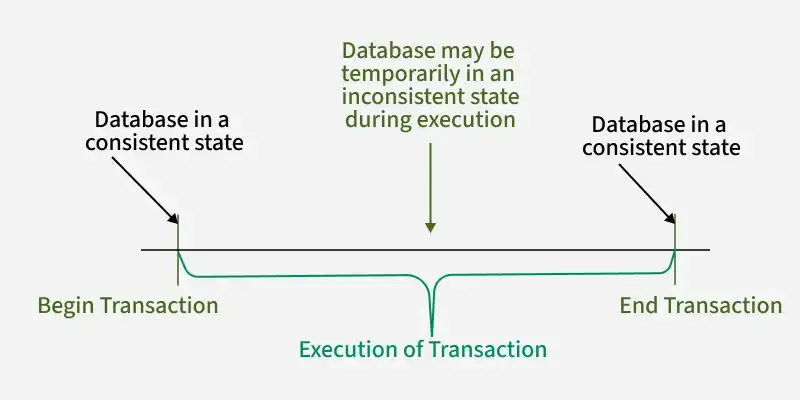
Transaction
All types of database access operation which are held between the beginning and end transaction statements are considered as a single logical transaction. During the transaction the database is inconsistent. Only once the database is committed the state is changed from one consistent state to another.
Example: Let’s consider an online banking application:
**Transaction: When a user performs a **money transfer, several operations occur, such as:
- **Reading the account balance of the sender.
- **Writing the deducted amount from the sender’s account.
- **Writing the added amount to the recipient’s account.
Facts about Database Transactions
- A transaction is a program unit whose execution may or may not change the contents of a database.
- The transaction is executed as a single unit.
- If the database operations do not update the database but only retrieve data, this type of transaction is called a read-only transaction.
- A successful transaction can change the database from one CONSISTENT STATE to another.
- DBMS transactions must be atomic, consistent, isolated and durable.
- If the database were in an inconsistent state before a transaction, it would remain in the inconsistent state after the transaction.
Operations of Transaction
A user can make different types of requests to access and modify the contents of a database. So, we have different types of operations relating to a transaction. They are discussed as follows:
1) Read(X)
A read operation is used to read the value of a particular database element **X and stores it in a temporary buffer in the main memory for further actions such as displaying that value.
**Example: For a banking system, when a user checks their balance, a Read operation is performed on their **account balance:
SELECT balance FROM accounts WHERE account_id = 'A123';
This updates the balance of the user's account after withdrawal.
2) Write(X)
A write operation stores updated data from main memory back to the database. It usually follows a read, where data is fetched, modified (e.g., arithmetic changes) and then written back to save the updated value.
**Example: For the banking system, if a user withdraws money, a **Write operation is performed after the balance is updated:
UPDATE accounts SET balance = balance - 100 WHERE account_id = 'A123';
This updates the balance of the user’s account after withdrawal.
3) Commit
This operation in transactions is used to maintain integrity in the database. Due to some failure of power, hardware, or software, etc., a transaction might get interrupted before all its operations are completed. This may cause ambiguity in the database, i.e. it might get inconsistent before and after the transaction.
**Example: After a successful money transfer in a banking system, a **Commit operation finalizes the transaction:
COMMIT;
Once the transaction is committed, the changes to the database are permanent and the transaction is considered **successful.
4) Rollback
A rollback undoes all changes made by a transaction if an error occurs, restoring the database to its last consistent state. It helps prevent data inconsistency and ensures safety.
**Example: Suppose during the money transfer process, the system encounters an issue, like insufficient funds in the sender’s account. In that case, the transaction is rolled back:
ROLLBACK;
This will undo all the operations performed so far and ensure that the database remains consistent.
ACID Properties of Transaction
Transactions in DBMS must ensure data is accurate and reliable. They follow four key ACID properties:
- **Atomicity: A transaction is all or nothing. If any part fails, the entire transaction is rolled back. Example: While transferring money, both debit and credit must succeed. If one fails, nothing should change.
- **Consistency: A transaction must keep the database in a valid state, moving it from one consistent state to another. Example: If balance is ₹1000 and ₹200 is withdrawn, the new balance should be ₹800.
- **Isolation: Transactions run independently. One transaction’s operations should not affect another’s intermediate steps. Example: Two users withdrawing from the same account must not interfere with each other’s balance updates.
- **Durability: Once a transaction is committed, its changes stay even if the system crashes. Example: After a successful transfer, the updated balance remains safe despite a power failure.
Read more about ACID Properties
Transaction Schedules
When multiple transaction requests are made at the same time, we need to decide their order of execution. Thus, a transaction schedule can be defined as a chronological order of execution of multiple transactions. Example: After a successful transfer, the updated balance remains safe despite a power failure.
There are broadly **two types of transaction schedules discussed as follows:
i) Serial Schedule
In a serial schedule, transactions execute one at a time, ensuring database consistency but increasing waiting time and reducing system throughput. To improve throughput while maintaining consistency, concurrent schedules with strict rules are used, allowing safe simultaneous execution of transactions.
ii) Non-Serial Schedule
Non-serial schedule is a type of transaction schedule where multiple transactions are executed concurrently, interleaving their operations, instead of running one after another. It improves system efficiency but requires concurrency control to maintain database consistency.
Read more about Types of Schedules
Transaction Recovery Techniques in DBMS
When a system failure occurs during a transaction (such as power failure, hardware malfunction, software error, or deadlock), the database can become inconsistent or partially updated. Recovery techniques are designed to restore the database to a consistent state, ensuring the ACID properties are maintained.
Checkpointing
- A checkpoint is a snapshot of the database state at a specific point in time.
- During recovery, the system does not have to start from scratch; it can roll back to the last checkpoint and replay committed transactions.\
Undo and Redo Operations
- Recovery involves two essential types of operations:
**Undo: Revert the effects of incomplete or uncommitted transactions.
**Redo: Reapply committed transactions that might not have been written to disk at the time of failure.
- The Write-Ahead Logging (WAL) principle ensures that log records describing changes are written to stable storage before the changes themselves are applied to the database.
Deferred Update (No-Undo/Redo Approach)
- In this approach, the system does not write changes to the database immediately.
- Changes are made in temporary memory (buffer).
- Only after a COMMIT is the data written to the database.
Immediate Update (Undo/Redo Approach)
- Changes are written to the database as they happen, even before a COMMIT.
- To ensure recoverability, logs are used to undo incomplete transactions and redo committed ones.
Shadow Paging
- Instead of modifying the actual database pages directly, the system maintains a shadow copy of the database.
- All operations are performed on a copy.
- Once the transaction successfully commits, the new version replaces the old version atomically.