Flower Recognition Using Convolutional Neural Network (original) (raw)
Last Updated : 23 Jul, 2025
Convolutional Neural Network (CNN) are a type of deep learning model specifically designed for processing structured grid data such as images. In this article we will build a CNN model to classify different types of flowers from a dataset containing images of various flowers like roses, daisies, dandelions, sunflowers and tulips. This project demonstrates how CNNs can be applied to solve a supervised image classification problem.
1. Importing modules
For this project we will be using:
- Pandas – This library helps to load the data frame in a 2D array format.
- Numpy – Numpy arrays are very fast and can perform large computations.
- Matplotlib – This library is used to draw visualizations.
- OpenCV – This library focuses on image processing and handling.
- Tensorflow – It has a range of functions to achieve complex functionalities with single lines of code.
- **keras: A deep learning library for building and training neural networks offering high-level APIs for ease of use.
- **zipfile: A module for reading and writing ZIP files, useful for handling compressed datasets.
- **os: Provides a way to interact with the operating system, such as managing file paths and directories. Python `
import numpy as np import pandas as pd import cv2 import matplotlib.pyplot as plt from PIL import Image import zipfile import os import keras from keras.preprocessing import image from tensorflow.keras import layers from tensorflow.keras.models import load_model from tensorflow.keras.preprocessing.image import ImageDataGenerator, load_img from tensorflow.keras.models import Sequential from tensorflow.keras.layers import Conv2D, MaxPooling2D from tensorflow.keras.layers import Activation, Dropout, Flatten, Dense from tensorflow.keras.optimizers import Adam import tensorflow as tf
`
2. Importing Dataset and Preprocessing
You can download flowers dataset containing images of various flowers from kaggle. After downloading the dataset the images need to be resized to fit the input size of the model i.e 224x224 pixels in this case.
- **base_dir: The directory where the unzipped contents will be stored.
- **os.makedirs(base_dir, exist_ok=True): Creates the
flowersdirectory if it doesn't already exist. - ****(**
exist_ok=True): If the directory exists it will not raise an error - **zip_ref.extractall(base_dir): Extracts all the files from the ZIP file and places them in the
flowersdirectory. - **img_size: Defines the target size for resizing the images.
- **batch: The batch size or the number of images processed in one go during training. Python `
zip_file_name = 'flowers-20250320T105846Z-001.zip' base_dir = 'flowers/' os.makedirs(base_dir, exist_ok=True)
with zipfile.ZipFile(zip_file_name, 'r') as zip_ref: zip_ref.extractall(base_dir)
img_size = 224 batch = 64
`
3. Image Data Generator
Next we will use an **ImageDataGenerator to apply data augmentation and split the dataset into training and validation sets:
- **ImageDataGenerator: is used to preprocess the images and apply real-time data augmentation to the training set.
- **rescale: Rescales pixel values to the range [0, 1].
- **shear_range, zoom_range, horizontal_flip: Apply random transformations to the images to increase variety in the dataset and help the model generalize better.
- **validation_split: Used to separate a portion of the data for validation.
flow_from_directory:reads the images from the directory and prepares batches of images for training and validation. Python `
train_datagen = ImageDataGenerator(rescale=1. / 255, shear_range=0.2, zoom_range=0.2, horizontal_flip=True, validation_split=0.2)
test_datagen = ImageDataGenerator(rescale=1. / 255, validation_split=0.2)
train_datagen = train_datagen.flow_from_directory(base_dir, target_size=( img_size, img_size), subset='training', batch_size=batch) test_datagen = test_datagen.flow_from_directory(base_dir, target_size=( img_size, img_size), subset='validation', batch_size=batch)
`
**Output :
Found 3454 images belonging to 1 classes.
Found 863 images belonging to 1 classes.
4. Model Development
We will now define our CNN model architecture using the Keras as it contains all the functionalities that one may need to define the architecture of a Convolutional Neural Network and train it on the data.
- **Conv2D: Convolutional layers are used to detect features in the image. Each layer helps the model learn more complex features as the depth increases.
- **MaxPooling2D: Reduces the spatial dimensions of the feature maps.
- **Flatten: Converts the 2D feature maps into a 1D vector to be input into the fully connected layers.
- **Dense: Fully connected layers that help the model make predictions.
- **Activation('relu'): Rectified Linear Unit (ReLU) activation function introduces non-linearity.
- **softmax: The final activation function used in multi-class classification problems to output probabilities for each class.
- **model.summary(): Prints a detailed summary of the model architecture, including the number of layers, their types, output shapes and the total number of trainable parameters. Python `
model = Sequential() model.add(Conv2D(filters=64, kernel_size=(5, 5), padding='same', activation='relu', input_shape=(224, 224, 3))) model.add(MaxPooling2D(pool_size=(2, 2)))
model.add(Conv2D(filters=64, kernel_size=(3, 3), padding='same', activation='relu')) model.add(MaxPooling2D(pool_size=(2, 2), strides=(2, 2)))
model.add(Conv2D(filters=64, kernel_size=(3, 3), padding='same', activation='relu')) model.add(MaxPooling2D(pool_size=(2, 2), strides=(2, 2)))
model.add(Conv2D(filters=64, kernel_size=(3, 3), padding='same', activation='relu')) model.add(MaxPooling2D(pool_size=(2, 2), strides=(2, 2)))
model.add(Flatten()) model.add(Dense(512)) model.add(Activation('relu')) model.add(Dense(5, activation="softmax"))
model.summary()
`
**Output :

Model Summary
5. Visualizing the Model Architecture
This code visualizes the CNN model's structure providing a clear and detailed view of its architecture including layer types, output shapes and activations.
- **keras.utils.plot_model: This function generates a graphical representation of the model architecture.
- **show_shapes=True: Displays the shape of the output at each layer helping to understand how the data dimensions change as it passes through the network.
- **show_dtype=True: Shows the data type of the tensors at each layer providing additional insight into the model’s structure.
- **show_layer_activations=True: Displays the activation function used in each layer making it easier to understand how each layer processes the input data. Python `
keras.utils.plot_model( model, show_shapes = True, show_dtype = True, show_layer_activations = True )
`
**Output:
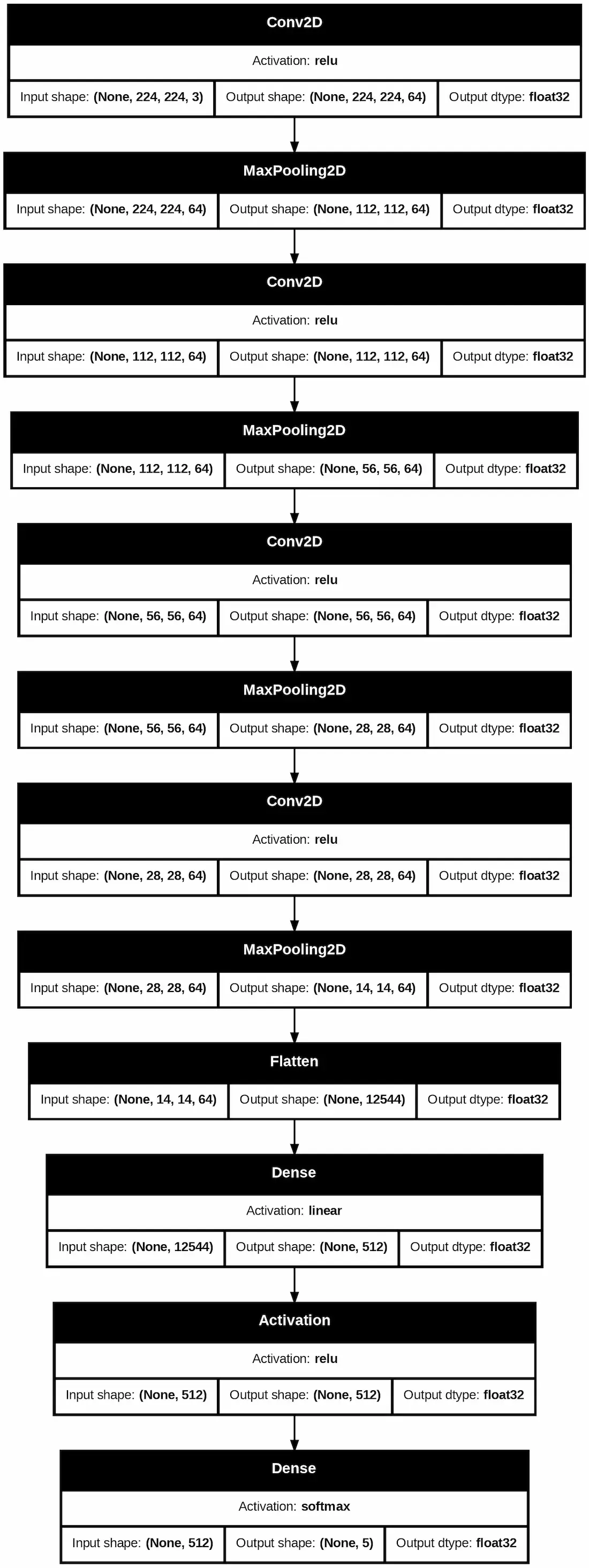
Visualizing Model Architecture
It starts with multiple **Conv2D layers with ReLU activation followed by **MaxPooling2D layers that progressively reduce the spatial dimensions of the input image. After several convolutional and pooling layers the feature maps are flattened into a 1D vector using the **Flatten layer. The model then passes through **Dense layers with the final layer using **softmax activation to classify the input into one of five categories of flowers. Each layer's input and output shapes are displayed helping to understand the flow of data and transformations at each step.
6. Compiling and Training the Model
Now that the model is built we will compile it using the Adam optimizer and categorical Sparse cross-entropy loss function.
Python `
model.compile(optimizer=tf.keras.optimizers.Adam(), loss='sparse_categorical_crossentropy', metrics=['accuracy'])
`
**7. Training the Model
We will now fit the model to the training data and validate it on the test data.
- **epochs: The number of times the entire training dataset is passed through the model.
- **train_datagen and **test_datagen: The augmented training and validation datasets. Python `
epochs=30 model.fit(train_datagen,epochs=epochs,validation_data=test_datagen)
`
**Output:
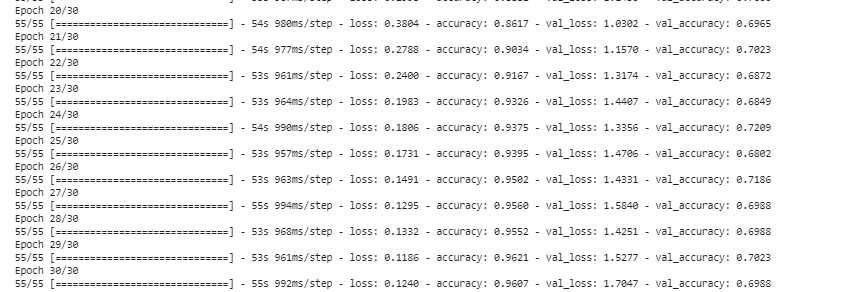
Model Training
**8. Saving and Loading the Model
After training we can save the model to avoid re-training in the future.
Python `
model.save('Model.h5') savedModel=load_model('Model.h5')
`
**9. Model Evaluation and Prediction
To evaluate the model we can test it with new images. We use the following code to load a test image, preprocess it and make a prediction.
Python `
list_ = ['Daisy','Danelion','Rose','sunflower', 'tulip']
test_image = image.load_img('img.jpg',target_size=(224,224))
plt.imshow(test_image) test_image = image.img_to_array(test_image) test_image = np.expand_dims(test_image,axis=0)
result = savedModel.predict(test_image) print(result)
i=0 for i in range(len(result[0])): if(result[0][i]==1): print(list_[i]) break
`
**Output:

Model Prediction
We will be using another example to see how our model is working.
Python `
test_image = image.load_img('img2.jpg',target_size=(224,224))
plt.imshow(test_image) test_image = image.img_to_array(test_image) test_image = np.expand_dims(test_image,axis=0)
result = savedModel.predict(test_image) print(result)
i=0 for i in range(len(result[0])): if(result[0][i]==1): print(list_[i]) break
`
**Output:
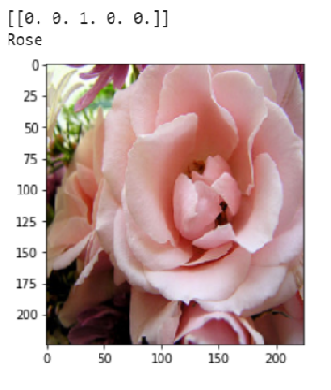
Model Prediction
We can see that our model is working fine and making accurate prediction. With this simple yet effective CNN model we have successfully built a flower recognition system that can classify images into five different flower types. By using convolutional layers and data augmentation we’ve created a model that can generalize well to new images. You can experiment with other hyperparameters, network architectures and datasets to further improve the model's performance.