How to Perform Contrast Enhancement of Color Image in MATLAB? (original) (raw)
Last Updated : 14 Aug, 2025
Color images in the RGB format consist of three channels: Red, Green and Blue. Any visible color is created by mixing these channels in varying proportions. When enhancing image contrast, especially for colored images, the appropriate method impacts the final appearance and color fidelity.
There are two approaches for enhancing the contrast of colour images:
- **Naive Method: Enhance each color channel (R, G, B) independently.
- **Standard Method: Utilize the HSV color model and enhance only the Value (V) channel.
Naive algorithm: Channel-wise Enhancement
Apply contrast enhancement of Red channel, Green channel and Blue channel separately. As a result, each color component will be enhanced accordingly and the resultant color combination will be very different from the original color combination.
**Steps for Naive algorithm:
- Read the image.
- Apply histogram equalization separately to each RGB channel.
- Display the enhanced images.
**Function Used:
- **imread( ) inbuilt function is used to read the image.
- **histeq( ) inbuilt function is used to apply histogram equalisation.
- **imshow( ) inbuilt function is used to display image.
**Example:
- **k(:,:,1)=histeq(k(:,:,1)); This line performs contrast enhancement of Red channel.
- **k(:,:,2)=histeq(k(:,:,2)); This line performs contrast enhancement of Green channel.
- **k(:,:,3)=histeq(k(:,:,3)); This line performs contrast enhancement of Blue channel.
- **imtool(k,[]); This line displays enhanced image.
To download the used sample, click here.

Matlab `
k=imread("apple.jpeg");
imshow(k,[]);
k(:,:,1)=histeq(k(:,:,1));
k(:,:,2)=histeq(k(:,:,2));
k(:,:,3)=histeq(k(:,:,3));
imshow(k,[]);
`
**Output:
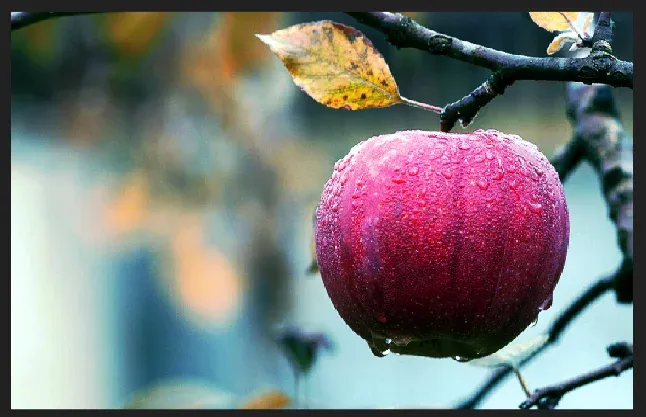
Naive Method
Standard Algorithm: (HSV-based Enhancement)
First, convert the RGB image into HSV format. H and S channels contain the color information while the V channel contains the brightness value which is similar to grayscale information. The idea is to apply contrast enhancement only of V channel keeping H and S undisturbed, this way the original color combination will be preserved and as a result, the resultant image will be of high quality.
**Steps:
- Read the image.
- Convert RGB image into HSV format.
- Apply histogram equalization on the Value channel.
- Convert HSV back into RGB format.
- Display resultant RGB image.
**Function Used:
- **imread( ) inbuilt function is used to read the image.
- **rgb2hsv( ) inbuilt function is used to convert RGB into HSV image.
- **histeq( ) inbuilt function is used to apply histogram equalisation.
- **hsv2rgb( ) inbuilt function is used to convert HSV into RGB.
- **imshow( ) inbuilt function is used to display image.
**Example:
- **k2=rgb2hsv(k1); This line converts RGB input image into HSV format.
- **k2(:,:,3)=histeq(k2(:,:,3)); This line applies contrast enhancement on Value part of HSV image.
- **k3=hsv2rgb(k2); This line Converts HSV back to RGB.
- **imtool(k3,[]); This line displays resultant RGB image. Matlab `
k1=imread("apple.jpeg");
imshow(k1,[]);
k2=rgb2hsv(k1); k2(:,:,3)=histeq(k2(:,:,3)); k3=hsv2rgb(k2);
imshow(k3,[]);
`
**Output:
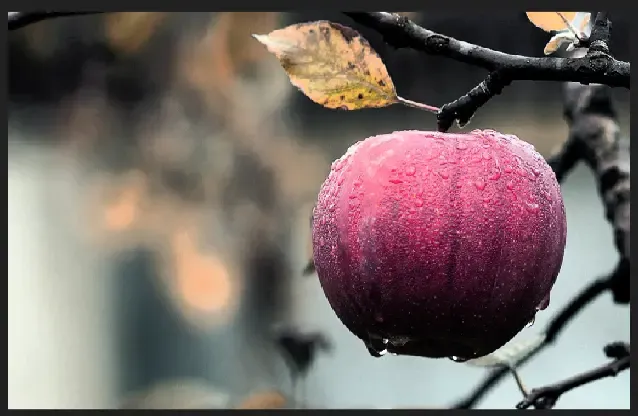
Standard Method: HSV-based Enhancement