How to Use Hugging Face Pretrained Model (original) (raw)
Last Updated : 15 Apr, 2026
Hugging Face is an open source platform that provides tools, libraries and a large community for building and sharing AI models. It makes it easy to access pre trained models and use them in real world applications.
- Provides ready-made models for NLP, computer vision and audio tasks, saving time on training from scratch.
- Enables performing tasks like sentiment analysis, text classification, translation and Q&A directly.
- Allows models to be accessed via the Transformers library, Hugging Face APIs or embedded in applications seamlessly.
- Helps in quick experimentation, fine-tuning and deployment of AI solutions in real-world projects.
Getting Started
Pretrained models are trained on large datasets and can be applied to specific tasks without training from scratch. The Hugging Face Transformers library offers models like BERT, GPT and T5.
Step 1: Install Transformers Library
Install the Transformers library to access pretrained models from Hugging Face. It includes tools for loading models, tokenizers and running different machine learning tasks.
Python `
pip install transformers
`
Step 2: Load Pretrained Model and Tokenizer
Load a pretrained model and its tokenizer to perform tasks like text classification. The tokenizer converts text into a format the model understands, while the model processes it for predictions.
- **AutoModelForSequenceClassification loads a model designed for classification tasks like sentiment analysis
- **AutoTokenizer converts input text into tokens required by the model Python `
from transformers import AutoModelForSequenceClassification, AutoTokenizer
model_name = "bert-base-uncased" model = AutoModelForSequenceClassification.from_pretrained(model_name) tokenizer = AutoTokenizer.from_pretrained(model_name)
`
**Output:
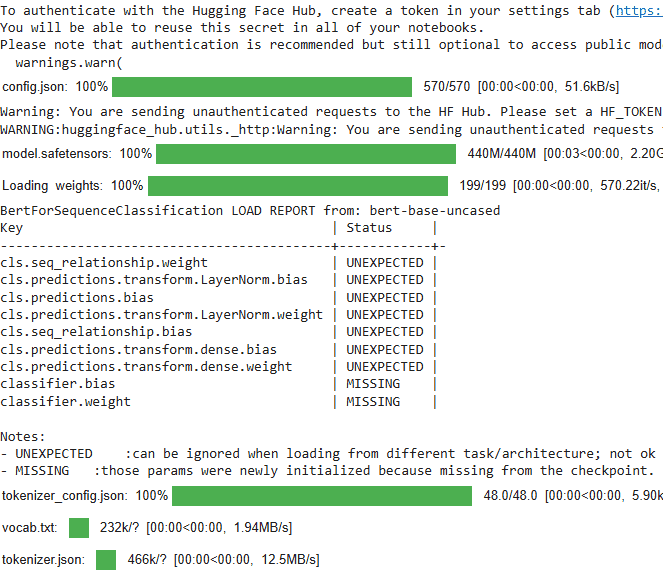
Load Pretrained Model and Tokenizer
Step 3: Generate Predictions
The input text is processed using the tokenizer and passed to the model to get prediction results. The output is then used to determine the final predicted class.
- **tokenizer converts text into tensors and the model returns logits as output
- **torch.argmax() is used to select the class with the highest score Python `
import torch text = "Hugging Face makes NLP easier!" inputs = tokenizer(text, return_tensors="pt") with torch.no_grad(): outputs = model(**inputs)
predictions = torch.argmax(outputs.logits, dim=-1) print(f"Predicted class: {predictions.item()}")
`
**Output:
Predicted class: 1
Step 4: Sentiment Analysis using Pipeline
Sentiment analysis can be performed easily using the Hugging Face pipeline, which provides a simple way to use pretrained models for specific tasks without manual setup.
- **pipeline() simplifies the process by combining model loading and inference in one step
- The sentiment-analysis pipeline returns labels like POSITIVE or NEGATIVE with confidence scores
- Multiple texts can be passed at once for batch predictions Python `
from transformers import pipeline
model_name = "distilbert-base-uncased-finetuned-sst-2-english" classifier = pipeline("sentiment-analysis", model=model_name) texts = [ "I love making models!", "The weather today is terrible." ]
results = classifier(texts)
for text, result in zip(texts, results): print(f"Text: {text}") print(f"Label: {result['label']}, Score: {result['score']:.4f}\n")
`
**Output:
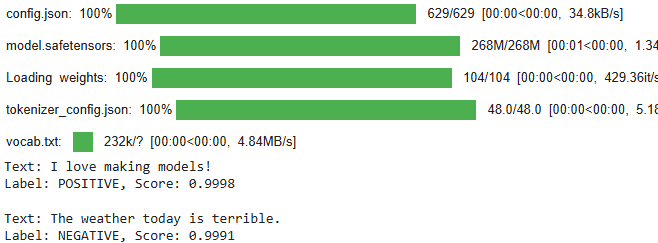
Output
As we can see our sentiment analysis model is working fine.