Introduction to Pooling Layer in CNN (original) (raw)
Last Updated : 13 May, 2026
A pooling layer is used to reduce the spatial dimensions (width and height) of feature maps while keeping the most important information.
- Reduces size of feature maps (downsampling)
- Applies a small filter over each region of the feature map
- Summarizes values within the region (e.g., max or average)
- Helps reduce computation and control overfitting
Output Size Formula for Pooling Layer
For a feature map with dimensions n_h \times n_w \times n_c, the dimensions of the output after a pooling layer are:
\left\lfloor \frac{n_h - f}{s} \right\rfloor + 1 \;\times\; \left\lfloor \frac{n_w - f}{s} \right\rfloor + 1 \;\times\; n_c
**Where:
- n_h: input height
- n_w: input width
- n_c: number of channels
- f: filter size
- s: stride length
**With Padding (if used): \left\lfloor \frac{n_h - f + 2p}{s} \right\rfloor + 1
Example
**Input: 4 × 4 feature map, filter = 2, stride = 2
\left\lfloor \frac{4 - 2}{2} \right\rfloor + 1 = 2
Output becomes 2 × 2, channels remain same.
Importance of Pooling Layers
Pooling layers play a key role in making CNNs efficient and robust by simplifying feature maps while preserving important information.
- Reduces dimensions, leading to faster computation and fewer parameters
- Provides translation invariance, so small shifts do not affect output
- Helps control overfitting and improves generalization
- Focuses on important features and supports hierarchical learning
- Example: A slightly shifted object (such as a cat) is still recognized
**Types of Pooling Layers
**1. Max Pooling
Max pooling selects the maximum value from each region of the feature map, capturing the most prominent features.
- Selects the maximum value from each filter region
- Retains important features like edges and textures
- Reduces spatial dimensions of the feature map
- Commonly used due to strong performance in practice
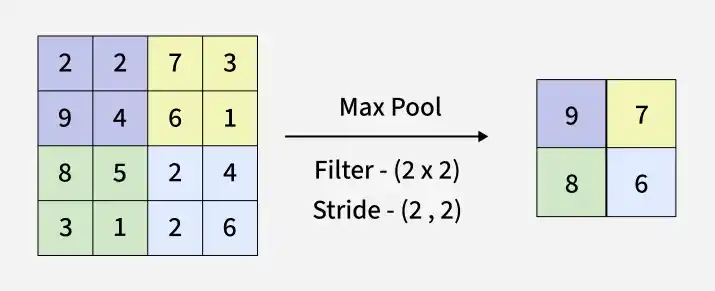
Working of Max Pooling
**Max Pooling in Keras:
Python `
from tensorflow.keras.layers import MaxPooling2D import numpy as np
feature_map = np.array([ [1, 3, 2, 9], [5, 6, 1, 7], [4, 2, 8, 6], [3, 5, 7, 2] ]).reshape(1, 4, 4, 1)
max_pool = MaxPooling2D(pool_size=(2, 2), strides=2) output = max_pool(feature_map)
print(output.numpy().reshape(2, 2))
`
**Output:
[[6 9]
[5 8]]
**2. Average Pooling
Average pooling computes the mean value of elements within each region of the feature map, capturing overall feature information.
- Calculates the average value from each filter region
- Represents overall features rather than the strongest ones
- Reduces spatial dimensions of the feature map
- Produces smoother feature maps compared to max pooling
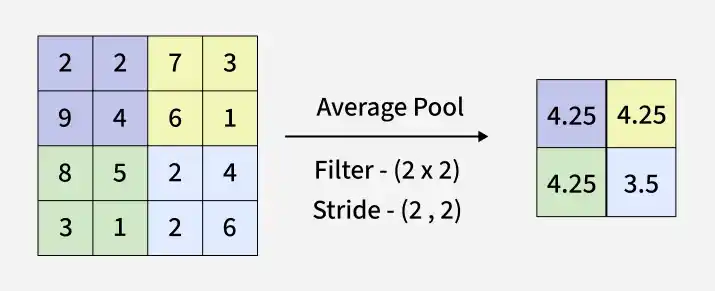
Working of Average Pooling
**Average Pooling using Keras:
Python `
import numpy as np import tensorflow as tf from tensorflow.keras.layers import AveragePooling2D
feature_map = np.array([ [1, 3, 2, 9], [5, 6, 1, 7], [4, 2, 8, 6], [3, 5, 7, 2] ], dtype=np.float32).reshape(1, 4, 4, 1)
avg_pool = AveragePooling2D(pool_size=(2, 2), strides=2) output = avg_pool(feature_map) print(output.numpy().reshape(2, 2))
`
**Output:
[[3.75 4.75]
[3.5 5.75]]
**3. Global Pooling
Global pooling reduces each channel of a feature map to a single value, resulting in a 1 \times 1 \times n_c output. This is equivalent to applying a filter of size n_h × n_w. There are two types of global pooling:
- **Global Max Pooling: Takes the maximum value across the entire feature map.
- **Global Average Pooling: Computes the average of all values in the feature map.
**Global Pooling using Keras:
Python `
from tensorflow.keras.layers import GlobalMaxPooling2D, GlobalAveragePooling2D
feature_map = np.array([ [1, 3, 2, 9], [5, 6, 1, 7], [4, 2, 8, 6], [3, 5, 7, 2] ], dtype=np.float32).reshape(1, 4, 4, 1)
gm_pool = GlobalMaxPooling2D() gm_output = gm_pool(feature_map)
ga_pool = GlobalAveragePooling2D() ga_output = ga_pool(feature_map)
print("Global Max Pooling Output:", gm_output.numpy()) print("Global Average Pooling Output:", ga_output.numpy())
`
**Output:
Global Max Pooling Output: [[9]]
Global Average Pooling Output: [[4.4375]]
You can download the source code from here.
Working of Pooling Layers
Pooling layers reduce the size of feature maps by summarizing information within small regions.
- Define a pooling window (e.g., 2×2) and stride
- Slide the window across the input feature map
- Apply operation (max or average) to each region
- Produce a smaller, downsampled feature map
Key Hyperparameters
- **Filter Size (f): Larger = more compression
- **Stride (s): Larger = faster reduction
- **Padding: Ensures edge coverage
**Advantages
- Reduces dimensionality, lowering computation and helping prevent overfitting
- Provides translation invariance, so small shifts do not affect detection
- Retains important features (max pooling) or captures overall context (average pooling)
**Limitations
- Causes information loss due to reduced spatial resolution
- May lead to over-smoothing of important features
- Requires careful tuning of filter size and stride