Keras Input Layer (original) (raw)
Last Updated : 16 Jul, 2025
Keras Input Layer helps setting up the shape and type of data that the model should expect. It doesn’t do any processing itself, but tells the model what kind of input to receive like the size of an image or the number of features in a dataset. This makes sure all the layers that come after can work properly with the data making it an important part of building any neural network.
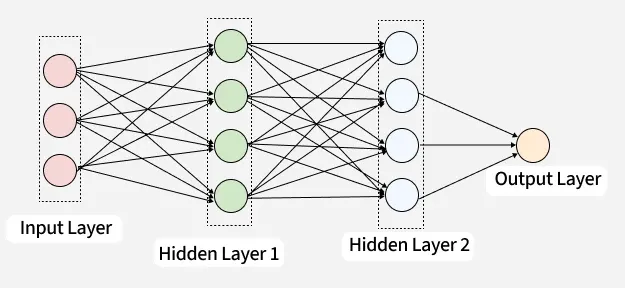
Keras NN architecture
It acts as the entry point for data in a neural network. It essentially informs the model about:
- The number and type of features in the input
- The expected dimensionality
- The batch size (optional)
There are two ways to define the input layer in Keras:
- Using the **keras.Input() function.
- By specifying the **input_shape argument in the first layer of the model.
Syntax of keras.Input()
To explicitly create an input layer we can use keras.Input() function which returns a symbolic tensor. This is especially useful in the Functional API.
Python `
keras.Input( shape=None, batch_size=None, dtype=None, sparse=None, batch_shape=None, name=None, tensor=None )
`
Parameters:
shape: Tuple specifying the input dimensions (excluding batch size). E.g.,(32, 32, 3)for a 32x32 RGB image.batch_size: Optional integer that sets a fixed batch size for the inputs. Useful in stateful models.dtype: Data type of the input tensor (e.g.,'float32'). Defaults to'float32'.sparse: Boolean indicating whether the input is a sparse tensor.batch_shape: Likeshape, but includes the batch size (e.g.,(None, 28, 28)).name: Optional string to name the input layer.tensor: Existing tensor to wrap in an Input layer (advanced use case for external tensors).
Example: Defining a CNN Model with an Input Layer
Below is an example of using keras.Input() to define a Convolutional Neural Network (CNN) for grayscale image classification:
- **Input Layer: The model begins with an explicit Input() declaration, specifying the input shape (28, 28, 1) for grayscale images and a fixed batch_size=3. This helps the model know exactly what kind of input to expect.
- **Convolution and Pooling: A Conv2D layer with 16 filters and ReLU activation extracts spatial features. It's followed by a MaxPooling2D layer that reduces spatial dimensions helping with downsampling and reducing computation.
- **Flattening and Classification: Flatten() converts the pooled feature maps into a 1D vector. Then, a Dense() layer with 10 neurons and softmax activation is used to classify the input into one of 10 categories (e.g., digits 0–9).
- **Model Assembly and Output: Using Keras’s Functional API, the input and output layers are connected to create the final model. Python `
from tensorflow.keras import Input, Model from tensorflow.keras.layers import Conv2D, MaxPooling2D, Flatten, Dense
#input layer input_layer = Input(shape=(28, 28, 1), batch_size=3)
#convolution and pooling x = Conv2D(16, kernel_size=(3, 3), activation='relu')(input_layer) x = MaxPooling2D(pool_size=(2, 2))(x)
#flattening and classification x = Flatten()(x) output_layer = Dense(10, activation='softmax')(x)
#model assembly and output model = Model(inputs=input_layer, outputs=output_layer) print("The shape of input layer: ", input_layer.shape)
`
Key Features Keras Input Layer
- **Input Shape Definition: Specifies the shape of the input, excluding the batch size. For example, an input shape of
(28, 28)represents a 28x28 grayscale image. - **Compatibility: Ensures that the model receives the correct format of input, helping prevent shape mismatch errors.
- **Flexibility: Particularly useful for handling variable-length inputs in models dealing with sequences like NLP or time-series.