Talking Healthcare Chatbot using Deep Learning (original) (raw)
Last Updated : 9 Jun, 2026
A healthcare chatbot is an intelligent system that can understand healthcare related queries and provide appropriate responses. Using Deep Learning, it can identify user intent and generate relevant replies through text or speech.
Step 1: Import Required Libraries
Here we imports all the libraries needed for data processing, text preprocessing, model training and chatbot response generation.
Python `
import json import random import pickle import numpy as np import pandas as pd
from sklearn.preprocessing import LabelEncoder
from tensorflow.keras.preprocessing.text import Tokenizer from tensorflow.keras.preprocessing.sequence import pad_sequences
from tensorflow.keras.models import Sequential from tensorflow.keras.layers import Embedding, LSTM, Dense, Dropout
`
Step 2: Load the Dataset
Read the JSON file and extract user patterns and labels.
You can download the dataset from here
Python `
with open("dataset path") as f: data = json.load(f)
patterns = [] labels = []
for intent in data["intents"]: for pattern in intent["patterns"]: patterns.append(pattern.lower()) labels.append(intent["tag"])
`
Step 3: Encode Intent Labels
Machine learning models cannot work directly with text labels such as "fever" or "cough". Therefore, each intent is converted into a numerical value using Label Encoding.
Python `
encoder = LabelEncoder()
y = encoder.fit_transform(labels)
`
Step 4: Tokenize Text Data
Text data must be converted into numerical form before it can be used for training a Deep Learning model. Tokenization assigns a unique number to each word and converts sentences into sequences of integers.
Python `
tokenizer = Tokenizer( num_words=5000, oov_token="" )
tokenizer.fit_on_texts(patterns)
X = tokenizer.texts_to_sequences(patterns)
X = pad_sequences( X, maxlen=20, padding="post" )
`
Step 5: Build the LSTM Model
The LSTM model learns patterns from user queries and predicts the corresponding intent.
Python `
model = Sequential([ Embedding( input_dim=5000, output_dim=64, input_length=20 ),
LSTM(128),

Dropout(0.5),

Dense(
    64,
    activation="relu"
),

Dense(
    len(np.unique(y)),
    activation="softmax"
)
])
`
Step 6: Compile the Model
Compiling configures the model for training by defining the optimizer, loss function and evaluation metric.
Python `
model.compile( optimizer="adam", loss="sparse_categorical_crossentropy", metrics=["accuracy"] )
`
Step 7: Train the Model
Python `
history = model.fit( X, y, epochs=100, batch_size=16, validation_split=0.2 )
`
**Output:
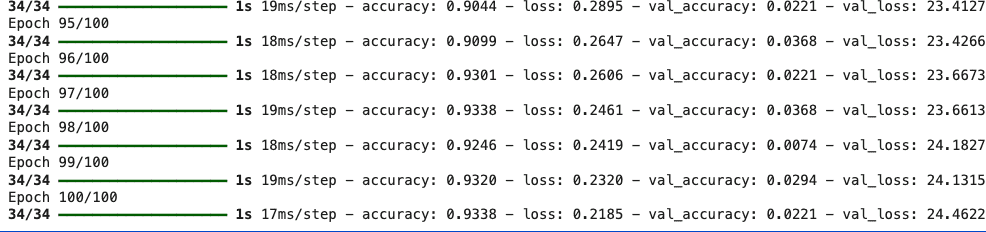
Training LSTM model
Step 8: Save the Trained Model
After training, the model and preprocessing objects are saved for future use.
Python `
model.save("healthcare_chatbot_model.h5")
pickle.dump( tokenizer, open("tokenizer.pkl", "wb") )
pickle.dump( encoder, open("label_encoder.pkl", "wb") )
`
Step 9: Create Intent Prediction Function
This function predicts the intent of a user's query.
Python `
def predict_intent(text):
sequence = tokenizer.texts_to_sequences([text])

padded = pad_sequences(
    sequence,
    maxlen=20,
    padding="post"
)

prediction = model.predict(
    padded,
    verbose=0
)

index = np.argmax(prediction)

return encoder.inverse_transform(
    [index]
)[0]
`
Step 10: Create Response Function
This function returns a response corresponding to the predicted intent.
Python `
def get_response(intent):
for item in data["intents"]:

    if item["tag"] == intent:

        return random.choice(
            item["responses"]
        )

return "Please consult a healthcare professional."
`
Step 11: Test the Chatbot
The chatbot continuously accepts user input and generates responses.
Python `
while True:
user_input = input("You: ")

if user_input.lower() == "quit":
    break

intent = predict_intent(user_input)

response = get_response(intent)

print("Bot:", response)
`
**Output:
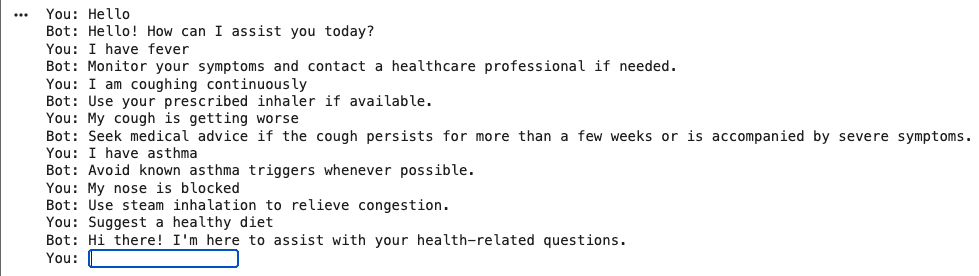
Output
Download full code from here