Amazon EC2 Instance Types (original) (raw)
Last Updated : 29 May, 2026
EC2 stands for Elastic Compute Cloud is a service from Amazon Web Services (AWS). EC2 is an on-demand computing service on the AWS cloud platform called instances. It lets you rent virtual computers to run your applications. You pay only for what you use.
- VMs exist within the provider's global cloud environment, offering flexibility, scalability, and automation beyond any on-premises setup.
- AWS groups EC2 instances into families optimized for general purpose, compute, memory, storage, and accelerated computing workloads.
- EC2 instance type names follow a structured pattern that encodes the family, generation, processor type, and size in a single string.
- EC2 instances can be purchased On-Demand, via Savings Plans or Reserved Instances, or as Spot Instances, each suiting different workload patterns and cost goals.
EC2 Instance Naming convention
Instance type names like "m6a.4xlarge" follow a logical pattern. Breaking down "m6a.4xlarge":
- **m — Instance Family: The first letter indicates the primary purpose. m stands for General Purpose.
- **6 — Generation: The number indicates the hardware generation. A higher number means newer, more powerful, and often more cost-effective hardware. m6 is newer than m5.
- **a — Processor Type: An optional letter indicating the CPU vendor: a = AMD, i = Intel, g = AWS Graviton (ARM-based).
- ****.4xlarge — Instance Size:** Determines the amount of vCPU, memory, and networking bandwidth allocated. Sizes typically double at each step (e.g., large → xlarge → 2xlarge → 4xlarge).
**Note: Some instances include an additional capabilities letter, such as d for local NVMe SSD storage (e.g., m5d) or n for enhanced networking (e.g., m5n).
EC2 Instance Type Categories
AWS groups EC2 instances into several families based on target use cases.
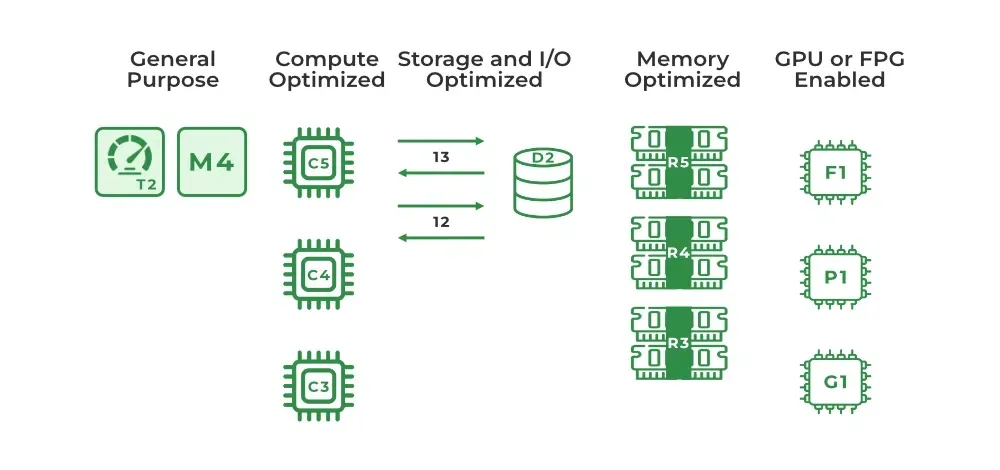
| **Instance Category | **Key Features | **Ideal Use Cases | **Common Examples |
|---|---|---|---|
| **General Purpose | Balanced **vCPU, memory, and network resources. | Web servers, code repositories, and dev/test environments. | **T3, T4g, M5, M6i |
| **Compute Optimized | High-performance processors; best price/performance for compute-bound tasks. | Batch processing, media transcoding, high-traffic web servers, and gaming. | **C5, C6g, C7g |
| **Memory Optimized | Designed for fast performance for workloads that process large data sets in memory. | In-memory databases (Redis/Memcached), SAP HANA, and real-time big data analytics. | **R5, R6g, X2gd, Z1d |
| **Storage Optimized | Optimized for high, sequential read/write access to very large data sets on local storage. | NoSQL databases (Cassandra, MongoDB), data warehousing, and log processing. | **I3, I4i, D2, H1 |
| **Accelerated Computing | Use hardware accelerators (GPUs, FPGAs, or TPUs) for parallel processing. | Deep Learning, 3D rendering, genomics research, and financial modeling. | **P4, G5, F1, Trn1 |
**1. General Purpose Instances
It provide a balanced mix of compute, memory, and networking, suitable for workloads that don't require specialized hardware but need reliable overall performance.
**Key Features
- Balanced CPU, memory, and network capabilities.
- Versatile across many different workload types.
- Cost-effective for common, everyday use cases.
**Families
- **M Series (e.g., M7g, M6i, M5): Balanced resources for small to medium databases, enterprise applications, and web servers. Newer generations like M7g (Graviton3) offer improved price-performance.
- **T Series (e.g., T4g, T3, T2): Burstable Performance Instances that provide a baseline CPU level with the ability to burst above it using CPU credits. Ideal for variable or low-to-moderate CPU workloads such as microservices, CI/CD pipelines, and small web servers.
- **A1 Series: ARM-based instances powered by AWS Graviton processors, offering strong price-performance for scale-out and ARM-compatible workloads.
- **Mac Series: Mac mini hardware used as EC2 instances, designed for macOS development and testing.
**Use Cases
- Hosting web servers and scalable web applications.
- Building, testing, and deploying applications in development environments.
- Hosting content delivery networks (CDNs) with low latency and high throughput.
**2. Compute Optimized Instances
It designed for tasks that require significant processing power, prioritizing CPU performance over memory.
**Key Features
- High CPU-to-memory ratio.
- Optimized for compute-intensive, parallelizable workloads.
- Graviton-powered variants (e.g., C7g) offer significant price-performance improvements.
**Use Cases
- Batch processing and high-performance web servers.
- Scientific modeling and media transcoding.
- Machine learning inference and dedicated gaming servers.
**Families
- **C Series (e.g., C7g, C6i, C5): The primary compute-optimized family, covering batch processing, high-performance web servers, scientific modeling, media transcoding, gaming servers, and ML inference.
**3. Memory Optimized Instances
It deliver a large amount of RAM relative to CPU, designed for applications that process large datasets entirely in memory.
**Key Features
- High memory capacity with fast access and low latency.
- Enhanced networking and storage support.
- Suited for workloads where RAM is the primary bottleneck.
**Use Cases
- High-performance relational and NoSQL databases.
- Big data analytics (Apache Spark, Hadoop).
- Real-time data streaming and in-memory caches (Redis, Memcached).
**Families
- **R Series (e.g., R8g, R7g, R6g, R5): Best for in-memory databases like SAP HANA, large in-memory caches, big data analytics, and enterprise applications requiring substantial RAM.
- **X Series (e.g., X2gd, X1e): Extremely high memory capacity for very large-scale enterprise workloads.
- **Z1d Series: Combines high compute with high memory, suited for Electronic Design Automation (EDA) and relational databases requiring both.
**4. Storage Optimized Instances
It deliver high-throughput, low-latency local storage, designed for workloads with heavy read/write access to large datasets.
**Key Features
- High-speed, low-latency local NVMe SSDs.
- Optimized for large sequential I/O operations.
- Enhanced networking for fast data transfer.
**Use Cases
- Data warehousing and big data analytics.
- High-frequency OLTP (Online Transaction Processing).
- Distributed file systems and log or data processing applications.
**Families
- **I Series (e.g., I4i, I3en, I3): Optimized for low-latency, high-IOPS transactional workloads including NoSQL databases (Cassandra, MongoDB) and real-time analytics.
- **D Series (e.g., D3en, D2): High-density HDD storage for distributed file systems (HDFS), large-scale parallel processing (MapReduce), and log processing.
- **H1 Series: High disk throughput for large-scale data processing and distributed file systems.
**5. Accelerated Computing Instances
It include specialized hardware such as GPUs or FPGAs to perform specific tasks far faster than standard CPUs.
**Key Features
- Equipped with NVIDIA GPUs, AWS Inferentia, AWS Trainium, or FPGAs.
- High parallel processing power.
- Optimized for compute-intensive and graphics-heavy tasks.
**Use Cases
- Machine learning training and inference.
- Video rendering and transcoding.
- Scientific simulations and financial risk analysis (HPC).
**Families
- **P Series (e.g., P5, P4d, P3): NVIDIA GPU-equipped instances primarily for machine learning training, deep learning, and HPC.
- **G Series (e.g., G6, G5, G4dn): NVIDIA GPU instances for graphics-intensive applications (3D rendering, video encoding, virtual workstations), ML inference, and game streaming.
- **Inf / Trn Series (e.g., Inf2, Trn1): Feature AWS Inferentia and Trainium chips, purpose-built for high-performance ML inference and training at scale.
- **F1 Series: Use FPGAs for custom hardware acceleration in genomics, financial modeling, and real-time video processing.
Choosing an Instance Type
Start by identifying where your application is actually constrained — CPU, memory or disk — then work from there:
- **Start with General Purpose. An M or T family instance is a balanced, low-risk starting point for most new applications.
- **Monitor with CloudWatch. Track CPU Utilization, memory usage, and EBS disk I/O under real load.
- **Move to the right family based on what you observe. Shift to Compute Optimized (C) if CPU runs consistently above 80–90%, Memory Optimized (R) if RAM is exhausted, or Storage Optimized (I) if disk I/O is the bottleneck.
EC2 Pricing Models
Choosing an instance type is a separate decision from choosing how you pay for it.
- **On-Demand: Pay by the second with no commitment. Best for unpredictable workloads and development or testing.
- **Savings Plans / Reserved Instances: Commit to a 1 or 3 year term for discounts of up to 72%. Best for steady-state, predictable workloads.
- **Spot Instances: Bid on spare EC2 capacity for discounts of up to 90%. Ideal for fault-tolerant, interruption-tolerant workloads like batch processing or data analysis, as AWS can terminate these instances with a two-minute warning.
**Note: You can estimate costs across all pricing models using the AWS Pricing Calculator.