Amazon RDS (original) (raw)
Last Updated : 15 Jun, 2026
Amazon Relational Database Service (RDS) is a fully managed SQL database service designed to simplify the deployment, operation, and scaling of relational databases within the AWS cloud environment.
- Simplifies the setup, scaling, and daily operations of industry-standard relational database engines.
- Automates database maintenance duties, including OS updates, engine version patches, and instant hardware failure recoveries.
- Manages automated daily backups, provides point-in-time recovery, and automates disaster recovery paths.
- Provides cost-efficient, dynamically resizable storage and compute capacity with zero down-time.
Supported Database Engines
Amazon RDS supports six popular relational database engines, allowing you to run your existing application code without modifications:
- **Amazon Aurora: A cloud-native, high-performance database engine built by AWS compatible with MySQL and PostgreSQL.
- **PostgreSQL: A highly advanced, open-source object-relational database system.
- **MySQL: The world's most popular open-source relational database management system.
- **MariaDB: A community-developed, commercially supported fork of the MySQL relational database.
- **Oracle Database: A multi-model enterprise database management system widely utilized in legacy infrastructures.
- **Microsoft SQL Server: An enterprise-grade database management system developed by Microsoft.
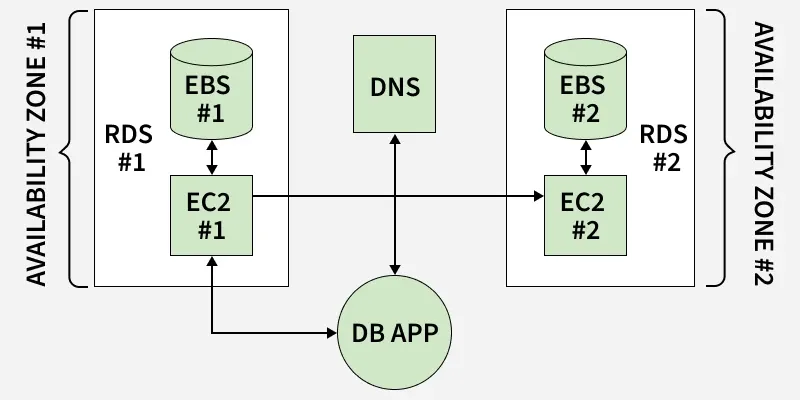
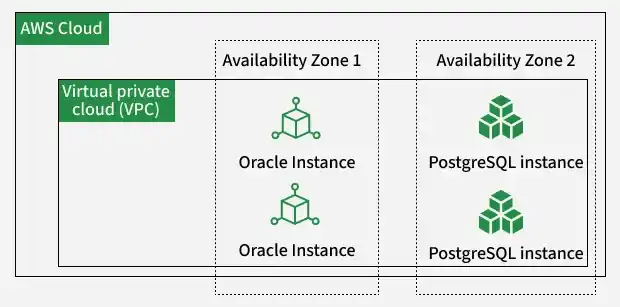
Relational Database Deployment Across AWS Availability Zones
High Availability vs. Scalability
A fundamental architectural decision in Amazon RDS is distinguishing between High Availability (Multi-AZ Deployments) and Read Scalability (Read Replicas):
**1. Multi-AZ Deployment (High Availability)
- **Primary Purpose: Disaster Recovery (DR), continuous data durability, and high availability.
- **Underlying Mechanism: RDS automatically provisions and maintains a synchronous standby replica in a separate Availability Zone (AZ) within the same AWS Region.
- **Failover Protocol: If the primary instance fails, RDS executes an automatic failover to the standby in under 60 seconds. The database endpoint URL remains unchanged, eliminating the need for application code modifications.
- **Access Restrictions: The standby instance remains completely passive. It cannot accept read or write traffic and serves purely as an idle backup until failover is triggered.
**2. Read Replicas (Scalability)
- **Primary Purpose: Improving system read throughput and offloading query overhead from the primary instance.
- **Underlying Mechanism: RDS creates a read-only copy of your database using asynchronous replication driven by the engine's native transaction logs.
- **Access Protocols: Applications query the Read Replica directly to offload reporting, analytics, or search queries, reducing the computing burden on the primary instance.
- **Promotion Capabilities: If needed, an asynchronous Read Replica can be promoted to a standalone, read-write database.
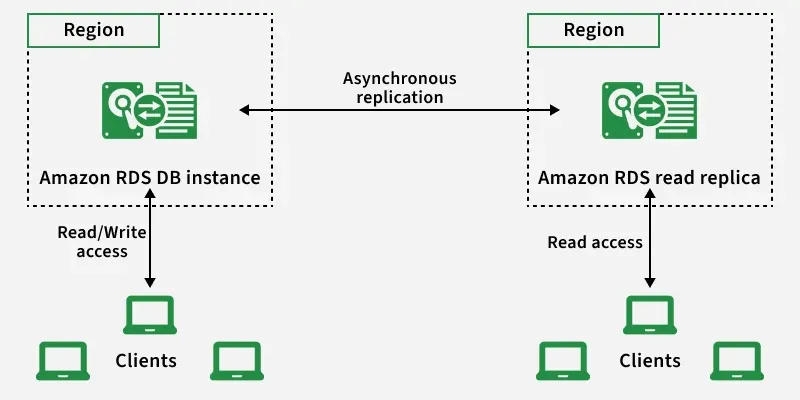
Read Scalability via Asynchronous Replication
Advanced Database Engineering Features
1. RDS Proxy
- Serverless apps (e.g., Lambda) can spawn thousands of concurrent connections, overwhelming traditional databases
- Sits as a managed proxy between your app and database
- Pools and shares existing connections, preventing exhaustion and reducing memory consumption
2. Blue/Green Deployments
- Schema changes, parameter updates, or engine upgrades can cause downtime
- Spins up a mirrored staging environment (Green) alongside production (Blue)
- Upgrades are tested safely in Green; switchover redirects traffic in under a minute with no data loss
3. Storage Auto-Scaling
- Prevents downtime from storage exhaustion by monitoring active space usage
- Triggers when available storage drops below 10% of provisioned capacity for 5+ minutes
- Automatically scales EBS volume size on-the-fly with no application downtime
Amazon RDS Multi-AZ Architectural Options
AWS supports different deployment tiers depending on your high availability, fault tolerance, and read scalability requirements:
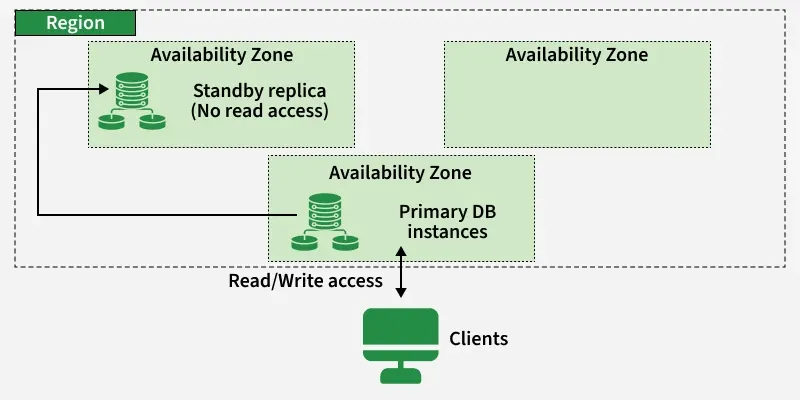
Multi-AZ Single Standby Deployment Topology
For workloads requiring parallel read scaling and rapid failovers, AWS provides Multi-AZ DB Cluster deployments. This configuration features one active writer instance and two readable standby instances distributed across three separate Availability Zones within a single region.
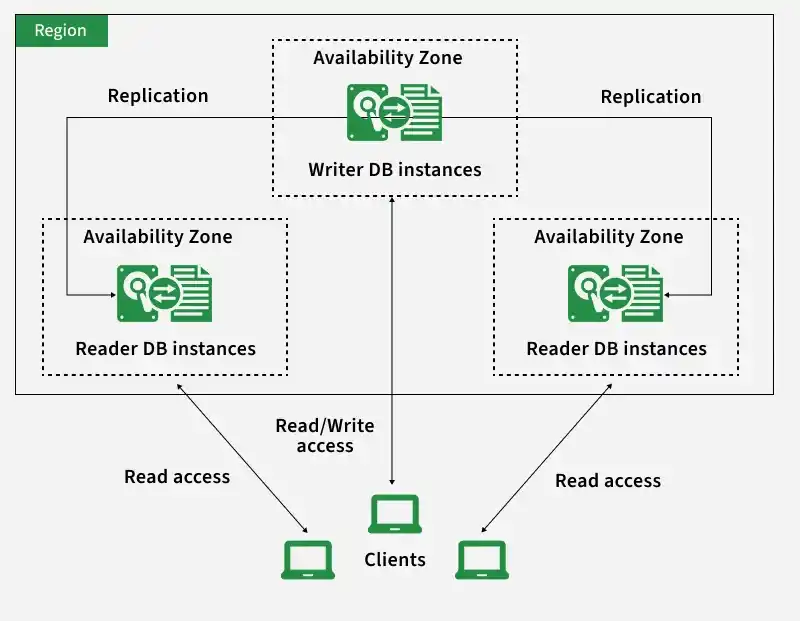
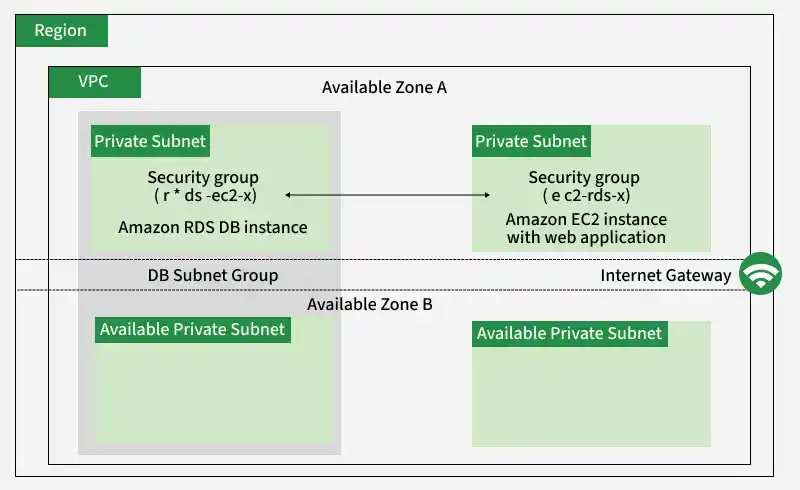
Access Control Using VPC Security Groups
Network security is enforced by restricting traffic at the virtual network level. The diagram below illustrates how VPC Security Groups act as a firewall, restricting incoming connections to the RDS DB instance so that only authorized EC2 web servers can communicate with the database port.
Interacting with Amazon RDS
Administrators can interact with, script, and manage Amazon RDS through three primary interfaces:
- **AWS Management Console: A web-based graphical interface for creating databases, scaling instances, and checking backups.
- **AWS Command Line Interface (CLI): Enables automation and infrastructure scripting using terminal-based CLI commands.
- **Amazon RDS APIs: Allows developers to programmatically control, provision, and modify RDS resources directly from custom application code.

Deploying a Database via the AWS RDS Console
Database Instances
RDS instances function as managed virtual database servers, combining pre-configured hardware templates, operating systems, and database engine softwares. Administrators can choose the ideal virtual server configuration and scale compute or memory allocation as application workload demands grow.
AWS RDS vs. Amazon Aurora vs. Aurora Serverless
The table below compares the core capabilities, scaling behaviors, and high availability architectures of the three managed SQL options:
| Technical Feature | Amazon RDS | Amazon Aurora | Amazon Aurora Serverless |
|---|---|---|---|
| Performance Throughput | Good for standard SQL workloads; limited by traditional block storage I/O limits. | Optimized cloud-native architecture; up to 5x standard MySQL and 3x standard PostgreSQL. | Excellent performance that scales dynamically based on real-time transaction demand. |
| Scalability Mechanics | Manual capacity scaling; resizing storage or compute requires proactive updates. | Automatic storage scaling up to 128 TB; compute scaling is managed manually. | Fully automated scaling; adjusts compute resources up or down dynamically. |
| High Availability | Multi-AZ standby mirror replication (standby node is passive). | Shared storage replication (6 copies across 3 Availability Zones with active read replicas). | Multi-AZ shared storage; compute layer scales automatically matching demand. |
| Pricing and Billing | Billed for provisioned instance type, storage size, and Multi-AZ configuration. | Billed for provisioned instance types, shared storage used, and individual I/O operations. | Billed dynamically per second based on compute capacity units (ACUs) consumed. |
Initial Access of the AWS RDS Console
Follow these steps to access and navigate the Amazon RDS management dashboard:
**Step 1: Log in to your AWS Management Console. In the search bar or under the Databases category, locate and click on RDS to open the service dashboard.
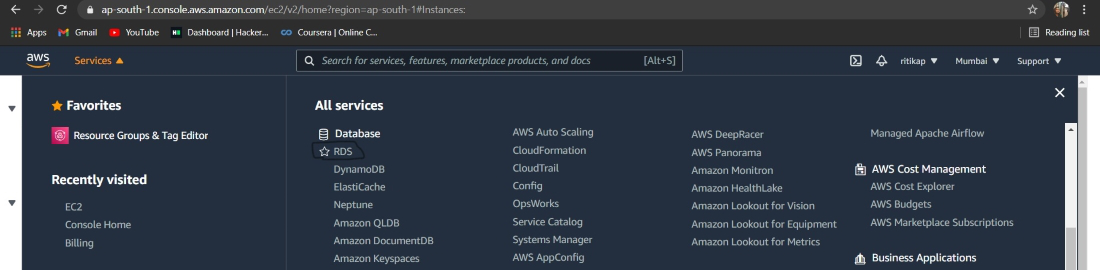
Accessing RDS under the Databases Category
**Step 2: The RDS Dashboard displays active resources, DB instances, and regional statuses. Click on the orange Create database button to launch the configuration wizard.
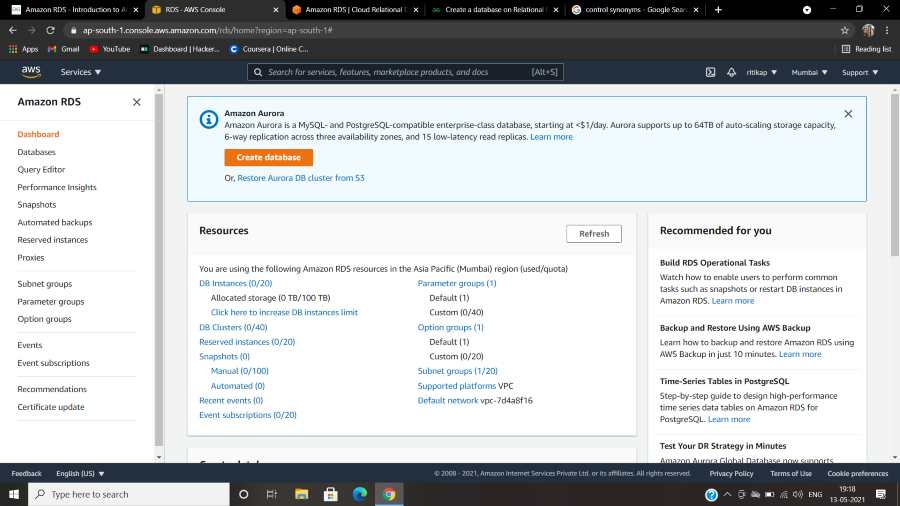
The Amazon RDS Console Landing Page
Drawbacks
While RDS simplifies administration, certain limitations should be factored into your architecture:
- **Limited OS Customization: Because RDS is a managed service, you cannot SSH directly into the host OS or configure specific kernel parameters.
- **Higher Cost at Scale: Provisioning large Multi-AZ instances with high-IOPS storage can result in significantly higher costs than self-hosting.
- **Manual Scaling Controls: Unlike Amazon Aurora, scaling compute and baseline storage in standard RDS is not fully automated and requires manual configuration.
- **Backup I/O Impact: During heavy write volumes, standard database backup execution can cause minor I/O latency spikes.
- **Cloud Vendor Lock-In: High integration with specific AWS RDS database endpoints can make subsequent migrations complex and time-consuming.
Pricing Models
Amazon RDS charges pay-as-you-go fees calculated using five primary resource categories:
- **Instance Class: Billed per hour based on the chosen CPU and RAM capacity (e.g.,
db.t3.microvsdb.r5.large). - **Storage Capacity: Billed per GB-month for the allocated size of your SSD volumes.
- **I/O Requests: Applied only to legacy magnetic storage or specific custom IOPS-provisioned configurations.
- **Backup Storage: Retaining snapshots up to your active DB size is free; additional backup storage is billed per GB.
- **Data Transfer: Inbound data transfer is free; outbound data transfers to other regions or the internet are billed at standard egress rates.
**Note: For steady-state production databases, purchase Reserved Instances to save up to 60% compared to On-Demand hourly pricing.