AWS VPC Peering (original) (raw)
Last Updated : 29 May, 2026
VPC Peering is a networking connection between two VPCs that enables you to route traffic between them using private IPv4 or IPv6 addresses. Instances in either VPC can communicate with each other as if they were within the same network.
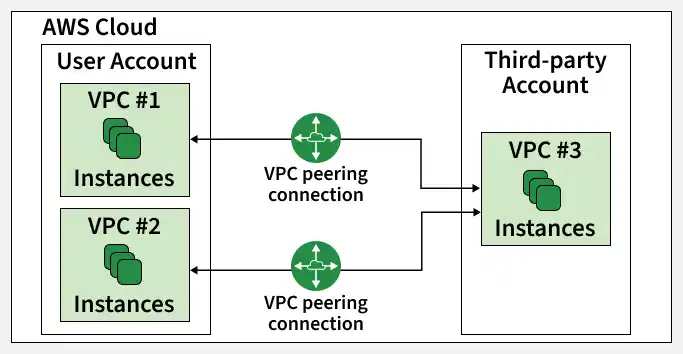
It is the simplest way to connect two VPCs, whether they are in the same AWS account or different accounts, and even across different AWS Regions.
How VPC Peering Works
When you peer two VPCs (let's call them VPC A and VPC B), you create a direct network route between them.
- **Private Connectivity: Traffic between peered VPCs stays within the AWS network and does not travel through the public internet, providing secure and high-speed communication.
- **No Gateways: Unlike VPNs, VPC Peering does not require a gateway or additional hardware because the connection is managed through route tables.
Architecture
VPC Peering is strictly a 1:1 relationship. This is its most critical architectural feature.
- **Non-Transitive: If VPC A is peered with VPC B, and VPC B is peered with VPC C, VPC A cannot talk to VPC C.
- **The Mesh Problem: To connect A, B, and C fully, you need three separate peering connections (A-B, B-C, A-C). As you add more VPCs, the number of connections grows exponentially ($N(N-1)/2$), which becomes unmanageable at scale.
AWS VPC Peering Connection Lifecycle
The lifecycle of an AWS VPC Peering connection includes several stages:
- **Initiation: The life cycle process starts with initiating a request to peer two VPCs. This request involves with specifying the VPCs to be peered and their respective settings.
- **Approval: After the request is sent, the administrator of receiving VPC must accept the peering request to establish the connection.
- **Establishment: Once Both approved the peering connection, the VPC peering connection is established. This enables the communication between two VPCs, if they were within same network, i.e., allowing instances in one VPC to communicate with other VPC's instance using private IP address.
- **Configuration: After once, the connection is established, administrator may ensure configuring the route tables and security groups to control flow of the traffic between peered VPCs. This steps ensure the communication should be done in secured and follow with desired network paths.
- **Utilization: Resources in the connected VPCs can now communicate with each other for tasks such as data sharing, application integration, and resources access.
- **Monitoring And Maintenance: Administrators monitor the performance and security of the connection and update route tables or security group rules when needed.
- **Termination ( Optional ): If the connection is no longer needed, administrators can terminate the VPC peering connections, which stops communication between the VPCs
How VPC Peering Works
Multiple VPC Peering connections help organizations build flexible cloud networks by connecting different VPCs for communication and resource sharing.
- Supports communication between multiple VPCs.
- Each connection works separately with its own settings.
- Useful for development, testing, and microservices environments.

These VPCs can be in different regions and are hence known as inter-region VPC Peering connections.
How to Setup AWS VPC Peering Connections: A Step-By-Step Guide
Step 1: Navigate to VPC Dashboard
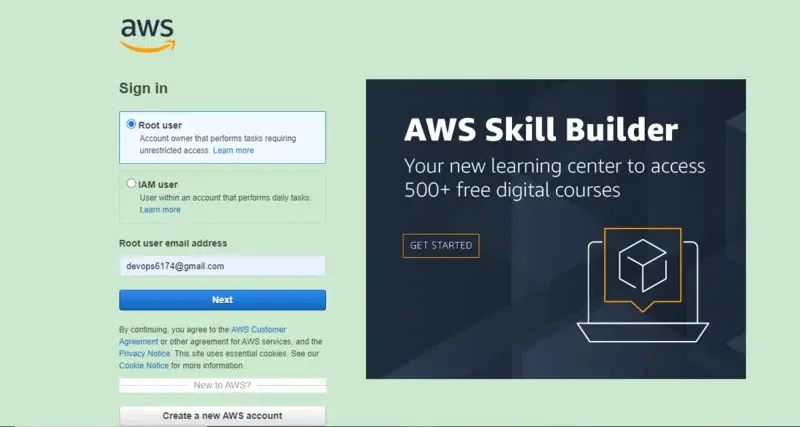
- Sign in to your AWS account with your credentials.
- After Navigate to Console, you look into the following Console Home Page
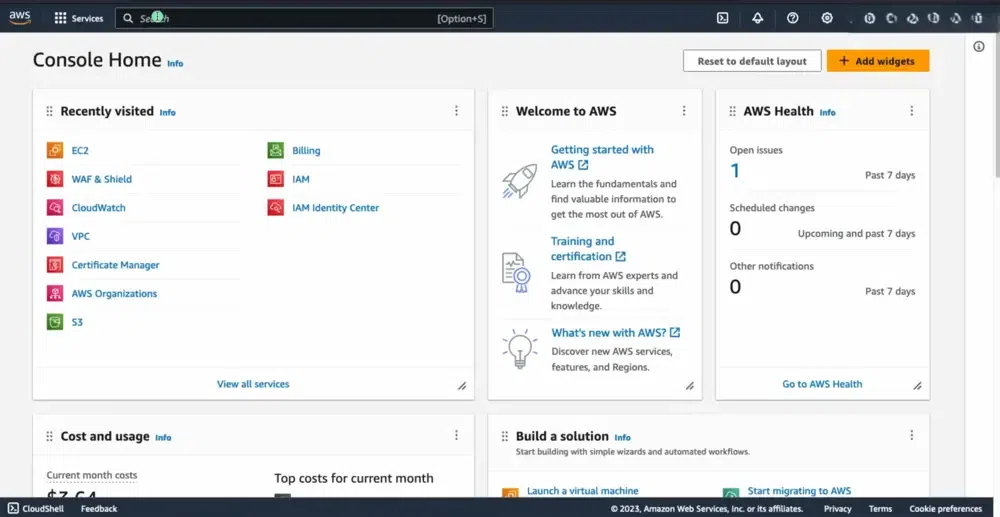
- Select the VPC service in the search box.
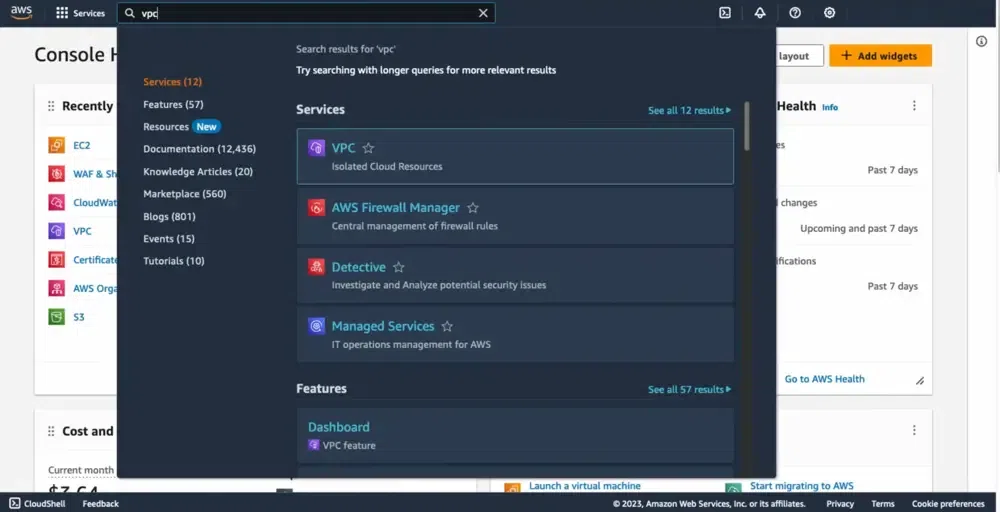
Step 2: Create Virtual Private Network
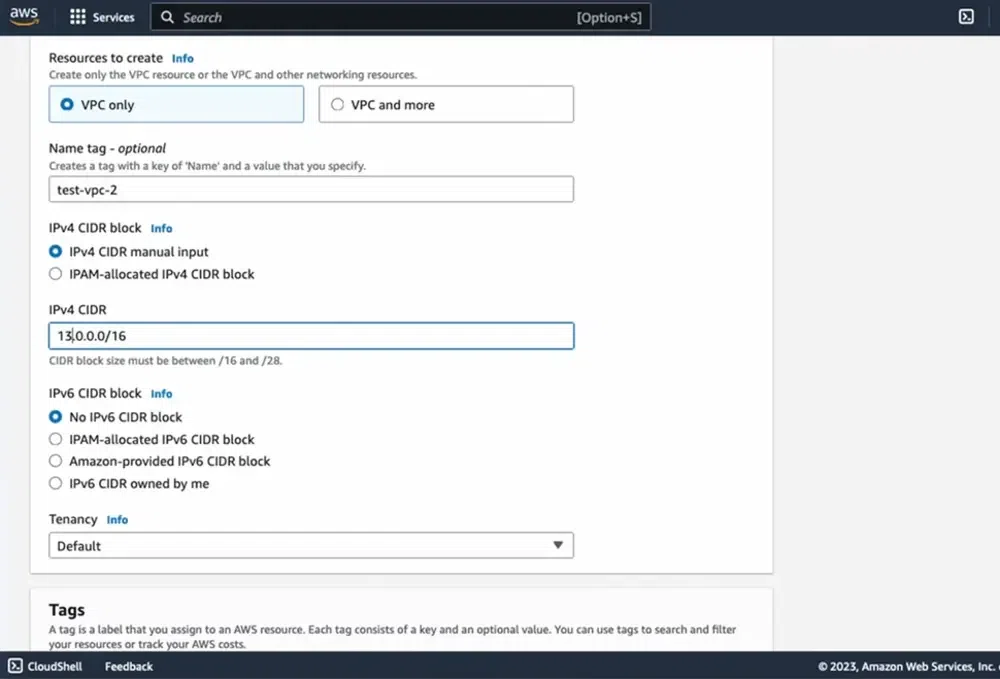
- Create 2 VPC networks with names test-vpc-1 and test-vpc-2.
- Firstly, Click on the Create VPC button to create VPC.
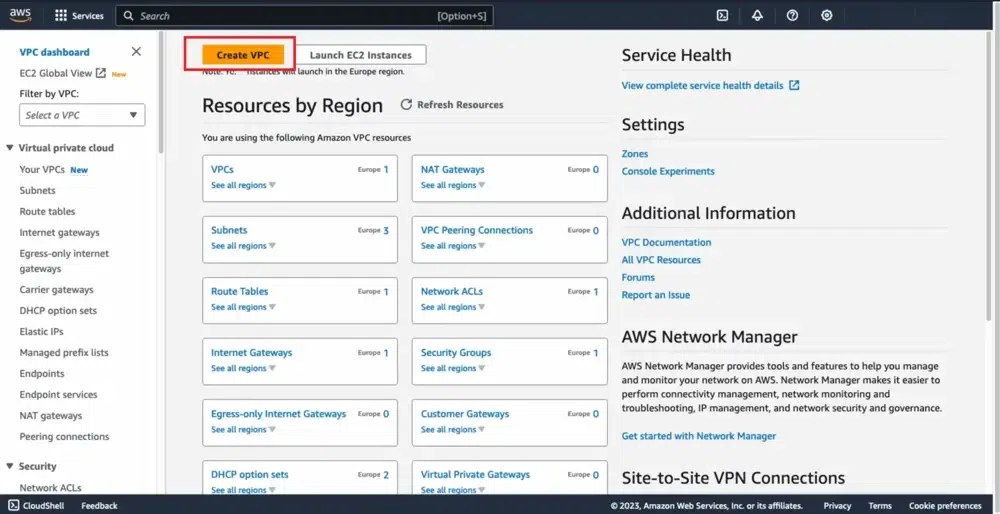
- Configure the VPC details as shown in the below screenshot.
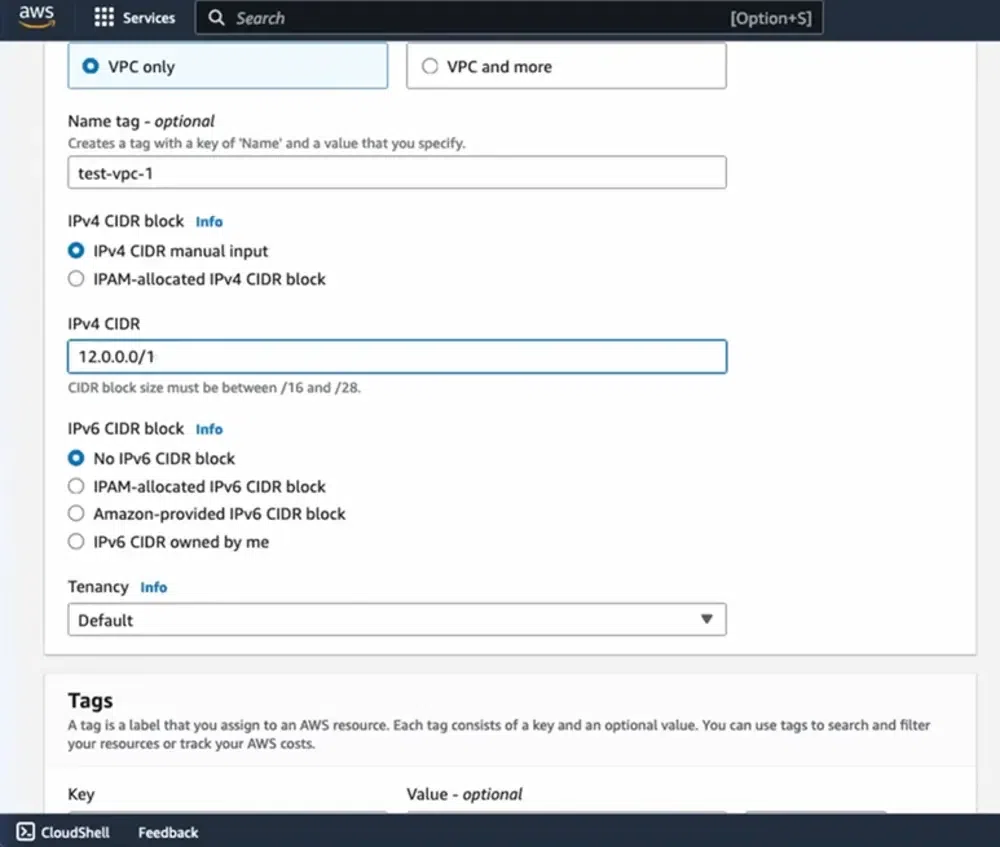
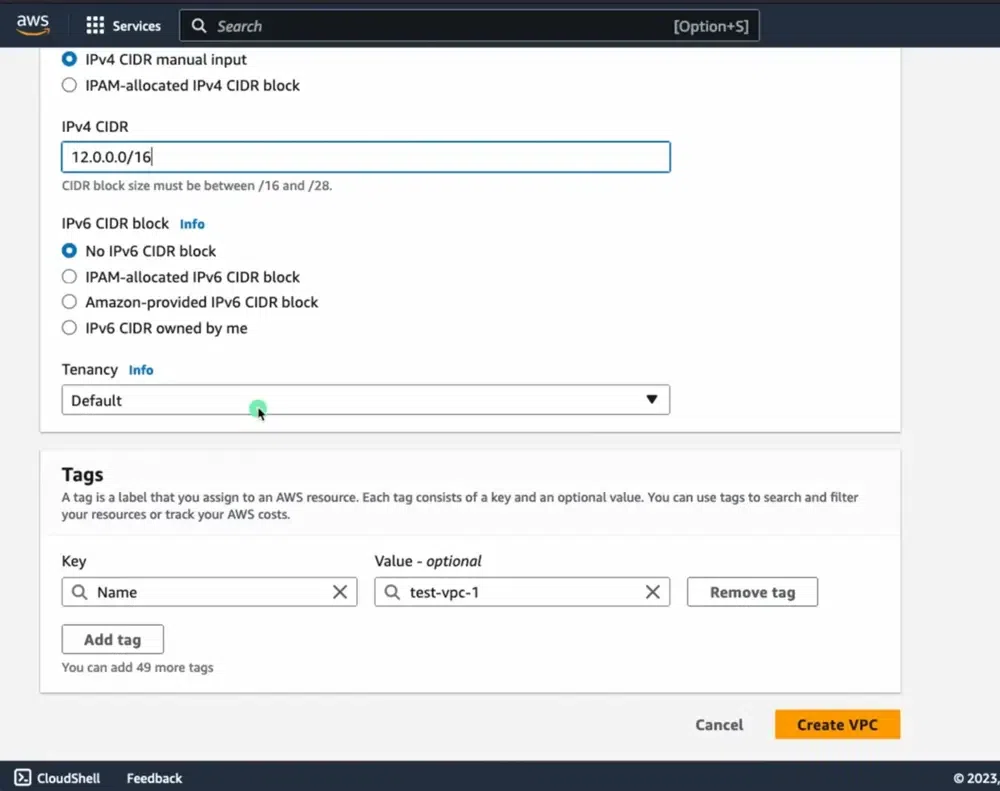
- Similarly define and create second VPC with name test-vpc-2 . Ensure that the CIDR of test-vpc-1 and test-vpc-2 doesn't overlay.
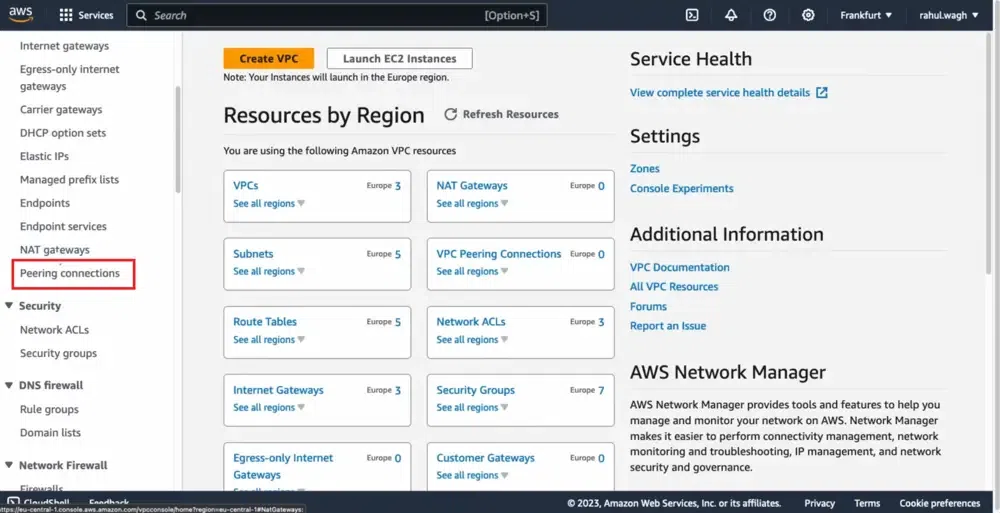
Step 3: Select "Peering Connections"
- Navigate to VPC Peering, and click on create VPC peering button.
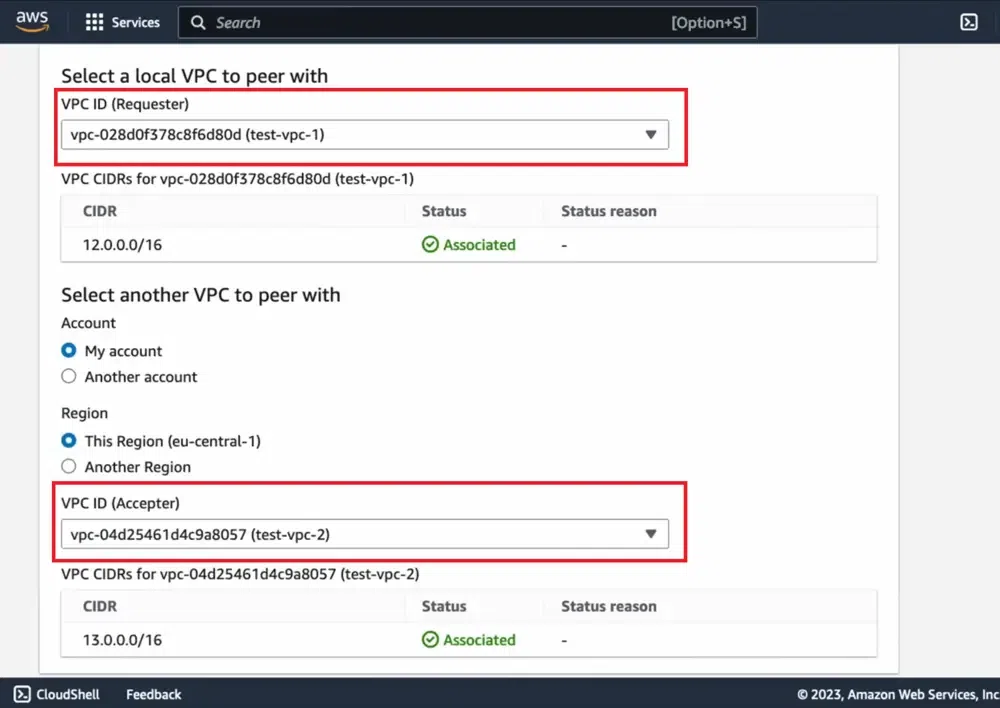
- Provide the accepter VPC name and receiver VPC name.
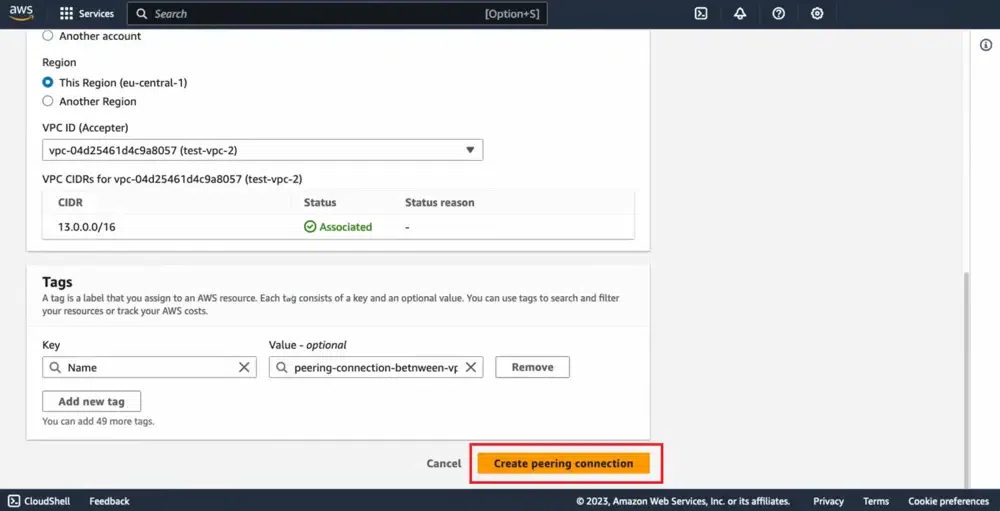
Step 3: Click "Create Peering Connection"
- After creating the VPC peering connection, it will be in pending status .
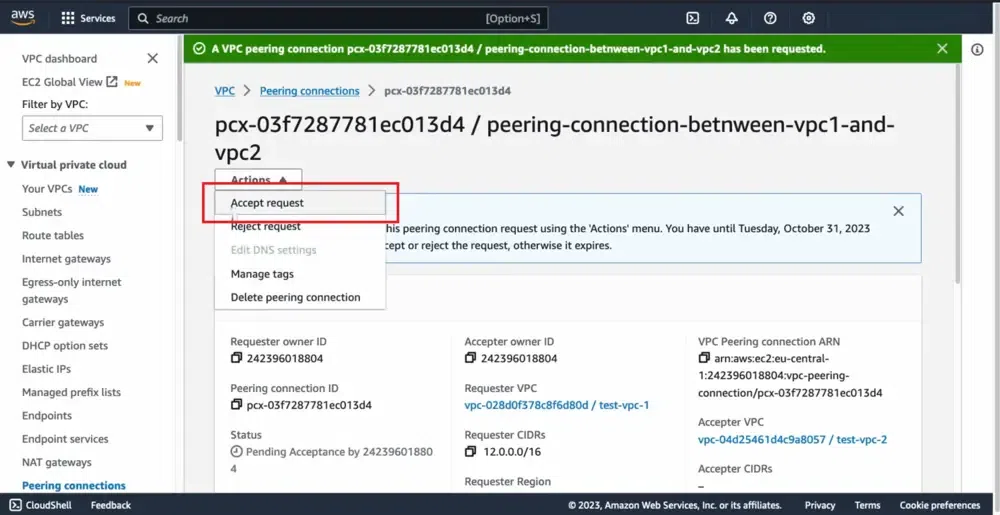
Step 4: Accept Peering Connection
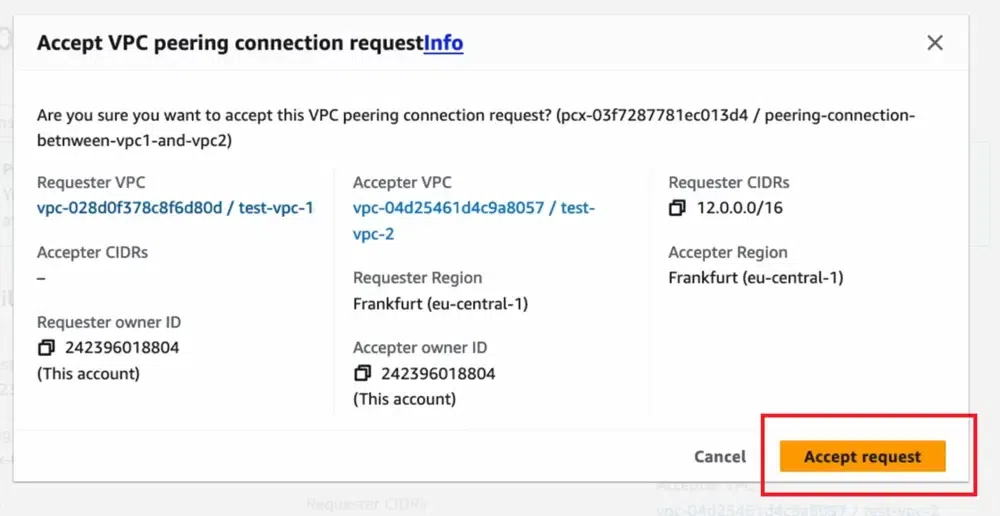
- Now, from the myvpc2 AWS account, go to vpc peering dashboard, click on the **accept request and accept the peering connection.
Step 5: Successful VPC Peering Connection
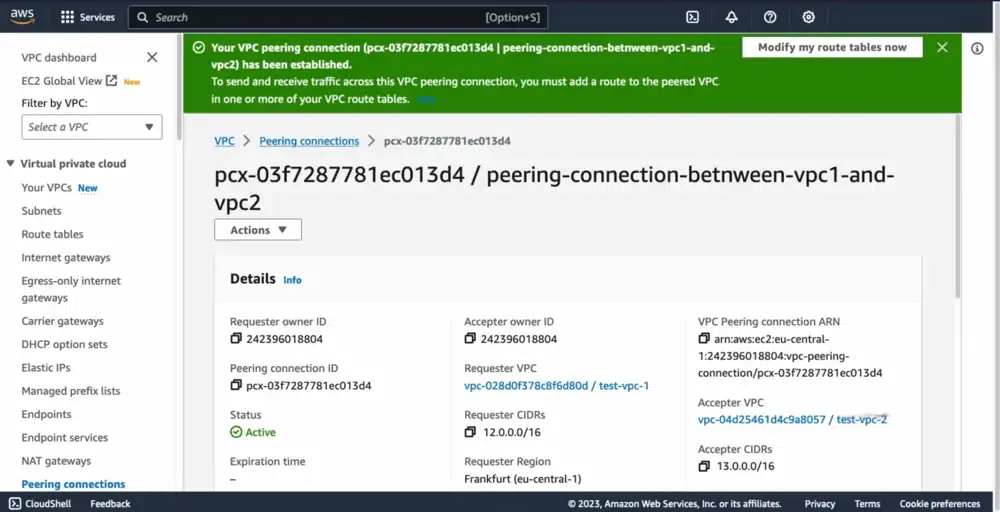
- After once the myvpc2 network accepts the request, the VPC peering connection will become active in status.
Step 6: Update Route Tables (if necessary)
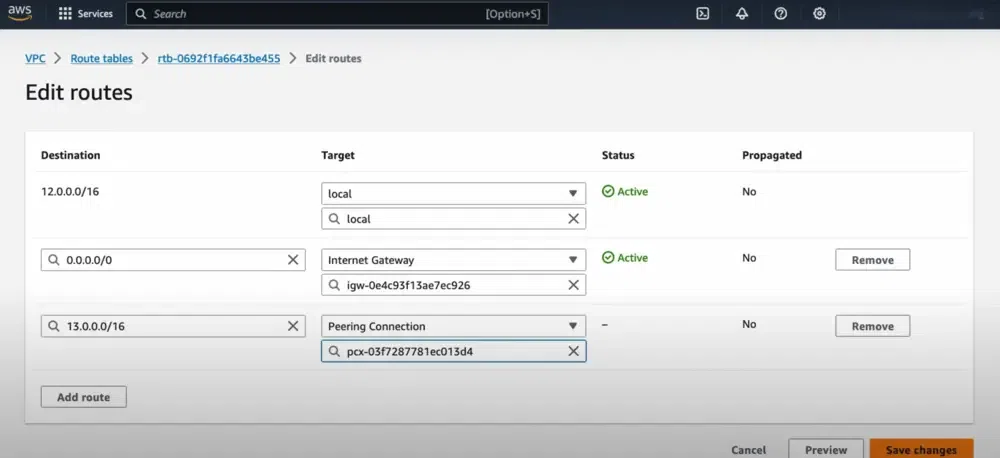
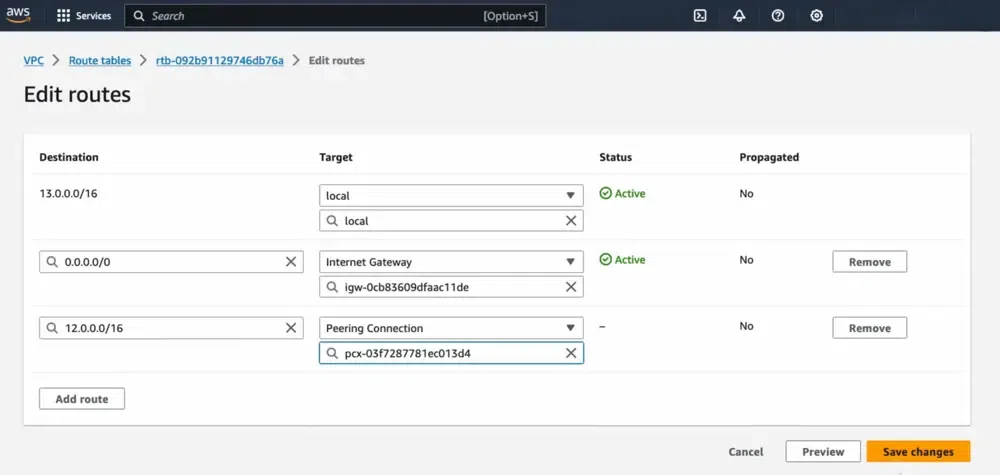
- Ensure that the route tables for both VPCs are updated to include routes for each other's CIDR blocks, pointing to the peering connection.
Step 7: Verify Connectivity
- Now, Create an instance on each VPC and try on pinging the private IP of instance on each other instance.
- If they are successfully pinging then you have established VPC peering successfully.
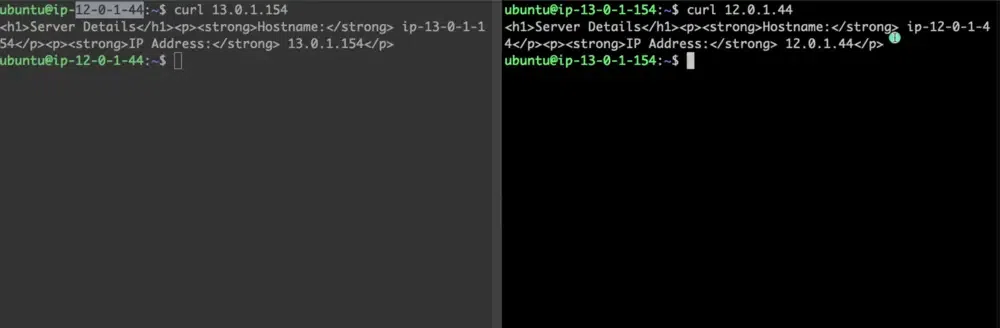
Sometimes we need to allow resources in different VPCs to exchange data based upon the architecture of the service. Regardless of any specific need, using VPC peering is a great way of extending your VPC design.
**Note: When managing many VPC Peering connections becomes complex, **AWS Transit Gateway can be used to simplify connectivity management.
VPC Peering vs. Transit Gateway
This is the classic "Build vs. Buy" networking decision.
| **Feature | **VPC Peering | **AWS Transit Gateway |
|---|---|---|
| **Topology | Mesh (Point-to-Point). | Hub-and-Spoke (Central Router). |
| **Transitive | No. A cannot talk to C via B. | Yes. A talks to C through the Gateway. |
| **Management | Decentralized. Hard to manage at scale (10+ VPCs). | Centralized. Easy to manage hundreds of VPCs. |
| **Bandwidth | Unlimited (limited only by instance type). | 50 Gbps per attachment. |
| **Latency | Lowest (Direct path). | Slightly higher (Extra hop). |
| **Cost | Low (Data transfer only). | High (Hourly attachment fee + data processing). |
Use VPC Peering for simple, high-bandwidth connections between 2-3 VPCs (e.g., App <-> DB). Use Transit Gateway for enterprise networks connecting dozens of VPCs and on-premises VPNs.
AWS VPC Peering Latency and Bandwidth
AWS VPC Peering provides low-latency communication between connected VPCs, especially when they are in same AWS region.
- Traffic stays within the AWS network for faster communication.
- It is suitable for real-time applications and services.
- Latency may slightly vary based on distance and network traffic.
AWS VPC Peering connections offers scalable and high-bandwidth communication between peered VPCs. The bandwidth between the AWS VPCs depends on type of instances and its network capabilities of communication. Direct Connect and VPN are used for on-premises connectivity, not for increasing bandwidth between peered VPCs.
Important Limitations
- **Overlapping CIDRs: You **cannot peer two VPCs with overlapping IP ranges (e.g., 10.0.0.0/16 and 10.0.0.0/16). This is a hard limit.
- **Cross-Region Security Groups: You can reference a security group ID from another VPC (e.g., allowing traffic from sg-12345) ONLY if they are in the **same region. For cross-region peering, you must use CIDR blocks in your rules.
- **Jumbo Frames: Supported for same-region peering, but check instance type compatibility.
Pricing for a VPC Peering Connection
The following tabular format discusses the pricing details of VPC Peering:
| Component | Description | Cost |
|---|---|---|
| VPC Peering Connection | It used for establishment of VPC Peering connection | $0.01 per GB |
| Data Transfer between VPCs | It used for transferring the data between VPCs | $0.02 per GB |
| Data Processing | If data processing has done in VPC | Variable(Charge varies based on many parameters) |
| Support | It used for providing support to VPC Connection | Variable(Charge varies based on many parameters |
Use Cases
- **Shared Services: A central "Tools" VPC (Jenkins, Monitoring) peered to multiple "App" VPCs.
- **Data Transfer: Replicating a database from a Production VPC to an Analytics VPC for reporting.
- **Mergers & Acquisitions: Quickly connecting two companies' cloud networks (provided CIDRs don't overlap!).