Amazon VPC Networking Components (original) (raw)
Last Updated : 28 May, 2026
Amazon Virtual Private Cloud (VPC) allows you to provision a logically isolated section of the AWS Cloud where you can launch AWS resources in a virtual network that you define. It gives you complete control over your virtual networking environment, including IP address ranges, subnets, and route tables.
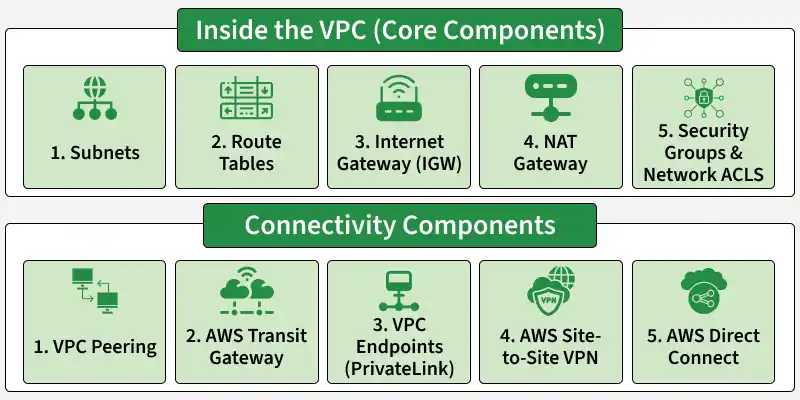
Amazon VPC
Core Components: Inside the VPC
These are the building blocks you use to construct your private network.
1. Subnets (Public vs. Private)
A subnet is a range of IP addresses in your VPC. You launch resources (like EC2 instances) inside a subnet.
- **Public Subnet: Has a direct route to an Internet Gateway. Resources here have public IP addresses and can talk to the internet directly. Used for: Load Balancers, Bastion Hosts, NAT Gateways.
- **Private Subnet: Not directly connected to the internet. Resources only use private IP addresses and are mainly used for Application Servers and Databases.
2. Route Tables
A Route Table contains rules that control how network traffic moves inside a VPC.
- Every subnet must be associated with a route table.
- Local Route: Every route table automatically gets a "local" route (e.g., 10.0.0.0/16 -> Local), which allows all resources inside the VPC to talk to each other.
3. Internet Gateway (IGW)
A horizontally scaled, redundant, and highly available VPC component that allows communication between your VPC and the internet.
- It allows resources with public IP addresses to communicate with the internet by performing Network Address Translation (NAT).
- One IGW can be attached to a VPC at a time.
4. NAT Gateway (Network Address Translation)
A NAT Gateway allows resources in a private subnet to access the internet for tasks such as software updates, while preventing direct internet access to those resources.
- **Placement: You must create the NAT Gateway in a Public Subnet.
- **Routing: You update the Private Subnet's route table to send internet traffic (0.0.0.0/0) to the NAT Gateway.
5. Security Groups & Network ACLs (Firewalls)
- **Security Groups: Acts as a virtual firewall for your instance to control inbound and outbound traffic. It is stateful (if you allow a request in, the response is automatically allowed out).
- **Network ACLs (NACLs): Provide security at the subnet level by controlling inbound and outbound traffic. They are stateless, so traffic must be explicitly allowed in both directions.
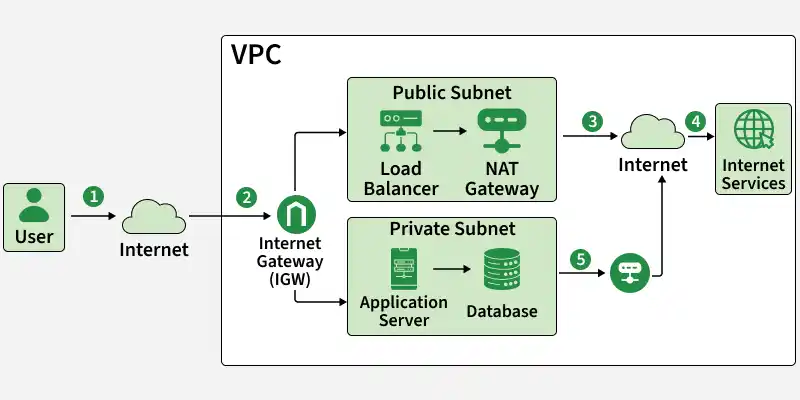
Security Groups & Network ACLs (Firewalls)
**Traffic Flow Steps
- User sends request to the internet.
- Traffic enters VPC through Internet Gateway(IGW).
- Public subnet resources access the internet directly via IGW.
- IGW sends traffic to internet and gets response.
- Private subnet resources access the internet via NAT Gateway and get response.
Connectivity Components
These components connect your VPC to other networks (other VPCs, on-premises data centers, or AWS services).
1. VPC Peering
A networking connection between two VPCs that enables you to route traffic between them using private IPv4 or IPv6 addresses.
- **Use Case: Connecting your "Dev" VPC to your "Shared Services" VPC.
- **Limitation: It is non-transitive. If VPC A peers with B, and B peers with C, A cannot talk to C.
2. AWS Transit Gateway
A cloud router that connects VPCs and on-premises networks through a central hub.
- **Use Case: Connecting hundreds of VPCs together or connecting multiple VPCs to a single on-premise VPN.
- **Advantage: Simplifies management compared to complex meshes of VPC peering.
3. VPC Endpoints (PrivateLink)
Enables you to privately connect your VPC to supported AWS services (like S3, DynamoDB, Kinesis, etc.) without requiring an Internet Gateway or NAT device.
- **Interface Endpoints: Elastic Network Interfaces (ENIs) with a private IP that serve as an entry point for traffic destined to a supported service.
- **Gateway Endpoints: A gateway that is a target for a specific route in your route table (supported for S3 and DynamoDB).
4. AWS Site-to-Site VPN
Enables you to create a secure connection between your data center or branch office and your AWS cloud resources.
- **Virtual Private Gateway (VGW): The VPN concentrator on the Amazon side of the connection.
- **Customer Gateway: A physical device or software application on your side of the connection.
5. AWS Direct Connect
A dedicated network connection from your premises to AWS. It bypasses the public internet entirely.
- **Use Case: High-throughput workloads (10Gbps+), consistent network performance, or regulatory requirements for private connectivity.
Benefits Of Using AWS VPC
Following are the benefits of using AWS VPC:
- **Efficient coordination: VPC can scale to a vast extent and users have total control over a network size including automation resources.
- **Protection: VPC environment is more secure and its resources contain cloud infrastructure which uses firewalls to protect the system from internet attacks.
- **Enhanced performance: VPCs enable a hybrid cloud environment in which a VPC is used by an organization as an extension of their database instead of having to deal with the complexity of building an on-premises private cloud.
- **Low Cost: VPCs are within a public cloud so the cost is quite economical.
- **East to use: AWS VPC can be easily created using AWS Management Console in two ways; first by creating manually and second through Start VPC Wizard.
- **Variety of Connectivity Options: AWS VPC can be connected to a variety of resources, such as the internet, other VPCs account, VPN connection, etc.
VPC Peering
- VPC Peering allows two VPCs to connect and communicate with each other using private IP addresses.
- Instances in connected VPCs can work like they are in the same private network.
- VPC Peering can be created between VPCs in the same AWS account or different AWS accounts.
- It also supports connections between VPCs in different AWS regions.
Pricing for Amazon VPC
As there is no additional charge for using a VPC. but there are charges for using some of VPC components like NAT gateways, IP Address Manager, traffic mirroring and many more. If user wants to create a NAT gateway in their VPC and choose this service, then the users are charged for every “NAT Gateway-hour" used.
Summary Table: When to Use What?
| **Component | **Purpose | **Traffic Flow |
|---|---|---|
| **Internet Gateway | Public internet access. | VPC <-> Internet |
| **NAT Gateway | Outbound internet access for private servers. | Private Subnet -> NAT -> Internet |
| **VPC Peering | Connect two VPCs directly. | VPC A <-> VPC B |
| **Transit Gateway | Connect many VPCs/VPNs centrally. | VPCs <-> Hub <-> VPNs |
| **VPN | Secure encrypted tunnel over internet. | VPC <-> On-Premises |
| **Direct Connect | Dedicated physical fiber connection. | VPC <-> On-Premises (No Internet) |