Amazon Web Services Introduction to EC2 Spot Instances (original) (raw)
Last Updated : 11 Jun, 2026
Amazon EC2 Spot Instances let you use unused EC2 capacity at steep discounts compared to On-Demand pricing. Because AWS can reclaim that capacity at any time, understanding which workloads qualify is essential before adopting them.
- Spot Instances offer discounts of up to 90% compared to On-Demand prices.
- AWS provides a two-minute warning before reclaiming a Spot Instance.
- Spot Instances integrate natively with CloudFormation, Auto Scaling, EMR, ECS, EKS, and AWS Batch.
- Instances can be configured to hibernate, stop, or terminate when capacity is reclaimed.
- Fault-tolerant, stateless, or flexible jobs such as batch processing, CI/CD, big data, containerized workloads, and web servers are good candidates.
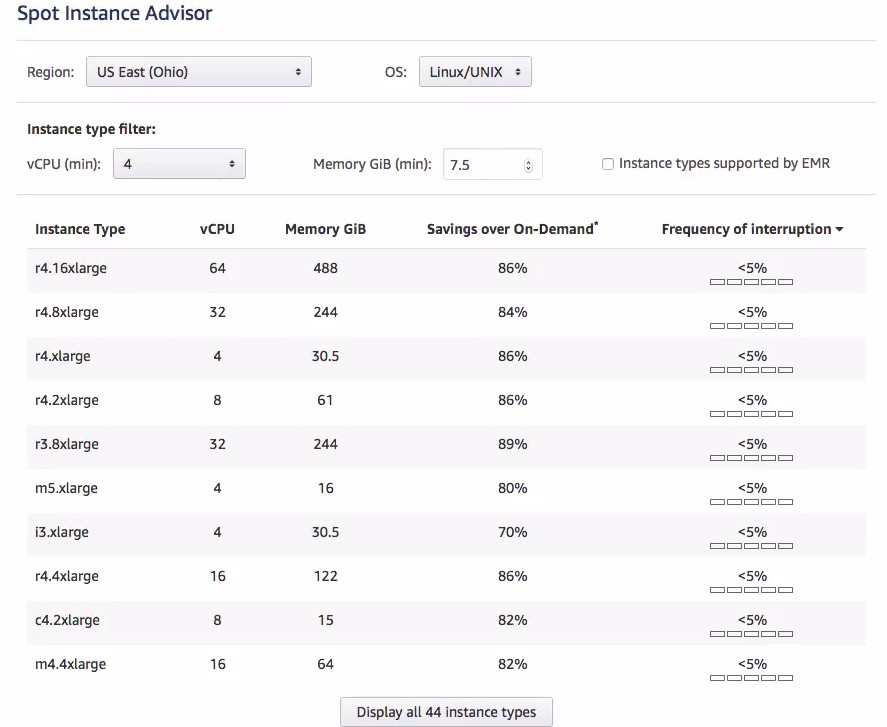
Profiling Workloads for Spot Instances
Before adopting Spot Instances, evaluate whether your workload can tolerate interruption. Key indicators of spot-readiness include:
- The workload scales horizontally across multiple instances.
- Instances are treated as replaceable, not persistent.
- Recovery and replacement happen without human intervention.
- Components are not tightly dependent on a single instance.
- The system remains functional if any one instance disappears.
The key qualifying question is: what would happen if a server were taken away?
- **Batch or queue processing: The job should automatically restart on a different instance without human intervention.
- **Web applications: A load balancer should automatically route traffic to healthy instances.
- **Time-insensitive workloads: If the workload cannot yet be architected for interruption, AWS can hibernate the instance — persisting memory to disk and resuming when capacity becomes available again.
Advantages of Spot Instances
- **Cost Savings: Spot pricing is typically far lower than On-Demand, significantly reducing compute costs.
- **Flexible Pricing: You set a maximum price you are willing to pay, giving you budget control.
- **Scalability: Compute capacity can be scaled up or down rapidly based on workload demand, with no upfront commitment.
- **Availability: Spot Instances draw from unused EC2 capacity across the AWS Region.
- **AWS Service Integration: Native integration with Auto Scaling, EMR, ECS, and EKS makes it straightforward to build scalable, cost-effective architectures.
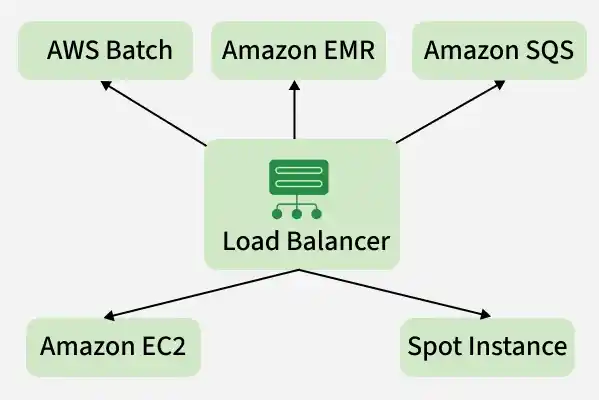
**Note: Spot Instances are not suitable for workloads that cannot tolerate interruptions, such as real-time applications, critical production systems, or stateful databases.
When to Use
Spot Instances are the best fit for workloads with variable schedules and a tolerance for interruption — batch processing, testing, large data processing pipelines, and traffic spike scenarios where paused work can be resumed when capacity returns.
Spot Instance Interruptions
A Spot Instance interruption occurs when AWS needs to reclaim capacity. The instance is terminated with a two-minute warning, halting any running workloads.
- **Trigger Conditions: Interruptions are driven by changes in supply, demand, and internal AWS capacity allocation — not solely by bid price comparisons.
- **Mitigation Strategies: Use checkpointing, distributed computing frameworks, or AWS-managed interruption handling to minimize data loss.
- **Interruption Actions: Instances can be configured to terminate, stop, or hibernate on interruption.

Spot Instance Pricing
**1. How AWS Determines Spot Prices
- **Market-Based Pricing: AWS sets Spot prices based on supply-demand dynamics, not individual bid prices.
- **Bid as a Cap: Your bid price acts as the maximum you are willing to pay, not a competitive auction price against other customers.
- **Interruption Independence: Interruptions are driven by capacity needs and internal algorithms, not by your bid price being exceeded by another customer's bid.
**Note: Setting a bid higher than the On-Demand price does not guarantee immunity from interruption or provide additional benefits.
**2. Checking Spot Instance Price History
Use the AWS Management Console to view historical Spot pricing for any instance type and region.
- Log in to the AWS Management Console.
- Navigate to the EC2 Dashboard.
- Select Spot Requests from the Instances menu on the left.
- Review the listed instance type, region, bid price, and request status, along with the price history for your selected configuration.

AWS Spot Fleet
AWS Spot Fleet automatically requests and manages a collection of Spot Instances (and optionally On-Demand Instances) to meet a specified target capacity, performance, and availability requirement.
- **Flexible Scaling: The fleet automatically adds or replaces instances to maintain the desired processing capacity at all times.
- **Mix and Match: Spot Fleet can span multiple instance types and Availability Zones, improving resilience against capacity shortages in any single pool.
- **Cost Savings: The fleet prioritizes cheaper Spot Instances whenever available, reducing overall compute costs.
- **Reliability: By distributing workloads across multiple instance types and zones, Spot Fleet keeps applications running even if a specific pool is interrupted or becomes expensive.
EC2 Spot Instances vs On-Demand Instances
| **Aspect | **EC2 Spot Instances | **On-Demand Instances |
|---|---|---|
| **Pricing | **Variable; prices adjust gradually based on long-term supply/demand. | **Fixed; set by AWS for specific instance types/regions. |
| **Pricing Model | Market-based; typically **70-90% discount off On-Demand. | **Pay-as-you-go; no upfront commitment or bidding. |
| **Interruptions | **Yes; AWS can reclaim capacity with a **2-minute notice. | **No; instances remain active until you stop or terminate them. |
| **Availability | **Dynamic; depends on unused AWS capacity in a specific pool. | **High; designed for immediate, reliable access. |
| **Use Cases | Fault-tolerant, stateless, or distributed workloads (e.g., Big Data). | Long-running, stateful, or mission-critical applications. |
| **Cost Savings | **High (up to 90%); best for reducing "burn rate." | **None (baseline); use Reserved Instances or Savings Plans for discounts. |
| **Best Workloads | CI/CD, batch processing, rendering, and containerized microservices. | Primary databases, core web servers, and production environments. |