Architecture of Docker (original) (raw)
Last Updated : 23 Apr, 2026
Docker uses a client–server architecture. The Docker client talks to the Docker Daemon, which builds, runs, and manages containers. They communicate through a REST API via UNIX sockets or a network interface.
- Docker is based on a client–server model.
- The Docker client sends requests to the Docker Daemon.
- The Docker Daemon handles container lifecycle tasks.
- Communication happens over a REST API using sockets or networks.
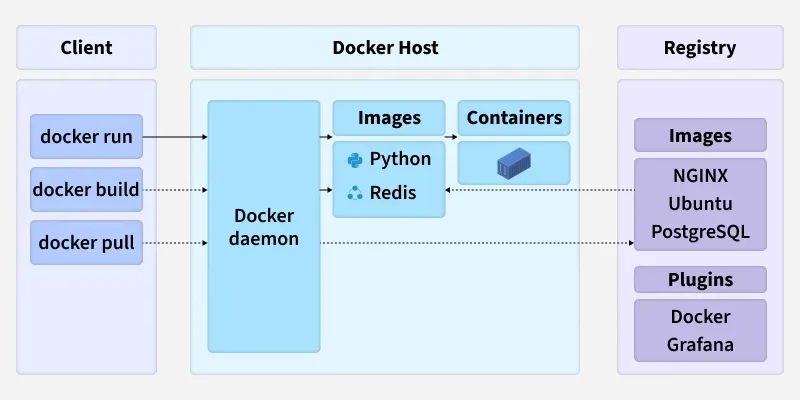
Docker Architecture
The Core Architectural Model
- **Docker Client: It is the primary interface for users. When you execute commands such as docker run or docker build, the client translates them into REST API requests and sends them to the Docker Daemon.
- **Docker Host: This is the machine where the magic happens. It runs the Docker Daemon (dockerd) and provides the environment to execute and run containers.
- **Docker Registry: This is a remote repository for storing and distributing your Docker images.
This interaction forms a simple yet powerful loop: you use the Client to issue commands to the Daemon on the Host, which can pull images from a Registry to run as containers.
1. The Docker Daemon (dockerd):
The Docker Daemon is the persistent background process that acts as the brain of your Docker installation.
- It runs on the Docker Host.
- It listens for API requests from the Docker Client.
- It manages all Docker objects: images, containers, networks, and volumes.
- It can communicate with other daemons to manage Docker services in a multi-host environment (like a Docker Swarm cluster).
2. The Docker Client:
The Docker Client is the primary interface through which users interact with Docker. This is most commonly the Command Line Interface (CLI).
- It translates user commands like docker ps into REST API requests.
- These requests are sent to the Docker Daemon for processing.
- A single client can communicate with multiple daemons.
Common Commands:
- docker build: Builds an image from a Dockerfile.
- docker pull: Pulls an image from a registry.
- docker run: Creates and starts a container from an image.
3. The Docker Host
The Docker Host is the physical or virtual machine that provides the complete environment for executing and running containers. It comprises:
- The Operating System (and its kernel).
- The Docker Daemon.
- Images that have been pulled or built.
- Running Containers.
- Networks and Storage components.
4. The Docker Registry
A Docker Registry is a stateless, scalable storage system for Docker images.
- Public Registry: The default public registry is Docker Hub, which contains a vast collection of community and official images.
- Private Registries: Organizations often use private registries (like Harbor, AWS ECR, or Google Artifact Registry) to store proprietary images for security and control.
Image Lifecycle Commands:
- docker pull <image_name>: Downloads an image from a configured registry to your local Docker Host.
- docker push <image_name>: Uploads a local image to a registry.
Docker Objects
Whenever we are using a docker, we are creating and use images, containers, volumes, networks, and other objects. Now, we are going to discuss docker objects:-
1. Images
An image is a read-only, inert template that contains the instructions for creating a Docker container. Think of it as a blueprint or a class in object-oriented programming.
- It's built from a Dockerfile, a simple text file defining the steps to assemble the image.
- Images are built in layers, where each instruction in the Dockerfile corresponds to a layer. This layered architecture makes builds and distribution incredibly efficient.
2. Containers
A container is a runnable, live instance of an image. If an image is the blueprint, a container is the house built from that blueprint.
- You can create, start, stop, move, or delete containers using the Docker API or CLI.
- Each container is isolated from other containers and the host machine, having its own filesystem, networking, and process space.
- You can run multiple containers from the same image.
3. Storage
Since a container's writable layer is ephemeral (data is lost when the container is deleted), Docker provides robust solutions for data persistence. Storage driver controls and manages the images and containers on our docker host.
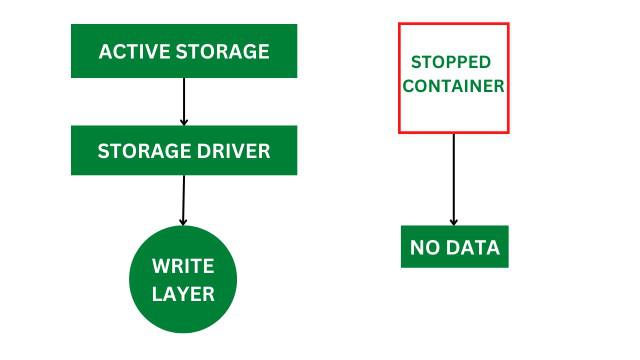
Docker Storage
Types of Docker Storage
Docker provides multiple storage options to persist, share, and manage data across containers and hosts.
- **Volumes: The preferred mechanism. Volumes are managed by Docker and stored in a dedicated area on the host filesystem (e.g., /var/lib/docker/volumes/ on Linux). They are designed to survive the container lifecycle.
- **Bind Mounts: Allow you to map a file or directory from the host machine directly into a container. This is very useful for development, where you might want to share source code with a container.
- **tmpfs Mounts: In-memory storage that is temporary and never written to the host filesystem. Useful for sensitive data or high-performance temporary files.
Docker Networking
Docker networking provides complete isolation for docker containers. It means a user can link a docker container to many networks. It requires very less OS instances to run the workload.
Types of Docker Network
- **Bridge: It is the default network driver. We can use this when different containers communicate with the same docker host.
- **Host: When you don't need any isolation between the container and host then it is used.
- **Overlay: For communication with each other, it will enable the swarm services.
- **None: It disables all networking.
- **macvlan: Assigns a unique MAC address to a container, making it appear as a physical device on your network.
Step-by-Step Execution of a Docker Command
Let’s trace a common command to understand how all components work together:
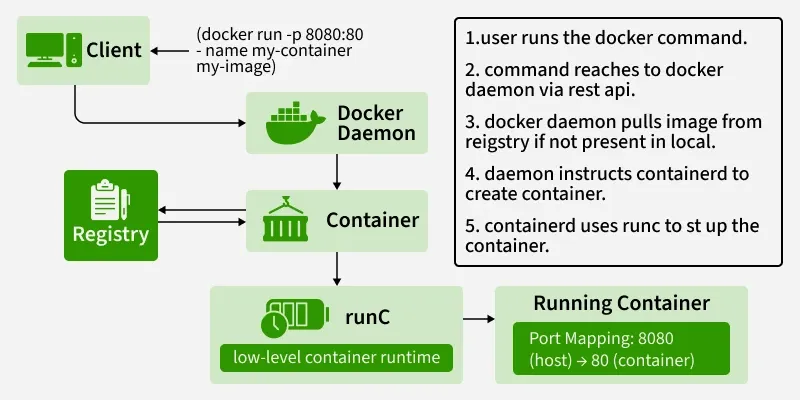
End -to-End Command Execution flow
You run the command: docker run -d -p 80:80 nginx
- **Client: The Docker Client sends a REST API request to the Docker Daemon to create and run a container from the nginx image.
- **Daemon: The Daemon receives the request. It first checks if the nginx image exists locally on the Host.
- **Registry (Pull): If the image is not found locally, the Daemon contacts the configured Registry (Docker Hub by default) and pulls the nginx image.
- **Runtime (containerd): The Daemon passes the image and run-configuration over to containerd.
- **Runtime (runc): containerd uses runc to create a new container. runc interfaces with the Linux kernel to create isolated namespaces and limit resources with cgroups.
- **Execution: The container is started. Docker maps port 80 of the host to port 80 of the nginx container, as requested by the -p 80:80 flag. The Nginx process runs as PID 1 inside the container's isolated PID namespace.