Google Cloud SQL (original) (raw)
Last Updated : 11 Mar, 2026
Google Cloud SQL is a fully managed relational database service provided by Google Cloud. It enables users to deploy, manage, and scale relational databases without handling underlying infrastructure. Cloud SQL ensures high availability, automated backups, and built-in security. It integrates seamlessly with other Google Cloud services, making it ideal for modern cloud-native applications.
- Fully managed database administration with minimal operational overhead.
- High availability with automatic failover.
- Built-in backups, replication, and security features.
- Native integration with Google Cloud services.
Core Cloud SQL Concepts
- **Instance: In order to run the database, we need to use a virtual machine called instance created in the Google Cloud Platform. We can create multiple database instances.
- **Database: A database is a collection of data that is organized in a structured way. A database is in the form of a table, which consists of more than one row and column.
- **Table: A table is an arrangement of information or data, usually in rows and columns or in a more complex structure. Tables are commonly used in reporting, research, and data analysis.
- **Field: A field is a single piece of data that is stored in a record in a table.
- **Primary Key: It's a unique identifier like a driver's license number, area code, or vehicle identification number. A relational database should have only one primary key. Each row of data must have a primary key value and none of the rows can be NULL.
- **Replication: Replication is the ability to create a copy of a Cloud SQL instance or a local database and transfer your work to the copies.
- **Backups: Backups restore lost data to Cloud SQL instances. If something goes wrong, we can also restore it to its previous state by overwriting it with a backup. Enable automatic backup for each instance that contains the necessary data. Backups protect data from loss.
Key Characteristics of Google Cloud SQL
The below characteristics make Google Cloud SQL a reliable, scalable, and low-maintenance database solution for applications that require structured data, high availability, and seamless cloud integration
Fully Managed Service
In a fully managed database model, organizations pay the cloud provider to handle the complete database infrastructure lifecycle.
- Google manages provisioning, patching, upgrades, and maintenance automatically.
- Built-in backup, restore, and failover capabilities ensure high availability.
- Eliminates the need for dedicated database administrators for routine operations.
- Enables teams to focus on application development and business productivity.
Relational Database System
A relational database is a database management system that stores structured data in a tabular format with clearly defined relationships.
- Data is organized into tables consisting of rows and columns.
- Relationships between tables are maintained using keys and constraints.
- Ensures data consistency and reliability across transactions.
- **Structured Query Language (SQL): The standard language used to query, update, and manage relational databases.
- **Data Integrity: Enforces accuracy, consistency, and completeness of data through constraints and validation rules.
Three relational Database Engines Supported by Google Cloud SQL
Each of these database engines supported by Google Cloud SQL has its own strengths and use cases, allowing developers to choose the one that best fits their application requirements and preferences.
Steps to Create a Cloud SQL instance on GCP
Here are the detailed steps to create a Cloud SQL instance on Google Cloud Platform (GCP).
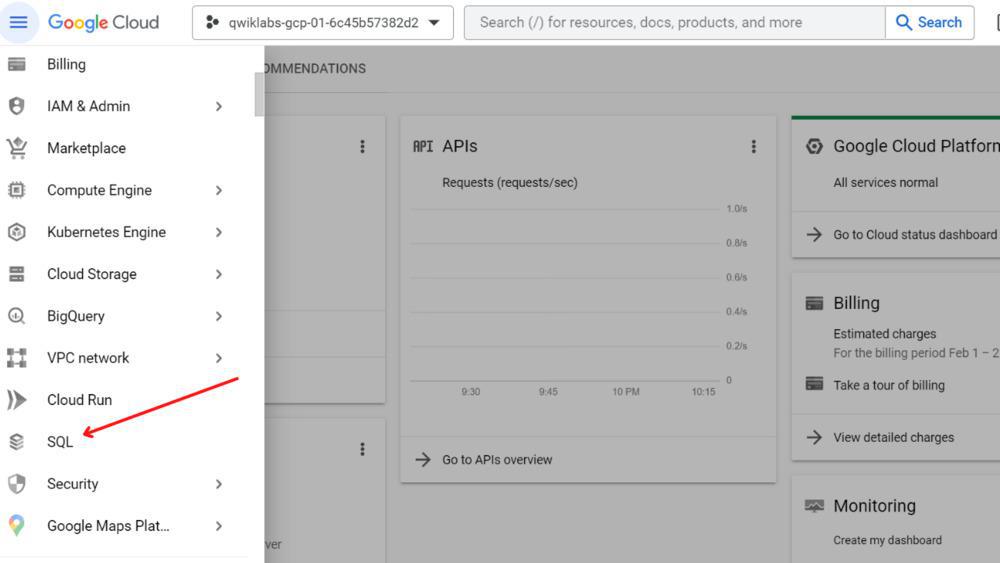
**Step 1: First, go to the navigation menu and click SQL.
**Step 2: Now, Click on Create Instance.

**Step 3: Create your instance with the following settings:
- Click choose MySQL
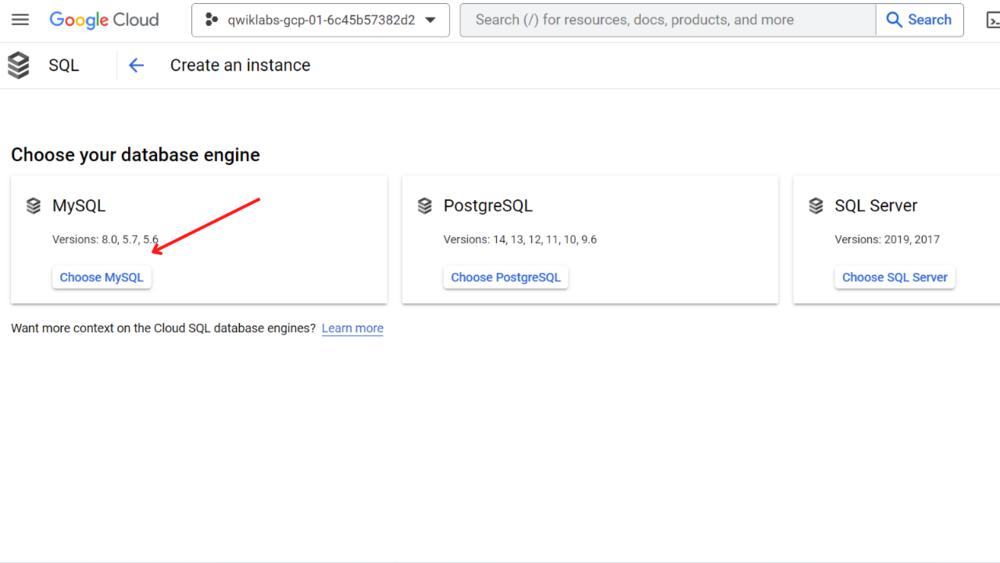
- To create a MySQL instance, we must put in an Instance ID and Password. Type "**myinstance" for the Instance ID. In the password field click on the Generate link and the eye icon to see the password. Save this password which can be used in the next section. Leave all other fields at the default values.

**Step 4: Click Create Instance.

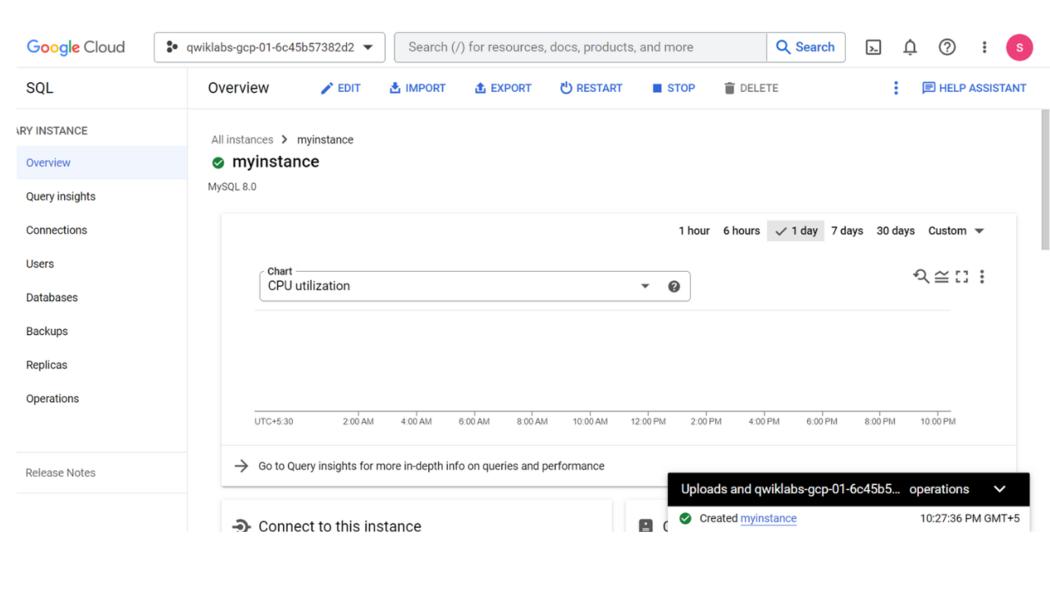
**Step 5: Finally **myinstance is created.
How to Connect to Google Cloud Instance?
**Step 1: Connect your Cloud SQL instance
gcloud sql connect myinstance --user=root
**Step 2: In order to create a database called **guestbook on your Cloud SQL instance, you have to run the below SQL query
CREATE DATABASE guestbook;
**Step 3: Insert the following sample data into the **guestbook database by using SQL queries like use, create, insert, etc...
USE guestbook;
CREATE TABLE entries ( guestName
VARCHAR(255), content VARCHAR(255),
entryID INT NOT NULL AUTO_INCREMENT,
PRIMARY KEY(entryID));
INSERT INTO entries (guestName, content)
values ("first guest", "I got here!");
INSERT INTO entries (guestName, content)
values ("second guest", "Me too!");
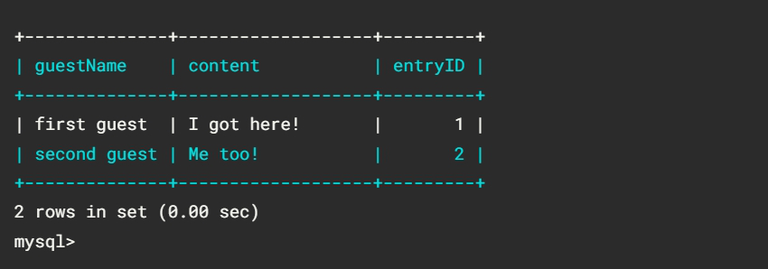
**Step 3: To retrieve data we have to use this query
SELECT * FROM entries;
How do you manage your Cloud SQL instances?
- **Creating an Instance: Only the instance name is required during creation. Default values can be accepted for other settings.
- **Editing an Instance: Settings can be modified after creation. Changes are immediately applied except for instance size.
- **Restarting an Instance: Instance is stopped, connections are drained. Restart occurs upon fresh connection request.
- **Deleting an Instance: Data loss upon deletion, perform backups or exports first.
- **Configuring SSL for Instances: Enable SSL connection post-creation. Required certificates available in Google Developers Console.
- **Adding Project Members: Add project members for instance management. Use Google Cloud SDK or Google Developers Console. Validation required for connecting via SDK. Project rights consistent across associated instances.
How do you Use Google Cloud SQL Instances?
- **Creating Databases and Tables: Start by creating databases and defining tables with appropriate schemas to organize your data effectively. Use SQL commands or graphical tools to create and manage database structures according to your application requirements.
- **Connecting to Instances: Establish secure connections to your Google Cloud SQL instances using standard database connection methods such as JDBC, ODBC, or language-specific APIs. Ensure proper authentication and access control mechanisms to protect sensitive data and resources.
- **Executing Queries and Transactions: Execute SQL queries to retrieve, update, or delete data stored in your databases. Implement transactions to maintain data consistency and integrity, especially in multi-user environments or critical applications.
Cloud SQL Application Programming Interface (API)
The Google Cloud SQL API allows for programmatic management of instances, providing various functionalities such as:
- **Retrieving Information: Obtaining details about instances, including their configurations and status. Listing all SSL certificates associated with an instance. Enumerating instances within a project. Listing available service tiers for Cloud SQL instances.
- **Managing Instances: Creating new instances with specified configurations. Deleting existing instances. Restarting instances to apply configuration changes or resolve issues.
- **Backup and Restore Operations: Querying information about backup runs, including their status and metadata. Exporting databases from Cloud SQL instances to Google Cloud Storage. Importing databases from Google Cloud Storage into Cloud SQL instances. Restoring instances from backups to recover data or configurations.
Advantages of Google Cloud SQL
- **Fully Managed Service: Google Cloud SQL is a fully managed service, meaning Google takes care of database management tasks such as patching, backups, and replication, allowing developers to focus on building applications.
- **Scalability: Google Cloud SQL offers both vertical and horizontal scalability, allowing you to easily scale your database resources up or down based on your application's needs.
- **High Availability: Google Cloud SQL provides built-in high availability with automatic failover, ensuring your databases remain accessible even in the event of hardware failures or maintenance events.
Disadvantages of Google Cloud SQL
- **Limited Database Options: Google Cloud SQL currently supports only a limited set of database engines, including MySQL, PostgreSQL, and SQL Server. If you require support for other databases such as Oracle or MongoDB, you may need to consider alternative solutions.
- **Vendor Lock-in: Using Google Cloud SQL may lock you into the Google Cloud Platform ecosystem, making it difficult to migrate to other cloud providers in the future.
- **Cost: While Google Cloud SQL offers a range of pricing options, including pay-as-you-go and committed use discounts, running databases in the cloud can still incur significant costs, especially for large-scale deployments or resource-intensive workloads.