How To Optimize Docker Image ? (original) (raw)
Last Updated : 1 Sep, 2025
Optimizing Docker images is crucial for building efficient and secure applications. The primary benefits include:
- **Faster Deployment: Smaller images take less time to pull from a registry and deploy, significantly speeding up CI/CD pipelines and scaling operations.
- **Reduced Resource Consumption: Optimized images consume less disk space on host machines and in container registries, lowering storage costs and reducing network bandwidth usage.
- **Enhanced Security: By removing unnecessary files, tools, and dependencies, you reduce the image's attack surface, making it less vulnerable to security exploits.
- **Improved Scalability: Lighter images allow container orchestration platforms like Kubernetes to launch new container instances more quickly, enabling applications to scale efficiently in response to demand
How do I optimize Docker images?
Image minimization without loosing functionality is possible using Docker image optimization. To optimize images for Docker, use the following techniques. Many commands and techniques, including the following, can be utilized to optimize a Docker image:
Minimize the Number of Layers
Minimize the number of levels in your Dockerfile by combining instructions into a single RUN directive for related instructions. Each instruction in a Dockerfile ****(like** RUN , COPY , ADD ) creates a new layer in the image. To reduce image size and improve build performance, consolidate related commands into a single RUN instruction using the && operator.
FROM base_image
RUN apt-get update && \
apt-get install -y package1 package2 && \
apt-get clean
Use Minimal Base Images
Always start with the smallest, most appropriate base image for your application. Using a full-featured OS image like ubuntu can add hundreds of megabytes of unnecessary files. Instead, opt for minimal images like alpine, distroless, or slim variants of official images.
- **Alpine Linux is a popular choice due to its incredibly small size (around 5-7 MB).
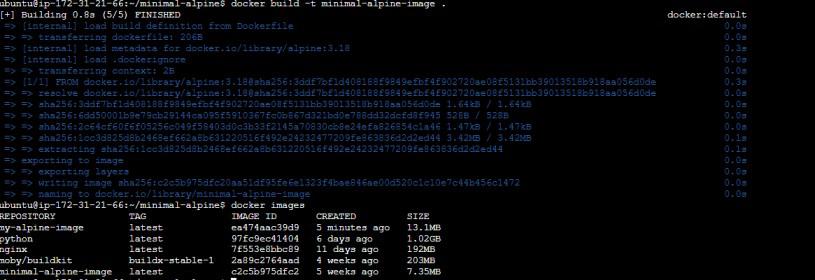
**Example:
FROM alpine:latest
Use Docker Multistage Builds
For speeding up the image building process, use Docker's multi-stage builds, that separate build needs from the final running environment. Multistage builds are a powerful feature for creating lean production images. They allow you to use one container image with a full build environment (the "builder" stage) to compile your code or build assets, and then copy only the necessary artifacts into a separate, minimal production image.
This separates build-time dependencies (like compilers, and development libraries) from runtime dependencies, drastically reducing the final image size.
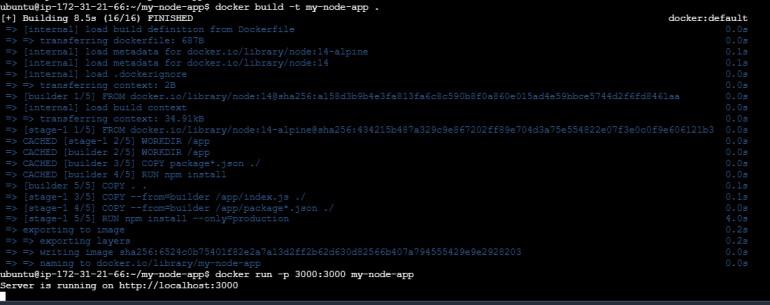
**Example:
FROM build_image AS builder
Build your application
FROM base_image
COPY --from=builder /app /app
Remove unnecessary files & Clean up Layers
After installing packages, always clean up caches and temporary files within the _same RUN instruction. If you create a cleanup instruction in a new layer, the previous layer containing the unnecessary files will still be part of the image, and the size won't be reduced.
*Example:
RUN apt-get install -y package \
&& apt-get clean \
&& rm -rf /var/lib/apt/lists/
Use Dockerignore
A **.dockerignore**file prevents unnecessary files and directories from being sent to the Docker daemon during the build process. This is crucial for avoiding the inclusion of local development files, logs, and build artifacts (node_modules, .git directory, etc.), which can unintentionally increase image size and pose security risks.
**Example .dockerignore:
.git
node_modules
*.log
**Docker Build Arguments
Use ARG to pass variables to the Docker build process. This allows for more flexible and reusable Dockerfiles, enabling you to customize builds for different environments (e.g., development vs. production) without altering the Dockerfile itself.
**Example:
ARG BUILD_ENV
RUN if [ "$BUILD_ENV" = "production" ]; then \
npm install --only=production; \
else \
npm install; \
fi
**Update Base Images
Regularly update your base images to ensure you have the latest security patches and performance improvements. Specify a version tag (e.g., node:18-alpine) instead of latest to ensure your builds are predictable and reproducible. Periodically pull the latest version of your chosen tag and rebuild your images.
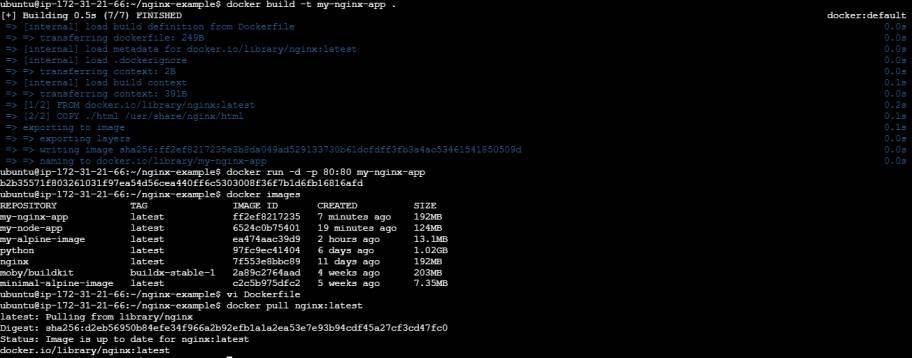
**Example:
docker pull base_image:latest
Understanding Caching
Caching is an essential strategy for improving the effectiveness and speed of image development in Docker builds. Every command in a Dockerfile creates a new layer, which is an essential component of Docker's caching technique. Docker caches the layers from previous builds. If a Dockerfile instruction and its context have not changed, Docker will reuse the cached layer, making builds much faster. To leverage this effectively, structure your Dockerfile from the least frequently changing instructions to the most frequently changing ones.
- Install OS dependencies first.
- Copy package manager files (e.g.,
package.json,requirements.txt) and install dependencies. - Copy your application source code last, as it changes most often.
Here's an example Dockerfile that illustrates the previously discussed strategies for efficiently using caching:
Set base image
FROM ubuntu:20.04 AS builder
Install build dependencies (least likely to change)
RUN apt-get update && apt-get install -y \
build-essential \
&& rm -rf /var/lib/apt/lists/*
Copy only necessary build files (potentially changing)
WORKDIR /app
COPY . .
Build the application (most likely to change)
RUN make
Final stage for production image
FROM alpine:latest
Copy built application from the builder stage
COPY --from=builder /app/app /app
Set entry point
ENTRYPOINT ["/app"]
Optimize Spring boot Docker image
A number of techniques are used for maximizing Docker images for Spring Boot apps in order to decrease image size and improve performance. The following are the top three simple procedures:
- **Use a lightweight base image: Rather than beginning your Dockerfile with a full-fledged operating system, use an easy base image like Alpine Linux (openjdk:alpine). Your Docker image will be smaller overall since Alpine images are smaller.
- **Utilize multi-stage builds: For maintaining the build environment & runtime environment separate use multi-stage builds. This allows you build your Spring Boot application in one step, then copy the created artifact—keeping only the runtime dependencies you need—into a new image in a later step.
- **Optimize dependencies: Minimize the number of dependencies in your application by eliminating dependencies which aren't required in your pom.xml or build.gradle file or by using the --exclude flags option. This improves runtime efficiency and reduces your final Docker image.
The top three instruments for docker image optimization are presented here.
- **Docker Slim: Reduces the size of your Docker image by removing unnecessary dependencies and files after inspection.
- **Dive: Assists in recognizing chances for decreasing size through the elimination of superfluous or redundant layers through analyzing and visualizing a Docker image's layer design.
- **Hadolint: A Dockerfile linter that examines Dockerfiles for possible problems and best practices, allowing simplify build operations.