How to Use Cloud Identity and Access Management (IAM) For Access Control on GCP? (original) (raw)
Last Updated : 23 Jul, 2025
IAM defines "who can do what on which resource". Cloud IAM (Identity Access Management) offers a standardized set of functions and integrates access management for Google Cloud services into a single solution. You can create and manage permissions for Google Cloud resources using the Identity and Access Management (IAM) service provided by Google Cloud. The appropriate tools are provided by Cloud IAM to efficiently and highly automate the management of resource rights. Users do not receive permissions directly from you, you give them roles instead, that combine one or more permissions. You can use this to relate jobs and groups within your organization to specific job responsibilities. Users only have access to the information they require to do their tasks, and administrators can easily give default permissions to huge groups of users.
**Feature of IAM
- **Integration with GSuite: Cloud IAM supports standard Google accounts. You can manage users and groups through the Google admin console, Here you can create IAM policies and grant permission to Google Group or Google Hosted Cloud Service Account using cloud identity.
- **Built-in audit trail: It allows you to focus on business policies around your resources. It provides a unified view of the security policy of the entire organization with built-in auditing to ease compliance processes.
**Roles in IAM
A role contains a set of permissions that allows you to perform specific actions on Google Cloud resources. In simple words, a role is a named list of permissions.
**Types of IAM Roles

- **Predefined roles: These are created and maintained by Google. Their permissions are automatically updated as necessary, such as when new features or services are added to Google Cloud.
- **Custom roles: These are user-defined, you create a custom role by combining one or more of the available Cloud IAM permissions. Custom roles are not maintained by Google and will not be updated automatically. These can be created at the organization level and project level, but not at the folder level.
Some commonly used project-level roles provided by Google are mentioned below:
| Role | Permissions |
|---|---|
| Viewer | Permissions for read-only actions like viewing existing resources. |
| Editor | All viewer permissions + permissions for actions that modify state , like changing existing resources. |
| Owner | All editor permissions + permissions for : Managing roles and permissions for all resources within the project.Setting up billing for a project. |
| Browser | Read access to browse the hierarchy for a project, including the folder, organization, and Cloud IAM policy.Does not include permission to view resources in the project. |
The Structure of a Cloud IAM permission looks like this:
..
**Example:
storage.bucket.admin****:** grants the ability to manage storage buckets, including creating, editing, and deleting buckets.compute.instances.stop :allows a user to stop a Virtual Machine.
**Steps to Set Up IAM Role (Using IAM Console)
- Enter the google cloud console.
- Select **Navigation menu > **IAM & Admin > **IAM. You are now in the "IAM & Admin" console.
- Click the ****+GRANT ACCESS / ADD** button at the top of the page
- Paste the name of the user you want to grant the role to.
- In the **Select a role field, hover over **Basic from the drop-down menu to select the needed role.
- Click save.
**Steps to set up IAM role (Using command line interface) :
- Check available permissions in your project.
gcloud iam list-testable-permission
- Use this command to create yaml file which will contain description of IAM roles and permission.
nano <<file_name>>.yaml
- Above wil allow you to enter data into yaml file. Enter description in following format.
title: "[ROLE-TITLE]"
description: "[ROLE_DESCRIPTION]"
stage: "[LAUNCH_STAGE]" //such as ALPHA, BETA, or GA
includedPermissions:
- [PERMISSION 1]
- [PERMISSION 2]
Save the above using CTRL+X and close it using CTRL+Y, then ENTER.
- Finally, create the role by using the given command
gcloud iam roles create <<role_name>> --project <<project_name>> --file <<file_name>>.yaml
**Cons of Custom Roles
Custom roles can only be used to grant permissions in policies for the same project or organization that owns the roles or resources under them. You cannot grant custom roles from one project or organization on a resource owned by a different project or organization.
**IAM Policies
An IAM policy specifies access controls for Google Cloud resources. IAM roles discussed above are part of policies. An IAM policy is attached to a cloud resource and specifies which principals have which roles for that particular resource. IAM policy can be declared using yaml or JSON format.
{ "bindings": [ /* A policy iscollection of bindings */ { "role": "roles/<role_name>", /* role can be an IAM predefined role or a user-created custom role */ "members": [ /* Binding binds one or more members, or principals */ "user:tanu@example.com", "group:gfg@example.com", "domain:google.com", "serviceAccount:<enter project_id>" ] }, { "role": "roles/<role_name>", /* a binding may consist of multiple roles each having some members */ "members": [ "user:jain@gmail.com" ], "condition": { /* logical expression that allows access to a resource only if the expression evaluates to true*/ "title": "expirable access", "description": "Does not grant access after Dec 2024", "expression": "request.time < timestamp('< enter timestamp >')", } } ], "etag": "< enter meta_data >", /* Enter meta data */ "version": 3}
This is how you set up IAM policy using JSON.
**Audit Logs
Audit logs help you answer "Who did what, where, and when?". Audit logs allow us to view all the changes that have happened on GCP resources. There are 4 types of audit logs supported in GCP.
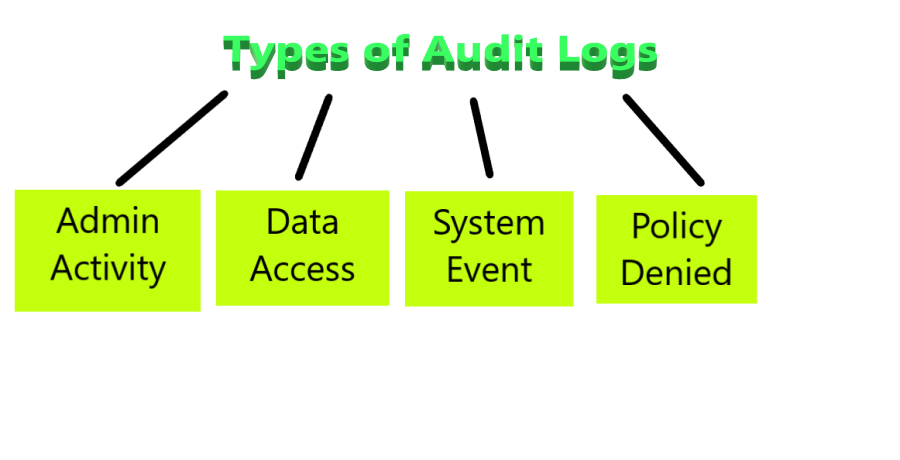
Types of audit logs
- **Admin Activity: Log entries for API calls and other operations that change the configuration or metadata of resources can be seen in the audit logs for admin activity. It is created even if the Cloud Logging API is disabled.
- **Data access: These include API calls that generate, edit, or read user-provided resource data.
- **System event: Log entries for Google Cloud activities that change resource settings are found in System Event audit logs.
- **Policy Denied: These are recorded when a Google Cloud service denies access to a user when the security policy is violated.
| Feature | Admin Activity | Data access | System Event | Policy Denied |
|---|---|---|---|---|
| Default enabling | Yes | No | Yes | Yes |
| Chargeable | No | charges on basis of volumes of logs of data | No | charges on basis of volumes of logs of data |
| Default retention period | 400 days | 30 days | 400 days | 30 days |
**How to View IAM Audit Logs
**Step 1: Go to **Logging> Logs Explorer from console navigation or by search bar.

**Step 2: To display audit logs, enter the given query into the query-editor field, and then click **Run query:
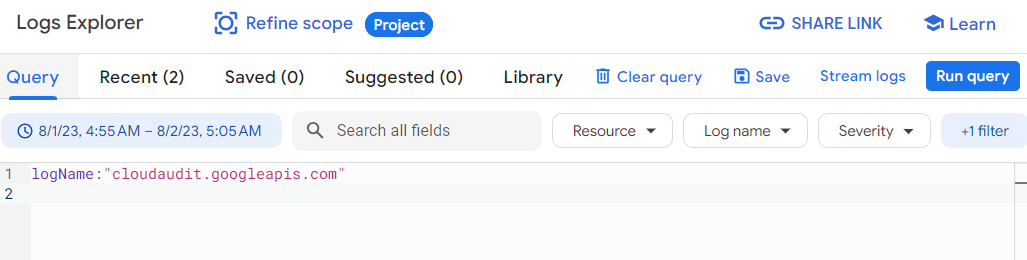
You can use this query too for displaying audit logs -
protoPayload."@type"="type.googleapis.com/google.cloud.audit.AuditLog"
**Troubleshooting Access Control Issues Using Audit Logs
We are clear that the audit log provides information about who has accessed your resources and what permissions they have used. This can be used to identify unauthorized access or track down access control errors. Moreover you can apply different filters to acknowledge the issues (no need to learn to write queries).
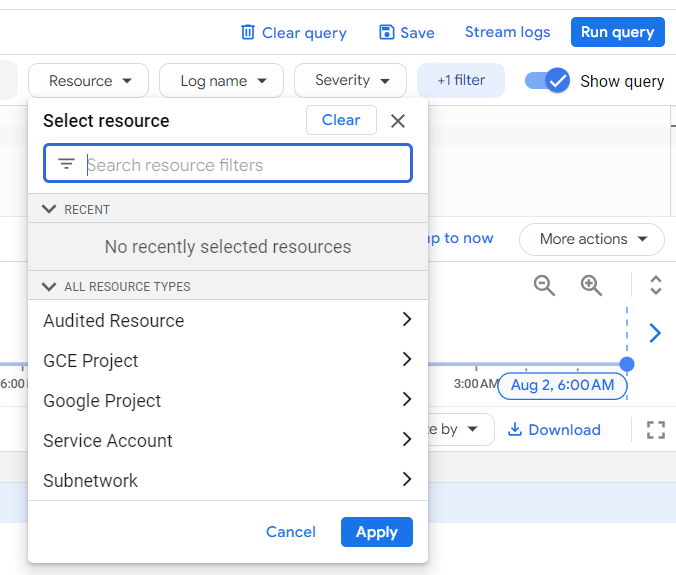
**Applying Viewer Access Permission To Cloud Storage
**Step 1: Create a Cloud Storage bucket with a unique name. From the Cloud Console, Go to the **Navigation menu > **Cloud Storage > **Buckets.
**Step 2 Create a bucket named gfg-tanu (this should be unique so you can modify the name ).

**Step 3: Upload desired file or folder to the bucket whose viewer access will be given to the principal role.

**Step 4: Select **Navigation menu > **IAM & Admin > **IAM.

**Step 5: Click on grant access.

**Step 6: In the **Select a role field, select **Basic > **Viewer from the drop-down menu.
.png)
**Step 7: In the **New Principals field add the service account to which you want to grant viewer access. Then, click "Save".
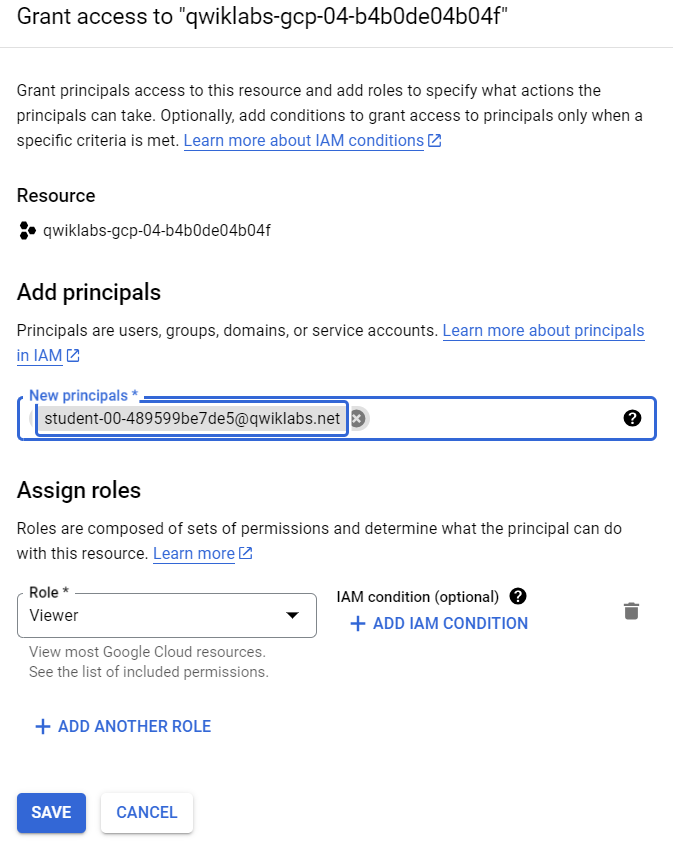
In this way, the mentioned principal service account will have Viewer access.
**Applications of IAM
A student who is enrolled in a particular course would be granted access to the course's materials, such as lecture videos, assignments, and exams. He/She will not be allowed to access other material. Any website that collects personal information about its users may use Identity and Access Management (IAM) to ensure that only authorized personnel have access to this data. A developer might need access to all of the company's code repositories, while a marketing manager might only need access to the website.