IAM Roles (original) (raw)
Last Updated : 2 Aug, 2025
AWS IAM Roles allow users, applications and services to securely access resources without requiring permanent credentials. Unlike IAM users, which are assigned to specific individuals, roles can be temporarily used by AWS services like EC2 and Lambda or even by external entities. This approach helps businesses manage permissions more efficiently while ensuring security best practices, such as granting access only when necessary.
**Reason to Use IAM Roles in AWS
IAM Roles eliminate the need to hardcode AWS access keys and secret keys within your applications. Instead, roles are assumed temporarily by trusted entities (like EC2, Lambda, or EKS), allowing them to perform actions based on defined permissions.
**For example:
- A Lambda function can use a role to access S3 or DynamoDB.
- An EC2 instance can assume a role to read from S3 without embedding credentials.
- EKS pods can assume roles to securely interact with other AWS services.
This model enhances security, scalability, and compliance.
Core Components of IAM Roles
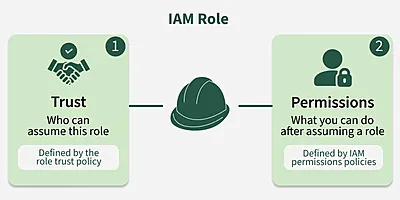
IAM Roles are made up of the following:
- **Trust Policy: Defines which entities (services or users) can assume the role.
- **Permissions Policy: Specifies what actions the role can perform on which resources.
**Types of IAM Roles
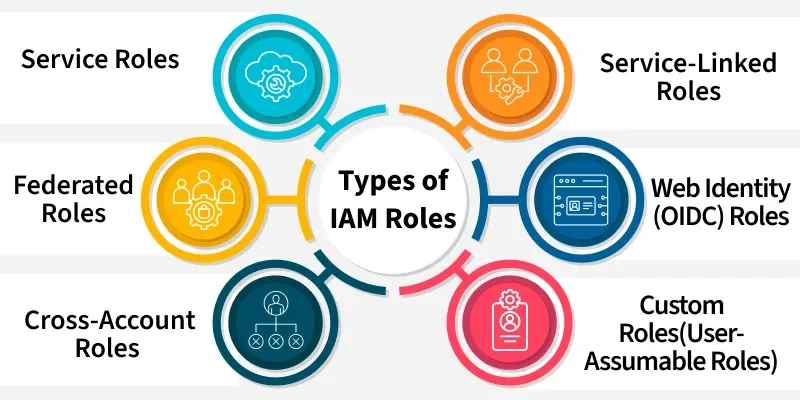
IAM Roles in AWS help control access to resources without using permanent credentials. Depending on the use case, different types of roles serve different needs:
1. **Service Roles
These are custom roles created by administrators to allow an AWS service (like EC2, Lambda, or CloudFormation) to access resources in your account on your behalf. You define both the **trust policy (which service can assume the role) and the **permissions policy (what actions the service can perform).
2. **Service-Linked Roles
Predefined and managed automatically by AWS for specific services. These roles come with all required permissions for the service to function correctly and **cannot be modified by the user. They are automatically created or updated by the service when needed.
3. **Cross-Account Roles
Allow users, services, or identities from one AWS account to assume a role in another account. This enables secure access across accounts without needing duplicate IAM users. The trust policy specifies the external account, and the permissions policy defines allowed actions.
4. **Federated Roles
Used for identity federation via SAML or OpenID Connect. These allow users from **external identity providers (e.g., Google, Okta, Active Directory) to assume roles in AWS without needing separate credentials.
5. **Web Identity (OIDC) Roles
Designed for mobile and web applications, these roles allow apps authenticated through **OIDC providers (e.g., Cognito, Facebook) to access AWS resources. Users assume roles using web-identity tokens with STS operations like AssumeRoleWithWebIdentity.
6. **Custom Roles (User-Assumable Roles)
These are fully **custom IAM roles created to be assumed by IAM users (in the same account) or other roles. Often used to grant temporary elevated permissions (e.g., admin privileges) when needed.
IAM Role Vs. IAM User
IAM Roles and IAM Users are both used to manage access to AWS resources, but they serve different purposes. Here’s how they compare:
| IAM Role | IAM User |
|---|---|
| 1. A temporary identity that users, applications, or AWS services can assume when needed. | 1. A permanent identity assigned to an individual with specific credentials. |
| 2. Uses temporary security credentials that expire and automatically refresh. | 2. Uses a fixed password for AWS console access or long-term access keys for API/CLI. |
| 3. Best for allowing AWS services (like EC2 and Lambda) or external users to access resources without storing credentials. | 3. Best for individuals who need direct and continuous access to AWS. |
| 4. More secure because it doesn’t require storing long-term credentials. | 4. Less secure if access keys are not rotated regularly or get exposed. |
| 5. Can be used by multiple users, AWS services, or external entities temporarily. | 5. Assigned to a specific person with fixed permissions. |
| 6. Users or AWS services assume the role when needed, gaining the required permissions for a limited time. | 6. The user logs in with a password or uses access keys for authentication. |
| 7. An EC2 instance needs temporary access to an S3 bucket. | 7. An administrator needs permanent access to manage AWS resources. |
Common Issues and Troubleshooting with IAM Role
Common IAM role issues and troubleshooting tips:
1. **Role won't be assumed due to wrong trust policy
- **What’s Happening: You can’t assume the role because its trust policy doesn’t let the right user or service take it on.
- **How to Fix It: Double-check the trust policy for the role. Make sure it lists the correct user, service, or account that should be able to assume the role. If needed, use IAM Access Analyzer to help you find any issues with the trust policy.
2. **Role Permissions aren't enough
- **What’s Happening: The role has permissions, but you’re still getting access denied when trying to perform an action.
- **How to Fix It: Go through the permissions attached to the role and make sure they cover the actions you’re trying to perform. You can also test it with the AWS IAM Policy Simulator to confirm the role’s permissions are enough.
3. **Session duration too short
- **What’s Happening: The session for assuming the role is too short, and it expires before you’re done.
- **How to Fix It: Check the session duration when assuming the role. If it's set too short, increase it within the allowed limits (up to 12 hours for most roles). Just make sure it’s set long enough for your needs.
4. **Resource-based policies blocking Role Access
- **What’s Happening: Even though the role has the right permissions, a resource policy (like for S3 or Lambda) is stopping access.
- **How to Fix It: Review the resource-based policies for things like S3 buckets or Lambda functions. Sometimes these policies can override the permissions set by the IAM role, so make sure they’re configured correctly to allow the actions the role should perform.
5. **MFA not set up for sensitive Roles
- **What’s Happening: You can’t assume a role that requires MFA because MFA isn’t being provided.
- **How to Fix It: If the role has MFA requirements in its trust policy, make sure the person or service assuming the role has MFA set up and is using it. You may need to check or enable MFA for the user or service.
6. **Changes to Permissions not taking effect right away
- **What’s Happening: You updated permissions or policies, but they’re not working right away.
- **How to Fix It: IAM permissions can take a few minutes to update. If things aren’t working after a policy change, give it a little time (about 5-10 minutes) and try again. If the problem persists, look for conflicting policies that might be causing issues.
7. **Role can't be assumed because MFA is missing
- **What’s Happening: You’re trying to assume a role that requires MFA, but it’s not working because the MFA condition wasn’t met.
- **How to Fix It: If MFA is a requirement for the role, make sure that the user or service has MFA enabled and that it’s properly set up to assume the role.
8. **Wrong role assigned to EC2 or other Services
- **What’s Happening: Your EC2 instance or another service isn’t able to assume the role, probably because the wrong role was assigned.
- **How to Fix It: Check that the right IAM role is linked to the EC2 instance or service. You can do this by reviewing the instance settings or service configuration. Also, confirm that the role has the necessary permissions for the task.
9. **Cross-Account Access not working
- **What’s Happening: You can’t access resources across accounts because the role is misconfigured.
- **How to Fix It: Ensure that the trust policy of the role in the source account is correctly set up to allow access from the target account. Also, make sure the permissions in the destination account allow the required actions.
10. **Role Session expired unexpectedly
- **What’s Happening: The role session is expiring earlier than expected.
- **How to Fix It: Check the expiration time set when the role was assumed. If it's too short, adjust the session duration. If the session is still expiring too quickly, try assuming the role again before the session expires.