Kubernetes Autoscaling (original) (raw)
Last Updated : 28 Feb, 2026
Autoscaling in Kubernetes is the process of automatically adjusting computing resources in a cluster based on workload demand. It can scale pods, nodes, or resources up and down to ensure applications remain available, efficient, and cost-effective.
There are three different methods of Kubernetes autoscaling:
1. Kubernetes Horizontal Pod Autoscaling(HPA)
Horizontal Pod Autoscaler (HPA) is a Kubernetes controller that automatically scales pods.
- It increases or decreases the number of pod replicas based on application workload.
- Scaling is triggered when preconfigured thresholds are reached.
- In most applications, scaling is mainly based on CPU usage.
- To use HPA, you must define the minimum number of pods and the maximum number of pods.
- You need to set the target CPU or memory usage percentage.
- Once configured, Kubernetes continuously monitors pods and automatically scales them within the defined limits.
**Example: In apps like **Airbnb, traffic spikes during offers. HPA adds pods automatically when CPU usage crosses the set limit, preventing slowdowns or downtime.
apiVersion: autoscaling/v2
#this specifies Kubernetes API Version
kind: HorizontalPodAutoscaler
this specifies Kubernetes object like HPA or VPA
metadata:
name: name_of_app
spec:
scaleTargetRef:
apiVersion: apps/v2
kind: Deployment
name: name_of_app
minReplicas: 1
maxReplicas: 10
metrics:
- type: Resource
resource:
name: cpu
target:
type: Utilization
averageUtilization: 40 - type: Resource
resource:
name: memory
target:
type: Utilization
averageUtilization: 50
targetCPUUtilizationPercentagesets the CPU usage target for HPA.- In this example, it is set to **50%.
- HPA scales the deployment automatically between **1 and 10 replicas.
- If CPU usage exceeds 50%, HPA **scales up to maintain optimal performance.
Working of Horizontal Pod Autoscaler
The working of HPA can be broken down into these key steps:
- **Metrics Collection: The HorizontalPodAutoscaler continuously monitors the resource usage (e.g., CPU, memory) of the pods in your deployment. This is typically achieved by the Kubernetes Metrics Server, which collects data at regular intervals (default: every 15 seconds).
- **Threshold Comparison: The collected resource metrics are compared against the desired threshold (e.g., CPU usage target of 60%). If the usage exceeds the target threshold, Kubernetes determines that the application requires more resources, and HPA triggers an action to add more pods.
- **Scaling Logic: HPA scales pods based on resource usage. If CPU goes above the threshold (e.g., 70%), it adds pods to share the load. If usage drops (e.g., 30%), it removes pods to save resources.
- **Feedback Loop: HPA operates in a feedback loop. As the traffic and resource demand changes, HPA will continuously adjust the pod count in response to real-time data. This ensures the system dynamically adapts to current workloads.

HPA
Limitations of HPA
The HorizontalPodAutoscaler (HPA) is great for scaling applications automatically in Kubernetes but it does have limitations that can impact its use in real-world scenarios:
- **Limited Metric Support: HPA mainly uses CPU and memory for scaling which may not represent the true load. Applications often need to scale based on other factors like request rates or network traffic. Custom metrics can be added but this requires extra setup and complexity.
- **Reactive Scaling: HPA reacts after thresholds are breached rather than scaling proactively. This can leave your application under-provisioned during sudden traffic spikes causing poor performance. You can use predictive scaling models but that adds complexity to infrastructure.
- **One Metric at a Time: HPA typically scales based on one metric like CPU or memory. Many applications need multiple factors like network or request rate considered together. To handle this you can use tools like KEDA but it increases operational overhead.
- **Handling Burst Traffic: HPA struggles with burst traffic since it does not scale fast enough to handle sudden demand spikes. Using queue-based systems like RabbitMQ can help manage bursts but adds more complexity.
- **Scaling Granularity: HPA scales pods as whole units which may be inefficient for applications that need finer control over resources like just increasing CPU. For more precise scaling the VerticalPodAutoscaler (VPA) can adjust resources for individual pods.
- **Fixed Scaling Intervals: HPA checks metrics at fixed intervals which can miss short traffic spikes. This can lead to delayed scaling or inefficient resource usage in dynamic environments. Adjusting the interval or combining HPA with event-driven scaling can help.
For a practical implementation guide on how to set up the Autoscaling nn Amazon EKS, refer to - Implementing Autoscaling in Amazon EKS
Usage and Cost Reporting with HPA
The Horizontal Pod Autoscaler (HPA) in Kubernetes helps keep applications performing optimally by adjusting the number of pod replicas based on demand to avoid over-provisioning and reduce costs. This guide explains how to monitor and report on HPA-driven usage to manage costs effectively.
Tracking HPA’s impact on costs helps avoid unnecessary expenses while capturing usage patterns to refine scaling decisions based on real data.
**Setting Up Usage and Cost Reporting with HPA
- **Define Metrics and Cost Allocation to track CPU memory and scaling events with tags for accurate cost attribution
- **Use Monitoring Tools like Prometheus and Grafana to visualize usage patterns and compare metrics to cost data
- **Add Custom Metrics to tailor HPA for specific application needs to keep scaling efficient
**Cost Optimization Tips
- **Spot Cost Anomalies by identifying scaling events that drive up costs unexpectedly
- **Refine HPA with Historical Data by adjusting thresholds and cooldowns to reduce unneeded scaling
- **Automate Reporting to maintain insight into usage trends and make informed scaling choices that are cost-conscious
2. Kubernetes Vertical Pod Autoscaler(VPA)
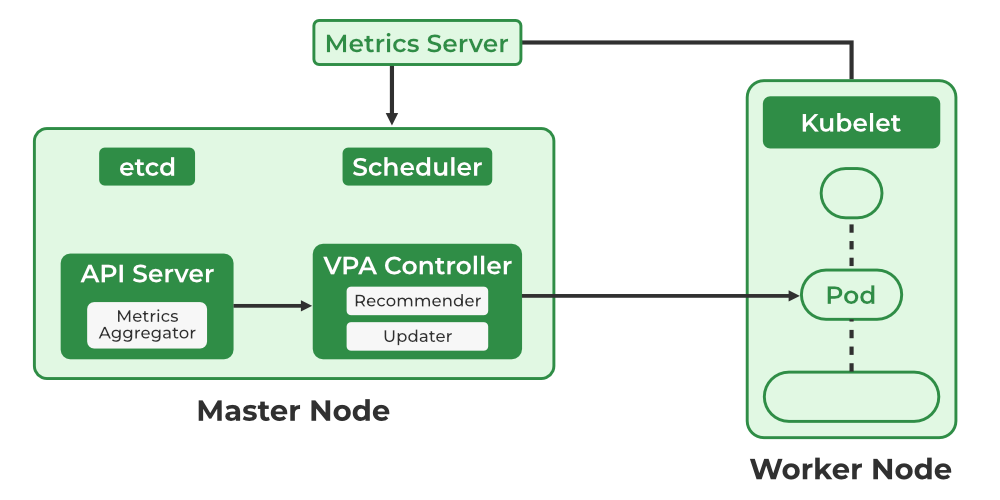
The Vertical Pod Autoscaler (VPA) is a Kubernetes tool that automatically adjusts CPU and memory requests and limits.
- It makes changes based on past resource utilization metrics.
- VPA helps allocate resources effectively and automatically within a Kubernetes cluster.
- It works at the level of individual containers and improves pod performance and efficiency by managing resource demands and limits.
- It can reduce application costs by minimizing resource wastage.
**The VPA deployment has three components namely:
- VPA Admission Controller
- VPA Recommender
- VPA Updater
2.1 VPA Admission Controller
- A component of the Vertical Pod Autoscaler that acts as a **webhook server that intercepts pod creation requests in the Kubernetes API..
- When a new pod is created, the Admission Controller can **modify its resource requests and limits based on recommendations from the VPA which ensures pods start with the right CPU and memory resources instead of waiting for scaling adjustments later.
- It improves efficiency by preventing under-provisioning or over-provisioning of resources at pod startup.
Note: The Admission Controller works only if VPA is configured in **“Auto” or “Initial” mode.In “Auto” mode, it updates running pods as well; in “Initial” mode, it only sets resources during pod creation.
2.2 VPA Recommender
A component in Kubernetes that is based on the resource utilization of those containers over time and suggests resource requests and limitations for specific containers in a pod. It is a core component of the Vertical Pod Autoscaler in Kubernetes. It analyzes both historical and real-time resource usage of containers.
- It uses data provided by the **Kubernetes Metrics Server, which collects resource consumption metrics across the cluster.
- While generating recommendations, it considers past usage patterns, current resource limits, and pod requirements.
- These recommendations help prevent under-provisioning and over-provisioning, ensuring efficient resource utilization.
- The suggestions can be applied automatically (Auto mode) or reviewed manually by administrators.
2.3 VPA Updater
The **VPA Updater is a component of the Vertical Pod Autoscaler in Kubernetes that ensures pods run with optimal resources by evicting and restarting them with updated CPU and memory requests based on recommendations.
The VPA Updater updates the Pod standard with the recommended resource requests and restrictions by continuously monitoring the suggestions made by the VPA Recommender. Using the Kubernetes API server, the changes are applied to the Pod standard.
Moreover, the VPA Updater makes sure that the updated resource requests and restrictions correspond to the existing VPA policy. The VPA Updater will reject the update and stop the pod from being updated if the new values do not satisfy the VPA policy's requirements.
YAML file for VPA:
apiVersion: autoscaling.k8s.io/v1beta2
kind: VerticalPodAutoscaler
metadata:
name: example-vpa
spec:
targetRef:
apiVersion: "apps/v2"
kind: Deployment
name: example_deployment
updatePolicy:
updateMode: "Auto"
resourcePolicy:
containerPolicies:- containerName: example_container
minAllowed:
cpu: 110m
memory: 150Mi
maxAllowed:
cpu: 500m
memory: 1Gi
mode: "Auto"
- containerName: example_container
Here the ‘resource policy’ specifies the resource policies that the VPA should use.
In this case, there is only one container policy specified for a container named "example_container".
The minAllowed and maxAllowed fields specify the minimum and maximum allowed resource requests and limits, respectively.
Here the mode is set to "Auto", which means that the VPA will automatically adjust the resource requests and limits of the container within the specified range.
3. Kubernetes Cluster Autoscaler(CA)
- The **Cluster Autoscaler (CA) in Kubernetes is a component that automatically adjusts the number of nodes in a cluster.
- It adds new nodes when existing ones cannot handle the workload (scale up) and removes underutilized nodes when they are no longer needed (scale down), ensuring efficient resource usage and cost optimization.
**For example, If a node is removed, pods may be rescheduled to new nodes. Workloads should handle interruptions, or critical pods must be protected before enabling the Cluster Autoscaler (CA). CA does not scale based on actual CPU or memory usage; it relies on pod resource requests. Under- or over-requested resources can lead to inefficiency.
YAML for cluster autoscaling:
apiVersion: autoscaling/v2
kind: ClusterAutoscaler
metadata:
name: cluster_autoscaler
spec:
scaleTargetRef:
apiVersion: apps/v2
kind: Deployment
name: cluster-autoscaler
minReplicas: 1
maxReplicas: 8
autoDiscovery:
clusterName: my_kubernetes_cluster
tags:
k8s.io/cluster_autoscaler/enabled: "true"
balanceSimilarNodeGroups: true
- The
clusterNameparameter specifies the name of the Kubernetes cluster where the Cluster Autoscaler is running. - The
tagsfield tells the Cluster Autoscaler to scale only nodes with the tag"k8s.io/cluster-autoscaler/enabled"set to"true". - The
balanceSimilarNodeGroupsfield determines whether the Cluster Autoscaler should balance similar node groups when scaling the cluster.
Kubernetes HPA Vs VPA
| Feature | Horizontal Pod Autoscaler (HPA) | Vertical Pod Autoscaler (VPA) |
|---|---|---|
| Purpose | Scales the number of pod replicas | Adjusts CPU and memory resources within individual pods |
| Primary Metric | CPU and memory usage or custom metrics | CPU and memory usage |
| Use Case | Handling fluctuating demand by adding/removing pods | Optimizing resource allocation for existing pods |
| Scaling Direction | Horizontal (increases/decreases the number of pods) | Vertical (adjusts resources for existing pods) |
| Ideal For | Applications needing more instances during high demand | Applications requiring optimized resources per pod |
| Impact on Application Design | Minimal; scales out by adding more pods | May require adjustments if resources are constrained |
| Common Usage Scenarios | Web applications, microservices | Resource-intensive applications, background processing |
| Configuration Complexity | Typically straightforward | Requires tuning to avoid excessive scaling |