Kubernetes Persistent Storage: Volumes, PVs, and PVCs (original) (raw)
Last Updated : 28 Apr, 2026
Kubernetes Volumes provide a persistent storage abstraction that decouples data from the individual container's lifecycle.
- **Persistence: Volumes prevent data loss by ensuring files remain intact even if a container crashes or is restarted by the kubelet.
- **Container Sharing: They act as a shared directory accessible by all containers within a single Pod, enabling efficient intra-Pod file exchange.
- **Lifecycle Coupling: Unlike ephemeral container storage, a Volume’s lifetime is tied to the Pod itself; data survives container restarts but is typically deleted if the Pod is destroyed.
- **Abstraction Layer: They provide a consistent interface for containers to access diverse storage backends, ranging from local disk and empty directories to cloud-based block storage.
Kubernetes Storage Plugins
These Kubernetes Storage plugins lay the foundation for the easy management and internal operations of storage solutions in containers. It does the configurational settings on containers that are orchestrated by Kubernetes. These plugins increase the platform's adaptability and guarantee a customized solution for a range of storage requirements.
The following 2 popular kubernetes storage plugins:
- Network File System Plugin
- Container Storage Interface ( CSI )
Network File System Plugin
- **Effortless Data Sharing: NFS plugin servers a vital, in establishing the connection between Kubernetes volumes and network file systems without any difficulties for transmission of data.
- **Cluster-wide Accessibility: The NFS plugin helps with enabling stable data transmission among the clusters improving the efficiency of resource usage.
- **Scalable Solutions: NFS acts as a great option for customizing storage needs facilitating effective data exchange and offering scalable solutions.
Container Storage Interface, or CSI
- **Standardized Integration: Container Storage Interface ( CSI ) comes with a standardized Interface with common language storage providers facilitating effortless integration with Kubernetes.
- **Flexibility And choice: The CSI plugin provides a method for the users to select the storage options that exactly meet to the needs of their applications.
- **Interoperability: CSI comes with adopting a standardized approach for enhancing the interoperability providing a smooth and efficient storage experience with containerized settings.
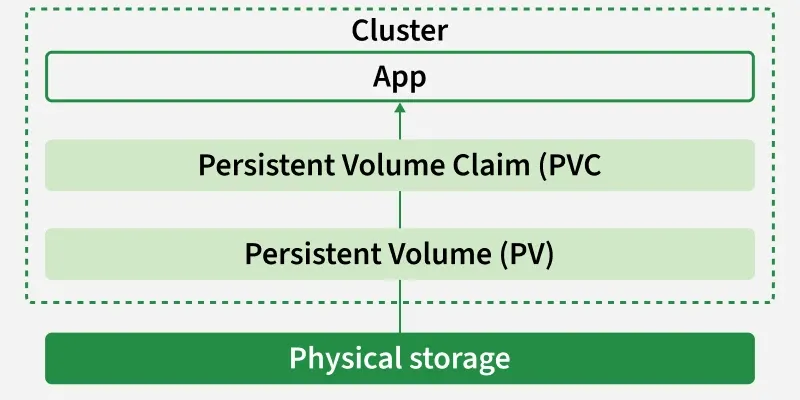
PersistentVolume (PV)
A PersistentVolume (PV) is a cluster-level storage resource that provides persistent data storage independent of Pod lifecycles. It is treated as a cluster resource, similar to nodes, and works like a volume plugin whose lifecycle is not tied to any specific Pod.
PVs can be:
- **Dynamically provisioned using StorageClasses.
- **Manually provisioned by an administrator.
Without PVs, developers would need to attach multiple files or volumes directly to Pods for storage, which:
- Increases Pod complexity.
- Tightly couples storage with the Pod lifecycle.
- Risks data loss, since Pod storage is ephemeral and not designed for persistence.
PVs solve this problem by offering a dedicated, persistent storage layer that remains intact even if Pods crash, fail, or restart. They can represent a variety of storage backends such as NFS, iSCSI, or cloud storage (AWS EBS, GCP Persistent Disk, Azure Disk, etc.).
The PV API object stores the implementation details of the storage, abstracting away the complexity from developers and ensuring consistent, reliable storage across the cluster.
PersistentVolume Claim(PVC)
A PersistentVolumeClaim (PVC) is a request made by a user or application to access persistent storage in a Kubernetes cluster.
Since Pods cannot directly manage or provision storage, PVCs act as a bridge between Pods and PersistentVolumes (PVs), ensuring applications get the storage they need without dealing with the underlying implementation details. PVCs can specify:
Storage size requirements, such as 5Gi or 10Gi. Access modes, including:
- **ReadWriteOnce (RWO) – mounted as read-write by a single node.
- **ReadOnlyMany (ROX) – mounted as read-only by multiple nodes.
- **ReadWriteMany (RWX) – mounted as read-write by multiple nodes.
If dynamic provisioning is enabled through a StorageClass, PVCs can automatically create new PVs without administrator involvement. This makes storage portable and reusable across different backends such as NFS, AWS EBS, or GCP Persistent Disk.
When a Pod uses a PVC, it automatically connects to the bound PV. This ensures that data remains safe and persistent even if the Pod is restarted or reschedule.
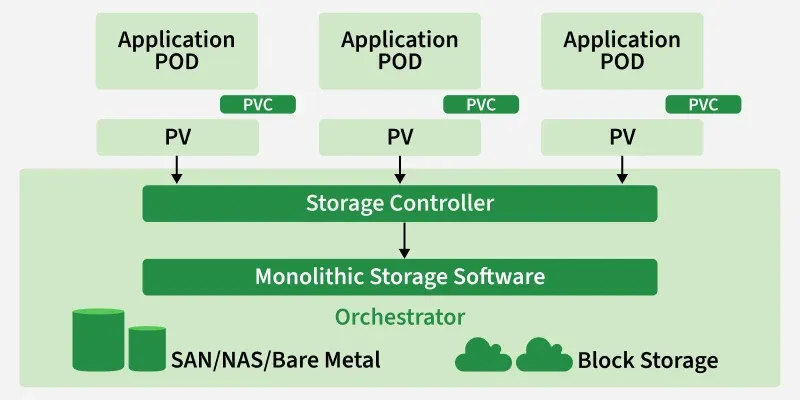
PV and PVC Working Together
The relationship between **PersistentVolumes (PV) and **PersistentVolumeClaims (PVC) ensures that storage is provisioned and consumed in a seamless way. The workflow can be understood as follows:
- The cluster administrator defines PersistentVolumes (PVs) or configures StorageClasses to enable dynamic provisioning.
- Developers or applications create PersistentVolumeClaims (PVCs) by requesting storage with requirements such as size, access mode, and optionally a StorageClass.
- The Kubernetes control plane matches each PVC with a suitable PV that meets the requirements and binds them together.
- If dynamic provisioning is enabled, a new PV is created automatically.
- Once bound, the Pod mounts the PVC and uses it like any other volume.
- The application running inside the Pod has persistent storage even if the Pod restarts.
Creating a Pod Yaml File with PV and PVC
Whenever developer deploying an Application using Kubernetes to make the data in this application Persistent , he raise the request for the persistent Volume it known as PVC. IT Administrators looks over the specifications of the PVC requests and provides Persistent Volumes (PV) as per required needs.
Step 1: Creating a PV ( Persistent Volume ) with a Yaml file
Based on the PVC specification , the Persistent Volume is created and allocated to it , here we are going to the manual way instead of precreated storage classes for better understanding of workflow. Try on writing a yaml code for persistent volume as follow:
apiVersion: v1
kind: PersistentVolume
metadata:
name: mypv
spec:
capacity:
storage: 2Gi
accessModes:
- ReadWriteOnce
persistentVolumeReclaimPolicy: Retain
hostPath:
path: "/mnt/data"
In this file, we providing reclaim policy as Retain, to make the data permant even after the deletion of the pod application.
Save the above specified yaml file with "**my_pv.yml" and then run it with the following command:
kubectl apply -f my_pv.yml
The following screenshots show the implementation of above step3 commands

Step 2: Checking the Status of PV
After once completing the step 3 to check the status of the PV try on running the following command:
kubectl get pv
To know more about the details of the PV that you created try on running the following command with its specific name of PV
kubectl describe pv mypv
The following screenshots show the implementation of above step4 commands

Step 3: Creating a PVC (Persistent Volume Claim) with a Pod Yaml
Here we are creating PVC with name as **mypvc using Yaml syntax file with specification of storage resource of **5Gib, having accessmodes Read and Write only Once. Save the file code with name such as **my_pvc.yml
apiVersion: v1
kind: PersistentVolumeClaim
metadata:
name: mypvc
spec:
accessModes:
- ReadWriteOnce
resources:
requests:
storage: 2Gi
Run this yaml file with kubectl create command or kubectl apply command as follows
kubectl create -f my_pvc.yml
The following picture show the practical usage of the above commands

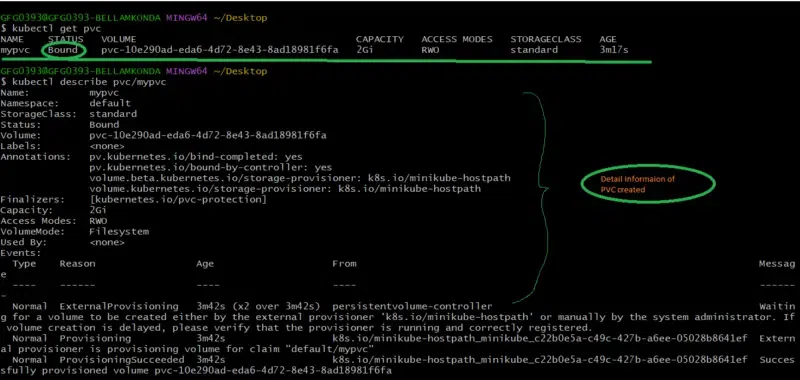
Step 4: Check the Status of the PVC
After executing the above step 1 to check the status of PVC creation try on running the following command:
kubectl get pvc
To know more about the PVC try on seeing the description on running the following command
kubectl describe pvc/mypvc
The following screenshots show the implementation of above step2 commands
Step 5: Creating Pod Yaml File with PV and PVC
Now create a pod yaml file as referring the following yaml code for using the above created PV and PVC with Pod application with image nginx latest version.
apiVersion: v1
kind: Pod
metadata:
name: my-pod
spec:
containers:
- name: my-container
image: nginx:latest
volumeMounts:- name: my-persistent-storage
mountPath: "/usr/share/nginx/html"
volumes:
- name: my-persistent-storage
- name: my-persistent-storage
persistentVolumeClaim:
claimName: my-pvc
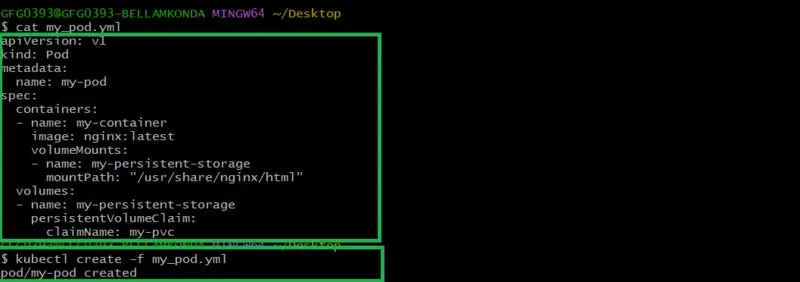
Save this pod yaml file with name my_pod.yml and then run it with the command kubectl create as follow:
kubectl create -f my_pod.yml
The following screenshots show the implementation of above step 5 commands
Step 6: To Check The Status Of Created Pod
to check the creation of the pod check with the following command:
kubectl get pods
To know more about the detailing of that pod, run with the following command
kubectl describe pods/mypod
The following screenshots show the implementation of above step6 commands


Best Practices for Using PVs and PVCs
**1. Always use StorageClass in cloud environments
- It enables dynamic provisioning, so you don’t need to manually create PVs.
- Makes storage portable across different cloud providers
**2. Define clear retention (Reclaim) policies
- Choose between Retain, Recycle, or Delete policies depending on your use case to prevent accidental data loss or unnecessary storage consumption.
- Monitor PV usage to avoid storage leaks.
- Regularly check for unbound PVs or unused PVCs to help reclaim resources and reduce costs.
- Right-size your storage requests by asking only for the capacity your application truly needs.
- Avoid overprovisioning and wasted storage.
- Use meaningful labels and annotations to make storage easier to manage, identify, and troubleshoot across namespaces.