Amazon Web Services Simple Notification Service(SNS): Complete Setup,Pricing,Features (original) (raw)
Last Updated : 4 Feb, 2026
Amazon Web Services Simple Notification Service (AWS SNS) is a fully managed service used to send notifications to multiple subscribers.
It ensures reliability by operating across multiple Availability Zones and offers a cost-effective notification mechanism.
SNS integrates with CloudWatch alarms to notify users when events like high CPU utilization occur.
- SNS delivers messages to subscribed endpoints such as Amazon SQS, AWS Lambda, HTTP/HTTPS endpoints, email, or SMS.
- CloudWatch alarms can trigger SNS topics when predefined thresholds (e.g., CPU > 80%) are crossed.
- An SNS topic acts as a logical communication channel between publishers and subscribers.
- Each SNS topic has a unique name and supports scalable, event-driven messaging.
Amazon Simple Notification Service (SNS) Working
Simple Notification Service (SNS) sends the notifications through SMS or email to an Amazon Simple Queue Service (SQS) , AWS lambda functions, or an HTTP endpoint. When the CPU utilization of an instance goes above 80%, the AWS cloudwatch alarm is triggered. This cloudwatch alarm activates the SNS topic hence notifying the subscribers about the high CPU utilization of the instance. SNS service has a topic that has a unique name. It acts as a logical access point and a communication channel between publishers and subscribers.

Use cases Of (AWS) Amazon Simple Notification Services (SNS)
- **Decoupling microservices and distributed systems: SNS is mostly to decouple microservices and distributed systems by providing that will allow them to communicate with each other asynchronously. Helps in improving the scalability and reliability of the systems.
- **Sending notifications to users: SNS can be used to send notifications to users about events that occur in your applications. For example, you can use SNS to send users notifications when they receive a new message, when their account is updated, or when an event occurs that they have subscribed to.
- **Sending alerts to operators: SNS can be used to send alerts to operators about problems that occur in your applications. For example, you can use SNS to send operators alerts when a server goes down or when an error occurs.
- **Building serverless applications: SNS can be used to build serverless applications by providing a way for them to communicate with each other and to send and receive notifications.
Benefits Of Using Amazon Simple Notification Service SNS
- **Scalability: AWS SNS is designed to handle a large number of messages, making it ideal for applications that need to send millions of notifications simultaneously.
- **Real-time notifications: SNS ensures that messages are delivered in real-time to the subscribed endpoints, which is crucial for time-sensitive applications.
- **Multiple protocols support: SNS supports various protocols such as HTTP, HTTPS, email, SMS, and even AWS Lambda functions, allowing flexibility in how messages are delivered.
- **High availability and durability: Being a part of AWS infrastructure, SNS offers high availability and fault tolerance, ensuring message delivery even in the event of an infrastructure issue.
- **Easy integration with other AWS services: SNS integrates seamlessly with other AWS services like S3, EC2, Lambda, and CloudWatch, enabling automation and alerting across the AWS ecosystem.
- **Cost-effective: SNS follows a pay-as-you-go model, making it a cost-effective solution for sending notifications, with no upfront costs or long-term commitments.
Features Amazon Simple Notification Service
- **Scalability: Simple Notification Service (SNS) had a capacity to handle millions of messages per second from thedifferent sources.
- **Security: Simple Notification Service (SNS) is very secured and it also offers wide range of security offers.
- **High Availability: Simple Notification Service (SNS) is designed to have more durability which ensures the message are delivered without any latency.
- **Flexibility To Use: SNS supports a variety of transport protocols and can be used to send notifications to a variety of applications.
Amazon Simple Notification Service Publishers And Subscribers
1. Publishers: Initiating Communication
They communicate with subscribers asynchronously by producing and sending a message to a topic (i.e. a logical access point and communication channel). They do not include a specific destination (e.g. - email ID) in each message instead, send a message to the topic. They only send messages to topics they have permission to publish. They simply publish messages to an SNS topic, and Amazon SNS handles the distribution to the appropriate subscribers.
- **Topic: The topic acts as a communication channel that publishers send messages to.
- **Seamless Distribution: Publishers can produce messages asynchronously without worrying about where or how the message is delivered.
- **Examples of Publishers: Microservices, EC2 instances, or application components that need to send real-time updates or notifications.
2.Subscribers:Receiving and Acting on Messages
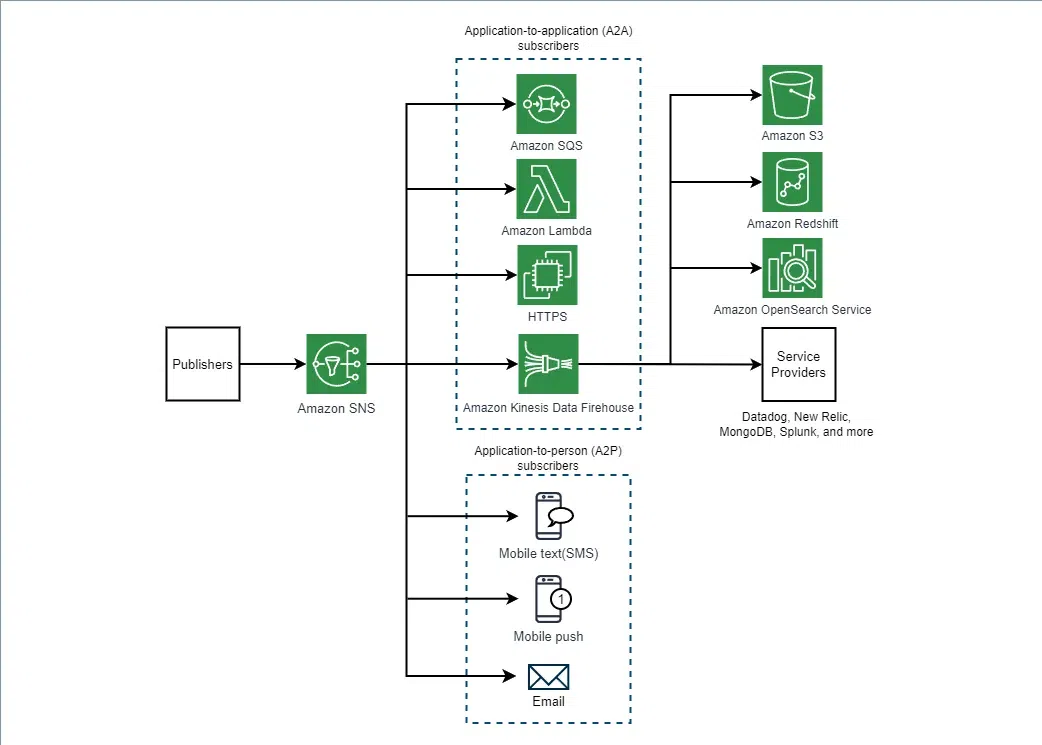
Subscribers like web servers, email addresses, Amazon SQS queues, and AWS Lambda functions receive the notification over one of the supported protocols like Amazon SQS, HTTP/S, email, SMS, Lambda) when they are subscribed to the topic. Amazon SNS matches the topic to a list of subscribers who have subscribed to that topic and delivers the message to each of those subscribers. Amazon SNS categorized into Application-to-application (A2A) or Application-to-person (A2P) subscribers.
- **A2A Subscribers: These are services like Amazon SQS, AWS Lambda, and HTTPS endpoints that subscribe to a topic and process incoming messages automatically.
- **Amazon SQS: Acts as a message queue, enabling decoupled and durable message storage.
- **AWS Lambda: Processes events in real-time, executing code based on incoming messages.
- **HTTPS: Web servers or services that receive messages through HTTP/S endpoints.
- **A2P Subscribers: These include individual users who receive notifications via email, SMS, or push notifications.
- **Email: Sends notifications via email to subscribers.
- **Mobile text (SMS): Sends text alerts directly to users.
- **Mobile push: Pushes notifications to mobile devices.
Below Is The Visual Representation of Publishers and Subscribers working.
Step-by-Step Processes To Create Amazon Simple Notification Service
1. Create Topic
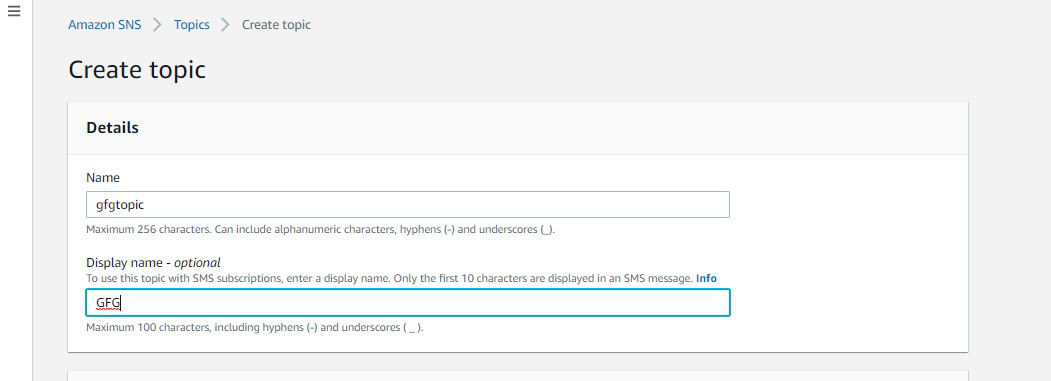
Step 1: Go to the Amazon SNS dashboard. Click on Create Topic button.

2. Give Display Name
Step 2: Type in the name of the topic and description( optional )
3.Create Key And Value( Optional)
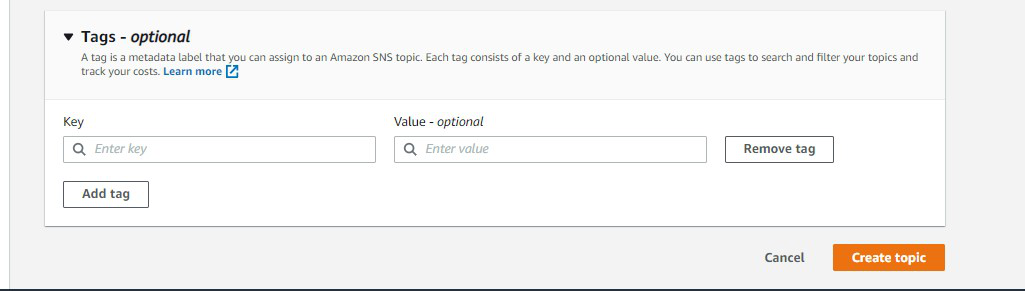
Step 3: Type in the key value of the tag which is completely optional. Click on create the topic.
4.Topic Created Successfully
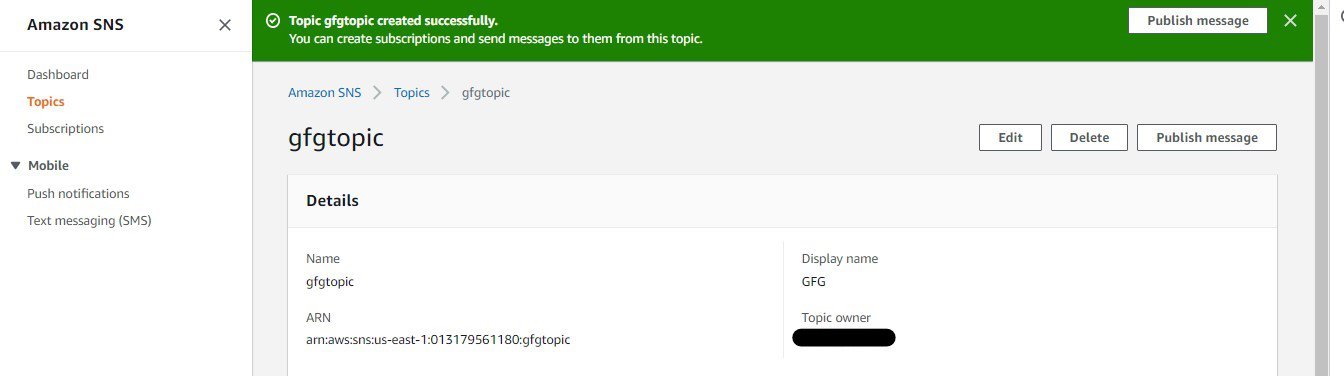
Step 4: Congratulations!! The topic is created successfully.
5.Topic Linking
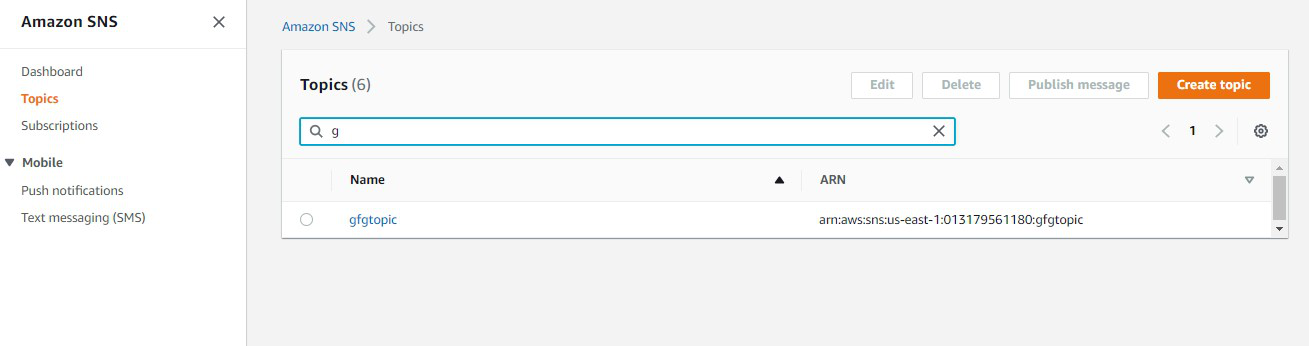
Step 5: Go back to the SNS dashboard. The created topic is visible in the dashboard now. Click on the link to the topic.
6. Create subscription
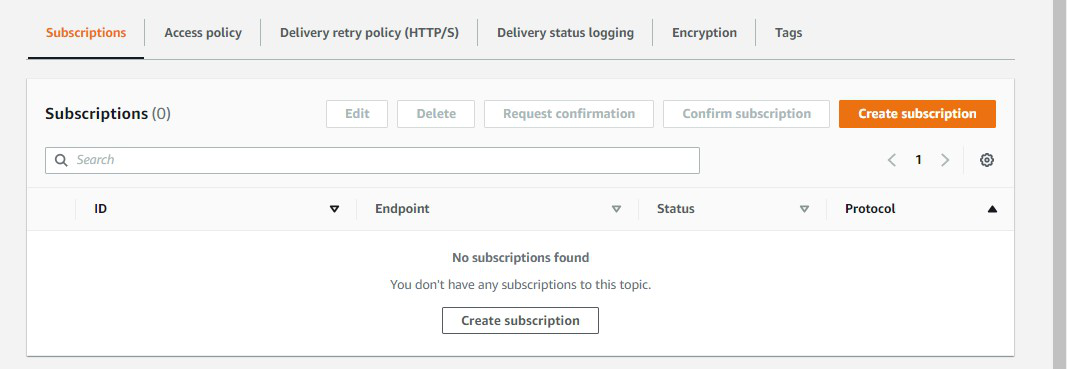
Step 6: You will be redirected to this page. Under subscription options, Click on Create subscription.
7.Configure Subscription
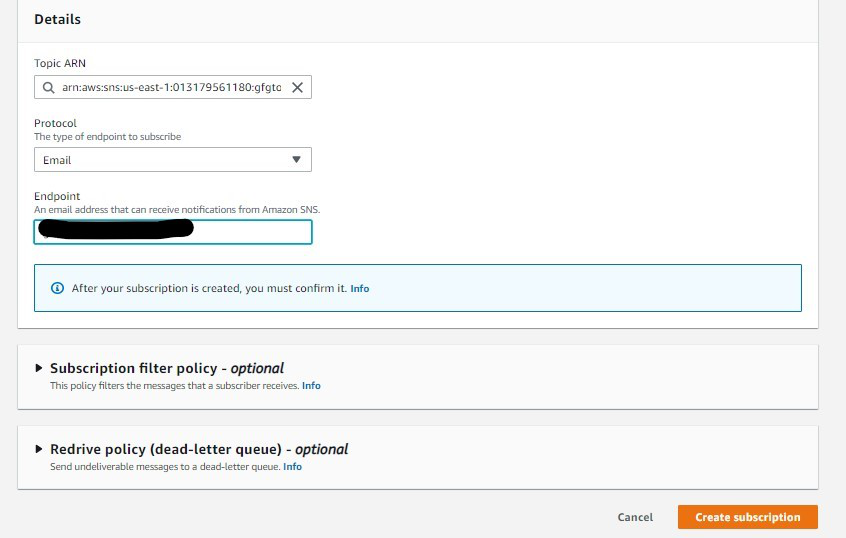
Step 7: Select the Protocol of the topic as Email and the endpoint of the topic as your email id. Click on Create Subscription.
8.Confirmation Mail
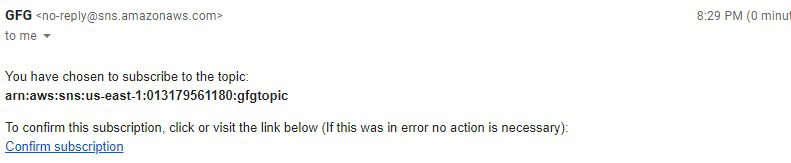
Step 8: Now go to the mailbox of the mentioned email id and click on Confirm subscription.
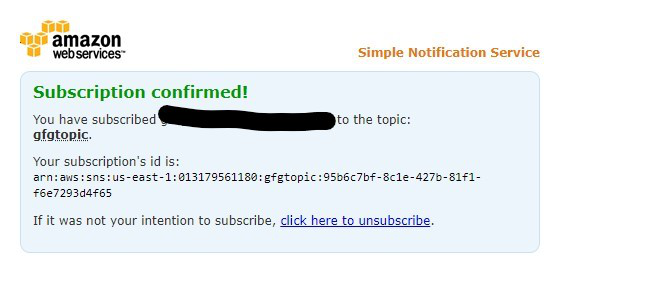
9. Confirmed Subscription
Step 9: You will be directed to this page. Your subscription is confirmed.
Amazon SNS Pricing
Amazon SNS pricing is dependent up on the type of tier your using as follows:
- Publish and publish batch requests: 0.30per1millionrequestsand0.30 per 1 million requests and 0.30per1millionrequestsand0.017 per GB of payload data.
- Subscription messages: 0.01per1millionmessagesand0.01 per 1 million messages and 0.01per1millionmessagesand0.001 per GB of payload data.
- Topic owner and subscription owner requests: $0.50 per 1 million requests.