Containerization in DevOps (original) (raw)
Last Updated : 11 Feb, 2026
Containerization is a method of packaging an application with all its dependencies (libraries, configuration files, runtime) into a single, portable unit called a Container. These containers run consistently across environments, whether on a developer’s laptop, a test server, or in production, without compatibility issues.
Before Containerization
Earlier, applications were mostly monolithic, i.e, they were built as a single, large codebase combining the user interface, business logic, and database layers. Even a small change required rebuilding and redeploying the entire application.
To run these applications, organizations relied heavily on **Virtual Machines (VMs).
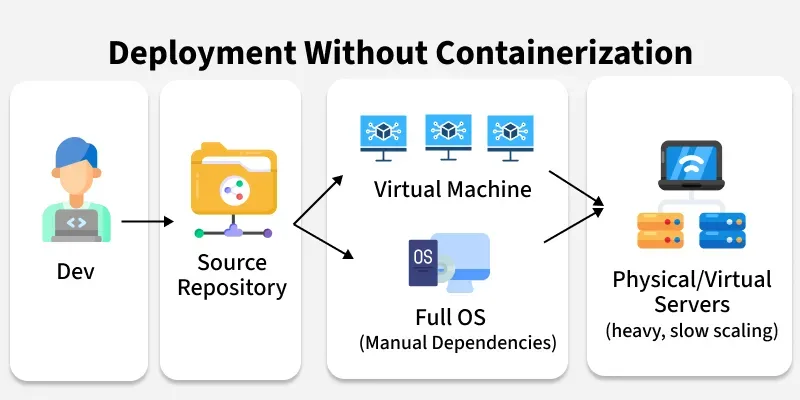
- **Virtual Machines setup: Each application ran inside its own VM, with a **full operating system on top of a hypervisor.
- **Resource wastage: Running multiple full OS instances consumed a lot of CPU, memory, and storage. Even small apps needed heavy resources.
- **Environment mismatch: “It works on my machine” was a common problem, because apps behaved differently across development, testing, and production environments.
- **Scaling issues: Scaling a monolithic app meant starting a new VM, which could take minutes and wasted resources since the entire OS had to boot.
- **Slow delivery: Updating even a small feature meant redeploying the entire application or spinning up more VMs, making releases slow and risky.
After Containerization
With containerization, applications no longer needed heavy Virtual Machines for isolation. Instead, they could run inside **lightweight containers that package the application and all its dependencies together:
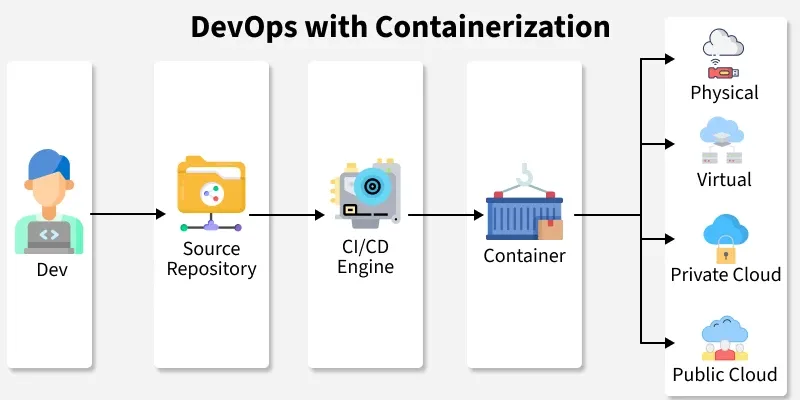
- Write Once, Run Anywhere: Containers package an application with its dependencies into a single, portable unit, ensuring it runs consistently across any environment.
- **Consistency: Since the app and dependencies are bundled together, the same container image runs everywhere without conflicts.
- **Microservices-friendly: Instead of one large monolithic app, systems can be split into smaller services, each in its own container, making scaling and updates easier.
- **Faster scaling & deployment: Tools like **Docker and orchestrators like **Kubernetes allow containers to be deployed, replicated, and rolled back quickly.
- **Modern CI/CD pipelines: Containers integrate seamlessly with automated pipelines, ensuring smoother collaboration between developers, testers, and operations teams.
**Linux Kernel Features
Containers aren't magic; they use two specific Linux Kernel features to create isolation:
- **Namespaces: Provide Process Isolation. They make the container feel like it has its own unique Filesystem, Network, and Process ID list. (It's like a partition in an office).
- **Control Groups (cgroups): Provide Resource Limiting. They ensure a container cannot use more than 512MB RAM or 1 CPU core. (It's like a budget for each department).
Containerization Workflow
Containerization is not just about running apps in small boxes; it follows a clear workflow from writing code to running containers in production. Here’s how it works step by step:
1. **Write the Application
Developers first write the application code in any language (Python, Java, Node.js, etc.). Along with the code, they identify everything the app needs to run properly: libraries, frameworks, configurations, environment variables, and ports.
_In the past, these dependencies were installed separately on each server, leading to mismatches. With containers, all these needs will be packaged together.
2. **Package the Application into an Image
Instead of deploying raw code, the app is **packaged into an image. An image is a lightweight, portable snapshot that contains:
- The application code
- Required dependencies
- System libraries
- Configurations and startup instructions
This image acts as a **blueprint, you can create as many running copies (containers) from it as you want, and they will always behave the same.
3. **Store the Image in a Registry
Once the image is created, it is stored in a **container registry (like Docker Hub, AWS ECR, or a private company registry).
- A registry is like a library for images, it makes them easy to share across teams and environments.
- This ensures everyone pulls the same version of the app, removing the “works on my machine” issue.
4. **Run Containers from the Image
When it’s time to run the application:
- The platform (local system, server, or cloud) pulls the image from the registry.
- It then starts one or more containers from that image.
- Each container is an **isolated environment where the app runs with its dependencies, without interfering with other apps.
_Multiple containers can run on the same machine without conflicts because they are isolated but still lightweight compared to Virtual Machines.
5. **Scale and Update
- If more users or load comes in, more containers can be started instantly. Unlike Virtual Machines, this doesn’t require booting a full operating system.
- When developers release a new version of the app, a **new image is built and stored in the registry. The old containers are replaced with new ones, making updates smooth and consistent.
6. **Manage and Orchestrate
In production, when hundreds or thousands of containers are running, orchestration tools like **Kubernetes manage them. These tools:
- Automatically start or stop containers based on demand
- Distribute traffic across containers
- Monitor health and restart containers if they fail.
- Make rolling updates and quick rollbacks possible.
**1. Docker
- Most widely used **container runtime for building, running, and shipping containers.
- Provides an easy way to package applications and dependencies into portable images.
- Integrates smoothly with CI/CD pipelines and cloud platforms, making deployment consistent across environments.
**2. Linux Containers (LXC)
- Early form of **OS-level virtualization that allows multiple isolated Linux systems (containers) to run on a single host.
- Provides lightweight isolation compared to full virtual machines, using kernel features like namespaces and cgroups.
- Often used for system-level containerization where fine-grained control of the Linux environment is needed.
**3. Kubernetes
- An open-source **orchestration platform for managing containerized applications at scale.
- Handles deployment, scaling, load balancing, and self-healing (restarts failed containers automatically).
- Widely adopted in production to run microservices and cloud-native workloads efficiently.
4. Amazon ECS
- Fully managed **container orchestration service by AWS.
- Runs Docker containers easily on **EC2 instances or **AWS Fargate (serverless).
- Integrated with other AWS services like IAM, CloudWatch, and ALB for security and monitoring.
5. Google GKE
- Managed **Kubernetes service provided by Google Cloud.
- Automates cluster setup, upgrades, scaling, and monitoring for containerized apps.
- Offers deep integration with Google Cloud services like Anthos, Cloud Logging, and AI/ML workloads
Containerization Use Cases
**1. Application Deployment
- Package applications with dependencies into portable containers.
- Run the same image across **development, testing, and production.
- Removes the _“works on my machine” issue
**2. Microservices Architecture
- Break large monolithic apps into smaller **independent services.
- Each service runs in its own container.
- Enables independent scaling, updates, and debugging.
**3. CI/CD Pipelines
- Containers integrate seamlessly into **Continuous Integration & Continuous Delivery.
- Automated testing and deployment happen in consistent environments.
- Faster rollouts and easier rollbacks.
**4. Cloud-Native Development
- Containers work on **any cloud platform (AWS, Azure, GCP) or hybrid environments.
- Ensures portability of apps across multiple infrastructures.
- Ideal for Kubernetes-based cloud-native systems.
**5. Resource Optimization
- Containers are **lighter than VMs, sharing the same OS kernel.
- Start in seconds and use fewer resources.
- Allow higher **density of applications on the same hardware.
**6. Testing & Debugging
- Create isolated environments for testing specific versions.
- Replicate production issues locally using the same image.
- Run multiple test environments side-by-side without conflicts.