E Library Management System (original) (raw)
Last Updated : 23 Jul, 2025
In this article, we will discuss the approach to creating an E-Library Management System where the user has the following options:
- Add book information.
- Display book information.
- To list all books of a given author.
- To list the count of books in the library.

E -Library Management System
**Functionalities Required :
- If the user tries to add a book then the user must have to provide the below specific Information about the book:
- Enter Book Name:
- Enter Author Name:
- Enter Pages:
- Enter Price:
- When the user tries to display all books of a particular author then the user must have to enter the name of the author:
- Enter the author's name:
- The E-Library Management System must be also capable of counting all the books available in the library.
**Note: Follow given link to build a Web application on Library Management System.
Below is the program to implement the E-Library Management System:
C++ `
// C++ code addition
#include #include
using namespace std;
// Create Structure of Library struct library { string book_name; string author; int pages; float price; };
// Driver Code int main() { // Create an array of structs library lib[100];
string ar_nm, bk_nm;

// Keep the track of the number of
// of books available in the library
int i, input, count;

i = input = count = 0;

// Iterate the loop
while (input != 5) {

    cout << "\n\n********######"
         << "WELCOME TO E-LIBRARY "
         << "#####********\n";
    cout << "\n\n1. Add book information\n2. Display book information\n";
    cout << "3. List all books of given author\n";
    cout << "4. List the count of books in the library\n";
    cout << "5. Exit\n";

    // Enter the book details
    cout << "\n\nEnter one of the above: ";
    cin >> input;

    // Process the input
    switch (input) {

    // Add book
    case 1:

        cout << "Enter book name = ";
        cin >> lib[i].book_name;

        cout << "Enter author name = ";
        cin >> lib[i].author;

        cout << "Enter pages = ";
        cin >> lib[i].pages;

        cout << "Enter price = ";
        cin >> lib[i].price;
        count++;

        break;

    // Print book information
    case 2:
        cout << "you have entered the following information\n";
        for (i = 0; i < count; i++) {

            cout << "book name = " << lib[i].book_name;
            cout << "\t author name = " << lib[i].author;
            cout << "\t  pages = " << lib[i].pages;
            cout << "\t  price = " << lib[i].price << endl;
        }
        break;

    // Take the author name as input
    case 3:
        cout << "Enter author name : ";
        cin >> ar_nm;
        for (i = 0; i < count; i++) {

            if (ar_nm == lib[i].author)
                cout << lib[i].book_name << " " << lib[i].author << " " << lib[i].pages << " " << lib[i].price << endl;
        }
        break;

    // Print total count
    case 4:
        cout << "\n No of books in library : " << count << endl;
        break;
    case 5:
        exit(0);
    }
}
return 0;
}
// The code is contributed by Nidhi goel.
C
// C program for the E-library // Management System #include <stdio.h> #include <stdlib.h> #include <string.h>
// Create Structure of Library struct library { char book_name[20]; char author[20]; int pages; float price; };
// Driver Code int main() { // Create a instance struct library lib[100];
char ar_nm[30], bk_nm[30];

// Keep the track of the number of
// of books available in the library
int i, input, count;

i = input = count = 0;

// Iterate the loop
while (input != 5) {

    printf("\n\n********######"
           "WELCOME TO E-LIBRARY "
           "#####********\n");
    printf("\n\n1. Add book infor"
           "mation\n2. Display "
           "book information\n");
    printf("3. List all books of "
           "given author\n");
    printf(
        "4. List the count of book"
        "s in the library\n");
    printf("5. Exit");

    // Enter the book details
    printf("\n\nEnter one of "
           "the above: ");
    scanf("%d", &input);

    // Process the input
    switch (input) {

    // Add book
    case 1:

        printf("Enter book name = ");
        scanf("%s", lib[i].book_name);

        printf("Enter author name = ");
        scanf("%s", lib[i].author);

        printf("Enter pages = ");
        scanf("%d", &lib[i].pages);

        printf("Enter price = ");
        scanf("%f", &lib[i].price);
        count++;

        break;

    // Print book information
    case 2:
        printf("you have entered"
               " the following "
               "information\n");
        for (i = 0; i < count; i++) {

            printf("book name = %s",
                   lib[i].book_name);

            printf("\t author name = %s",
                   lib[i].author);

            printf("\t  pages = %d",
                   lib[i].pages);

            printf("\t  price = %f",
                   lib[i].price);
        }
        break;

    // Take the author name as input
    case 3:
        printf("Enter author name : ");
        scanf("%s", ar_nm);
        for (i = 0; i < count; i++) {

            if (strcmp(ar_nm,
                       lib[i].author)
                == 0)
                printf("%s %s %d %f",
                       lib[i].book_name,
                       lib[i].author,
                       lib[i].pages,
                       lib[i].price);
        }
        break;

    // Print total count
    case 4:
        printf("\n No of books in "
               "brary : %d",
               count);
        break;
    case 5:
        exit(0);
    }
}
return 0;
}
Java
import java.util.Scanner;
// Create a class for the Library class Library { String bookName; String author; int pages; float price; }
// Main class for the driver code public class ELibrary {
public static void main(String[] args) {
    // Create an array of Library objects
    Library[] library = new Library[100];

    String arNm;

    // Keep track of the number of books available in the library
    int i, input, count;

    i = input = count = 0;

    // Initialize the array with Library objects
    for (int j = 0; j < library.length; j++) {
        library[j] = new Library();
    }

    // Scanner to take input from the user
    Scanner scanner = new Scanner(System.in);

    // Iterate the loop
    while (input != 5) {
        System.out.println("\n\n********###### WELCOME TO E-LIBRARY #####********");
        System.out.println("1. Add book information\n2. Display book information");
        System.out.println("3. List all books of given author\n4. List the count of books in the library");
        System.out.println("5. Exit");

        // Enter the book details
        System.out.print("\n\nEnter one of the above: ");
        input = scanner.nextInt();

        // Process the input
        switch (input) {

            // Add book
            case 1:
                System.out.print("Enter book name = ");
                library[i].bookName = scanner.next();

                System.out.print("Enter author name = ");
                library[i].author = scanner.next();

                System.out.print("Enter pages = ");
                library[i].pages = scanner.nextInt();

                System.out.print("Enter price = ");
                library[i].price = scanner.nextFloat();
                count++;
                i++;
                break;

            // Print book information
            case 2:
                System.out.println("You have entered the following information");
                for (int j = 0; j < count; j++) {
                    System.out.println("Book name = " + library[j].bookName +
                            "\t Author name = " + library[j].author +
                            "\t Pages = " + library[j].pages +
                            "\t Price = " + library[j].price);
                }
                break;

            // Take the author name as input
            case 3:
                System.out.print("Enter author name: ");
                arNm = scanner.next();
                for (int j = 0; j < count; j++) {
                    if (arNm.equals(library[j].author)) {
                        System.out.println(library[j].bookName + " " +
                                library[j].author + " " +
                                library[j].pages + " " +
                                library[j].price);
                    }
                }
                break;

            // Print total count
            case 4:
                System.out.println("\nNo of books in library: " + count);
                break;
            case 5:
                System.exit(0);
        }
    }
}
}
Python3
Python code equivalent of the C++ code
class Library: def init(self, book_name, author, pages, price): self.book_name = book_name self.author = author self.pages = pages self.price = price
def __str__(self):
    return f"{self.book_name}\t {self.author}\t {self.pages}\t {self.price}"
Driver Code
if name == "main": # Create an array of Library objects lib = []
# Keep the track of the number of
# of books available in the library
count = 0

# Iterate the loop
while True:
    print("\n\n********######WELCOME TO E-LIBRARY #####********\n")
    print("1. Add book information\n2. Display book information\n",
        "3. List all books of given author\n4. List the count of books in the library\n5. Exit\n")

    # Enter the book details
    input_choice = input("Enter one of the above: ")

    # Process the input
    if input_choice == '1':
        book_name = input("Enter book name = ")
        author = input("Enter author name = ")
        pages = int(input("Enter pages = "))
        price = float(input("Enter price = "))
        lib.append(Library(book_name, author, pages, price))
        count += 1
    elif input_choice == '2':
        print("you have entered the following information")
        for book in lib:
            print(book)
    elif input_choice == '3':
        ar_nm = input("Enter author name : ")
        for book in lib:
            if book.author == ar_nm:
                print(book)
    elif input_choice == '4':
        print(f"\nNo of books in library : {count}\n")
    elif input_choice == '5':
        exit(0)
C#
using System;
// Create Structure of Library struct Library { public string BookName; public string Author; public int Pages; public float Price; }
// Driver Code class Program { static void Main() { // Create an array of structs Library[] library = new Library[100];
    string authorName;

    // Keep track of the number of books available in the library
    int i, input, count;

    i = input = count = 0;

    // Iterate the loop
    while (input != 5)
    {
        Console.WriteLine("\n\n********######" +
                          "WELCOME TO E-LIBRARY " +
                          "#####********\n");
        Console.WriteLine("\n\n1. Add book information\n2. Display book information\n" +
                          "3. List all books of given author\n" +
                          "4. List the count of books in the library\n" +
                          "5. Exit\n");

        // Enter the book details
        Console.Write("\n\nEnter one of the above: ");
        input = int.Parse(Console.ReadLine());

        // Process the input
        switch (input)
        {
            // Add book
            case 1:
                Console.Write("Enter book name = ");
                library[i].BookName = Console.ReadLine();

                Console.Write("Enter author name = ");
                library[i].Author = Console.ReadLine();

                Console.Write("Enter pages = ");
                library[i].Pages = int.Parse(Console.ReadLine());

                Console.Write("Enter price = ");
                library[i].Price = float.Parse(Console.ReadLine());
                count++;

                break;

            // Print book information
            case 2:
                Console.WriteLine("You have entered the following information");
                for (i = 0; i < count; i++)
                {
                    Console.WriteLine($"Book name = {library[i].BookName}" +
                                      $"\t Author name = {library[i].Author}" +
                                      $"\t Pages = {library[i].Pages}" +
                                      $"\t Price = {library[i].Price}");
                }
                break;

            // Take the author name as input
            case 3:
                Console.Write("Enter author name : ");
                authorName = Console.ReadLine();
                for (i = 0; i < count; i++)
                {
                    if (authorName == library[i].Author)
                        Console.WriteLine($"{library[i].BookName} {library[i].Author} {library[i].Pages} {library[i].Price}");
                }
                break;

            // Print total count
            case 4:
                Console.WriteLine($"\nNo of books in library: {count}\n");
                break;

            case 5:
                Environment.Exit(0);
                break;
        }
    }
}
}
JavaScript
const readline = require('readline');
// Create a class for the Library class Library { constructor() { this.bookName = ""; this.author = ""; this.pages = 0; this.price = 0.0; } }
// Main function for the driver code function main() { // Create an array of Library objects let library = new Array(100).fill(null).map(() => new Library());
let arNm;

// Keep track of the number of books available in the library
let i = 0, input = 0, count = 0;

// Initialize the array with Library objects

// Iterate the loop
const rl = readline.createInterface({
    input: process.stdin,
    output: process.stdout
});

rl.setPrompt("\n\nEnter one of the above: ");

rl.prompt();

// Enter the book details
rl.on('line', (line) => {
    input = parseInt(line.trim());

    // Process the input
    switch (input) {

        // Add book
        case 1:
            rl.question("Enter book name = ", (bookName) => {
                library[i].bookName = bookName;
                rl.question("Enter author name = ", (author) => {
                    library[i].author = author;
                    rl.question("Enter pages = ", (pages) => {
                        library[i].pages = parseInt(pages);
                        rl.question("Enter price = ", (price) => {
                            library[i].price = parseFloat(price);
                            count++;
                            i++;
                            rl.prompt();
                        });
                    });
                });
            });
            break;

        // Print book information
        case 2:
            console.log("You have entered the following information");
            for (let j = 0; j < count; j++) {
                console.log("Book name = " + library[j].bookName +
                    "\t Author name = " + library[j].author +
                    "\t Pages = " + library[j].pages +
                    "\t Price = " + library[j].price);
            }
            rl.prompt();
            break;

        // Take the author name as input
        case 3:
            rl.question("Enter author name: ", (author) => {
                arNm = author;
                for (let j = 0; j < count; j++) {
                    if (arNm === library[j].author) {
                        console.log(library[j].bookName + " " +
                            library[j].author + " " +
                            library[j].pages + " " +
                            library[j].price);
                    }
                }
                rl.prompt();
            });
            break;

        // Print total count
        case 4:
            console.log("\nNo of books in library: " + count);
            rl.prompt();
            break;
        case 5:
            rl.close();
            break;
        default:
            rl.prompt();
    }
}).on('close', () => {
    process.exit(0);
});
}
// Call the main function to start the program main();
`
**Output :
**Displaying the functionalities and input for option 1:
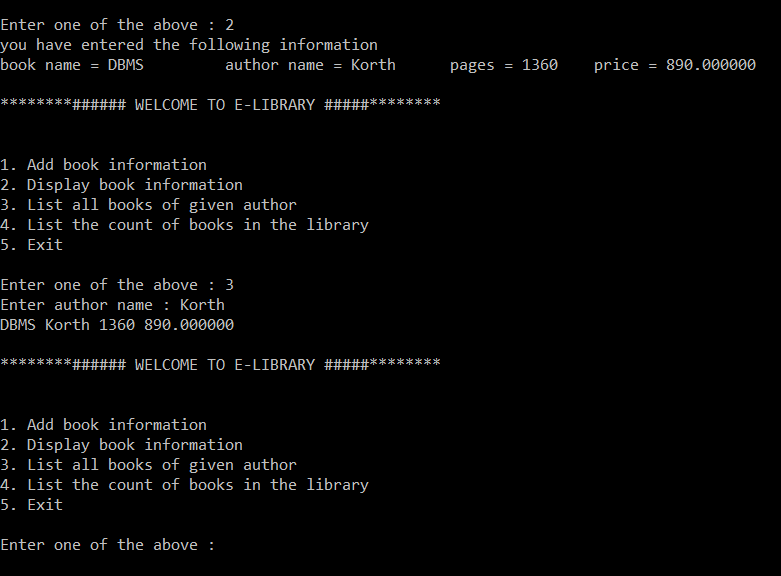
**For Choice 2 and 3:
**For choice 4 and 5:

Please refer to the complete article of **Library Management System Project.