Vehicle Count Prediction From Sensor Data (original) (raw)
Last Updated : 23 Jul, 2025
Sensors at road junctions collect vehicle count data at different times which helps transport managers make informed decisions. In this article we will predict vehicle count based on this sensor data using machine learning techniques.
Implementation of Vehicle Count Prediction
Dataset which we will be using contains two attributes:
- **Datetime: Timestamp of when data was collected.
- **Vehicles: Number of vehicles at that timestamp.
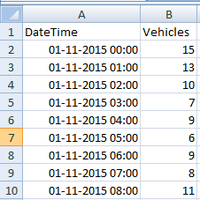
You can download dataset from here.
Since **Vehicles is a numeric attribute, using **Regression would be the best choice. Regression is a supervised learning technique used to predict a numeric value based on historical data. So we will use **Random Forest Regressor that predicts the target by averaging the results of multiple decision trees.
Step 1: **Import Libraries and Load Data
We will be using pandas library for data manipulation and loading dataset into a DataFrame.
Python `
import pandas as pd train = pd.read_csv('/content/vehicles.csv') train.head()
`
**Output:
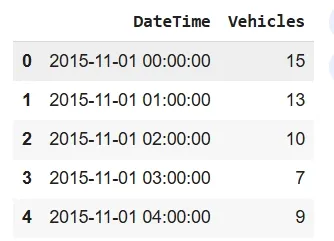
Top 5 values of data set
We extract useful features from **Datetime attribute such as day, weekday, hour, month, year etc which will help in predicting vehicle count.
- **get_dom(dt): Extracts day of the month from the timestamp dt (e.g. for "2021-01-15", it would return 15).
- **get_weekday(dt): Extracts weekday from the timestamp where Monday is 0, Tuesday is 1 and so on (e.g. "2021-01-15" would return 4 for Friday).
- **get_hour(dt): Extracts hour from the timestamp dt (e.g. "2021-01-15 15:30:00" would return 15).
- **get_year(dt): Extracts year from the timestamp dt (e.g. "2021-01-15" would return 2021).
- **train['DateTime'].map(pd.to_datetime): Converts DateTime column into a proper datetime format so we can use date-time attributes.
- **train['date'] = train['DateTime'].map(get_dom): Creates a new column date that holds day of the month extracted from the DateTime column.
- **train['weekday'] = train['DateTime'].map(get_weekday): Creates a new column weekday that holds weekday number like Monday=0.
- **train['hour'] = train['DateTime'].map(get_hour): Creates a new column hour that holds hour of the timestamp in 24-hour format. Python `
def get_dom(dt): return dt.day def get_weekday(dt): return dt.weekday() def get_hour(dt): return dt.hour def get_year(dt): return dt.year def get_month(dt): return dt.month def get_dayofyear(dt): return dt.dayofyear def get_weekofyear(dt): return dt.weekofyear
train['DateTime'] = train['DateTime'].map(pd.to_datetime) train['date'] = train['DateTime'].map(get_dom) train['weekday'] = train['DateTime'].map(get_weekday) train['hour'] = train['DateTime'].map(get_hour) train['month'] = train['DateTime'].map(get_month) train['year'] = train['DateTime'].map(get_year) train['dayofyear'] = train['DateTime'].map(get_dayofyear) train['weekofyear'] = train['DateTime'].map(get_weekofyear)
train.head()
`
**Output:
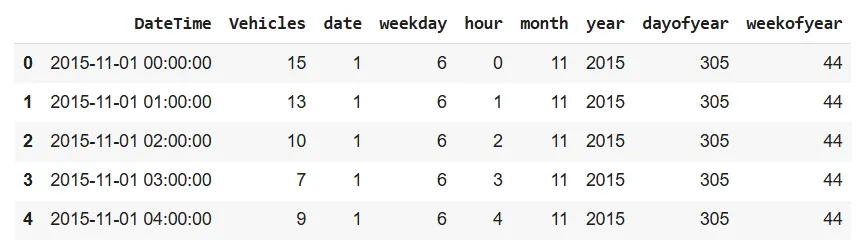
Updated DataFrame
Step 3: **Separate Class Label (Vehicles)
We separate **Vehicles class label and store it in the target variable while keeping remaining features in train1 variable.
Python `
train = train.drop(['DateTime'], axis=1) train1 = train.drop(['Vehicles'], axis=1) target = train['Vehicles'] print(train1.head()) target.head()
`
**Output:
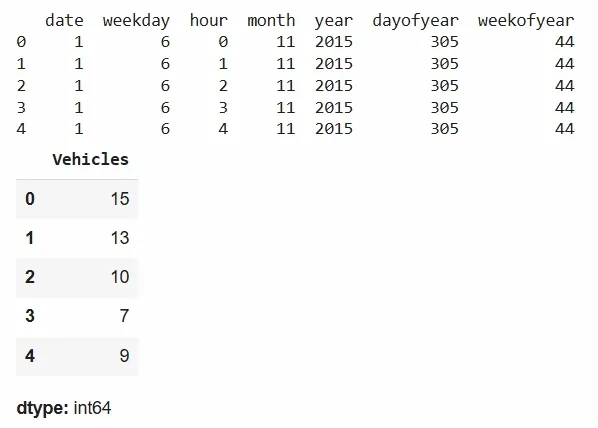
Vehicle table
Result shows data where various time-based features like day of the month, weekday, hour, month, year, day of the year and week of the year are extracted from the DateTime column. Vehicles column shows vehicle count at that timestamp which is 15.
Step 4: **Train the Model Using Random Forest Regressor
We will train **RandomForestRegressor model using features and target variable.
Python `
from sklearn.ensemble import RandomForestRegressor m1=RandomForestRegressor() m1.fit(train1,target) m1.predict([[11,6,0,1,2015,11,2]])
`
**Output:
array([9.88021429])
It show that based on input features model predicts approximately 9.88 vehicles at that specific timestamp.
**To get complete source code: **click here.