Malware and its Types (original) (raw)
Last Updated : 4 Jun, 2026
Malware (short for malicious software) is any program designed to harm, exploit or gain unauthorized access to systems, networks or devices. It can disrupt normal operations, steal sensitive data or allow attackers to control systems remotely. Understanding malware is important because it is widely used in cyber attacks and security breaches.
- Commonly used in attacks like ransomware, data breaches and system compromise
- Continuously evolves with new variants, making detection challenging
- Can spread across devices and networks, increasing its impact
- Causes significant financial losses worldwide
- Used in advanced attacks such as APTs and cyber espionage
Types of Malware
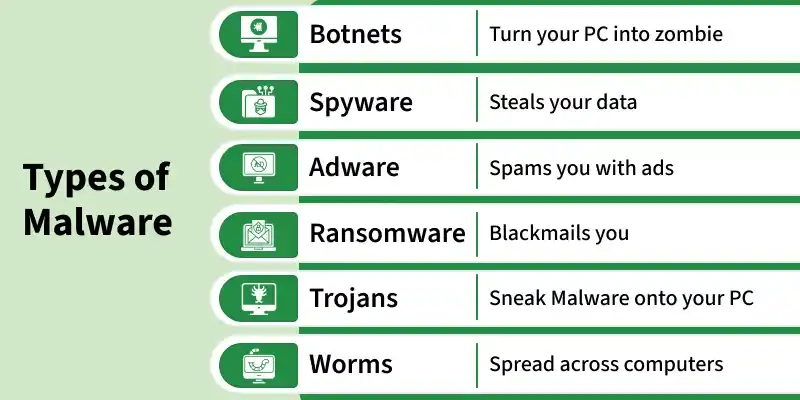
Types of Malware
- **Botnets: A botnet is a network of infected devices controlled by a hacker. These devices are used together to perform attacks like DDoS or sending spam without the owner’s knowledge.
- **Spyware: Spyware is malware that secretly monitors user activities. It collects sensitive information like passwords, browsing history and personal data.
- **Adware: Adware is software that shows unwanted advertisements on your system. It may also track your online behavior to display targeted ads.
- **Ransomware: Ransomware locks or encrypts your files and demands money to unlock them. It is one of the most dangerous types of malware for individuals and organizations.
- **Trojan Horse: A Trojan Horse is malware that looks like legitimate software. Once installed, it allows attackers to access or control the system.
- **Worms: Worms are self-replicating malware that spread automatically across networks. They do not need user action and can slow down systems by consuming resources.
Signs Your Device Is Infected
Common indicators include poor system performance, unexpected browser redirects, fake infection warnings offering paid fixes, startup/shutdown problems and persistent pop-up ads
1. Poor System Performance
When a device is infected, it often becomes slow and unresponsive. Programs take longer to open, the system may freeze and overall performance drops because malware uses system resources in the background.
2. Browser Redirects
Browser redirects happen when your web browser automatically takes you to a different website than the one you intended to visit. This is usually caused by malicious scripts or adware trying to generate traffic or steal data.
3. Fake Infection Warnings
Sometimes you may see pop-up messages saying your system is infected and asking you to buy a security tool. These warnings are usually fake and designed to trick users into paying money or installing more malware.
4. Startup or Shutdown Problems
Malware can interfere with normal system operations, causing delays or errors when starting or shutting down your computer. In some cases, the system may restart automatically or fail to boot properly.
If you see frequent and unwanted ads appearing on your screen, even when not browsing, it may indicate adware infection. These ads can be intrusive and may lead to harmful websites.
Purpose of Malware Attacks
- Cybercriminals use malware, including all forms of malicious software including viruses, for various purposes
- Using deception to induce a victim to provide personal information for identity theft
- Theft of customer credit card information or other financial information
- Taking over several computers and using them to launch denial-of-service attacks against other networks
- Using infected computers to mine for cryptocurrencies like bitcoin
Real-World Examples
These examples show how different types of malware have been used in real-world cyber attacks, highlighting their impact on systems organizations and individuals.
- **Ransomware - WannaCry (2017): A global ransomware attack that exploited a Windows vulnerability to spread rapidly. It encrypted files on hundreds of thousands of systems, severely disrupting hospitals and businesses.
- **Worm - Stuxnet: A sophisticated worm that targeted industrial control systems. It caused physical damage to nuclear centrifuges, demonstrating how malware can impact real-world infrastructure.
- **Trojan - Emotet: Initially a banking Trojan, Emotet evolved into a malware distribution platform. It was widely used to deliver ransomware and other malicious payloads.
- **Spyware - Pegasus: Advanced spyware used to monitor targeted individuals such as journalists and officials. It infects mobile devices and extracts sensitive data like messages and calls.
Protection Against Malware
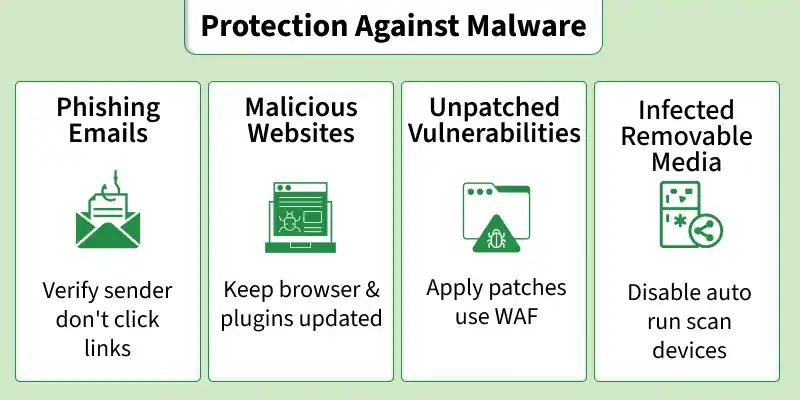
Protection Against Malware
- **Phishing Emails: Always verify the sender before opening emails. Avoid clicking on suspicious links or attachments. Do not respond to emails asking for personal information.
- **Malicious Websites: Browse safely and visit only trusted websites. Avoid clicking on unknown links from emails, social media or messages. Use safe search practices to stay protected.
- **Unpatched Vulnerabilities: Keep your operating system and software updated. Install updates and security patches regularly to fix known vulnerabilities.
- **Infected Removable Media: Avoid using unknown USB drives or external devices. Disable auto-run features and always scan removable media before use.
- **Use Security Software: Install and maintain reliable antivirus or anti-malware tools to detect and prevent threats.
- **Pop-up Safety: Do not click on pop-up ads or links. Close suspicious pop-ups using the “X” button.
- **App Installation: Avoid installing unnecessary applications. Download software only from trusted and official sources.
Steps to Remove Malware
Here are the steps to remove the malware
- **Install Malwarebytes: Download and install Malwarebytes on your device (Windows, macOS, Android or iOS).
- **Update Malware Definitions: Open the application and update the malware database to ensure detection of the latest threats.
- **Run a Full System Scan: Start a manual scan to check processes, files, registry entries and system storage for malware.
- **Review Scan Results: Once the scan is complete, examine the detected threats along with their names and locations.
- **Quarantine Threats: Move suspicious files to quarantine to isolate them and prevent further damage.
- **Remove Malware: Delete or clean quarantined items after confirming they are malicious.
- **Restart the System: Reboot the device if required to complete the malware removal process.
- **Verify System Security: Perform another scan or check for unusual behavior like slow performance or pop-ups.
- **Malwarebytes: Detects and removes malware, ransomware, spyware and adware. It offers fast scanning with real-time protection and minimal impact on system performance.
- **SUPERAntiSpyware: Focuses on detecting spyware, adware, Trojans and tracking cookies. It is especially useful for cleaning systems that are heavily infected.
- **Malicious Software Removal Tool (MSRT): A Microsoft tool that removes common malware from Windows systems. It runs automatically through Windows Update and performs periodic scans.
- **Bitdefender Antivirus Free Edition: Provides strong real-time protection against viruses and online threats. It is lightweight, easy to use and automatically detects malicious activity.
- **Adaware Antivirus Free: Protects against malware, spyware and phishing attacks. It includes real-time protection and a simple, user-friendly interface.
- **Avast Free Mac Security: Designed for Mac systems to detect malware and web-based threats. It provides real-time scanning along with email and web protection features.