Static Malware Analysis (original) (raw)
Last Updated : 3 Dec, 2025
Static malware analysis is the process of examining a suspicious file without executing it. Its purpose is to determine what the file is, how it is structured, what it might do, and whether it contains signs of malicious intent — all while maintaining a safe analysis environment. This method is widely used in cybersecurity because it allows analysts to quickly gain insights into malware characteristics, identify indicators of compromise (IOCs), and guide further dynamic analysis, without the risks of running the actual code.
Static Analysis Flow
How We Approach a Malware Sample\
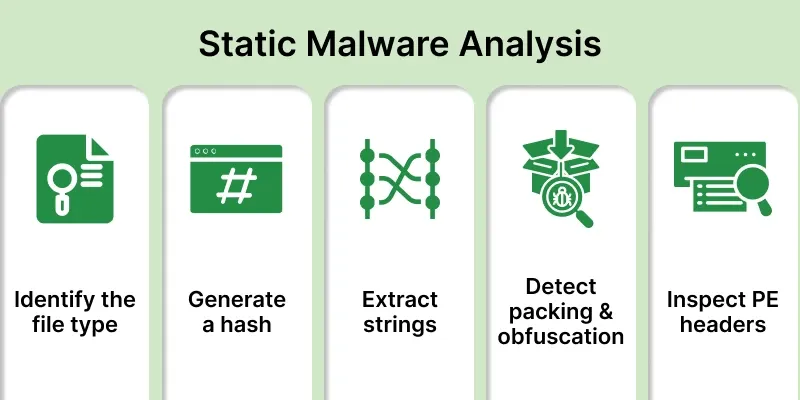
**Identify the file type
The first step is to check the file’s format (e.g., .exe, .dll) and architecture (32-bit or 64-bit). This tells us the target operating system and gives context about how the file might behave.
**Generate a hash of the malware
Creating a hash (like MD5, SHA-1, or SHA-256) gives the malware sample a unique fingerprint. This allows us to check online databases (like VirusTotal) to see if the file has already been analyzed, saving time and effort.
**Extract and analyze strings
Using tools like the strings command, we can pull out readable text from the binary. This may reveal URLs, IP addresses, function names, commands, or other clues about what the malware is designed to do.
**Detect packing and obfuscation
Malware authors often use packers or obfuscation techniques to hide code and avoid detection. By identifying if the file is packed (e.g., UPX), analysts may need to unpack or deobfuscate it to uncover hidden instructions.
Portable Executable (PE) headers contain structured metadata about the program — like imported functions, libraries, and entry points. Analyzing these headers helps us understand how the malware interacts with the operating system.
**Indicators in Static Malware Analysis
In static malware analysis, Indicators are crucial pieces of data that provide evidence of a security breach. Since static analysis doesn't involve running the malware, the analyst extracts these indicators directly from the file's code and metadata.
**1. File Identity
File extension is compared with the magic number to ensure the format is genuine. Attackers often disguise executables by renaming them to harmless formats like documents or images. Packer signatures such as UPX may reveal obfuscation, while compiler or linker metadata can give clues about the toolchain used.
Executable headers contain details like timestamps, entry points, and section names. Suspicious timestamps, unusual entry points, strange section names, or large overlays often indicate tampering or hidden code.
**3. Imports / API Calls
The imported functions of a binary reveal its intended behavior. Networking APIs may point to communication features, process or VM-related APIs suggest manipulation or evasion, and persistence-related APIs show attempts to survive reboots.
**4. Exports / Resources
Exports may allow interaction with other components, while resources often contain icons, manifests, certificates, or even hidden executables. These can provide insights into disguise, authenticity, or embedded payloads.
**5. Strings
Readable strings may expose URLs, IP addresses, registry keys, file paths, or encoded payloads. These artifacts are valuable for identifying infrastructure, persistence, and hidden data.
**6. Embedded Files / Data
Executables sometimes carry additional content like encrypted binaries, scripts, or certificates. Such embedded material often extends functionality or hides secondary payloads.
**7. Obfuscation / Packing
Packed or encrypted files often show high entropy, unusual section names, or known packer signatures. These techniques are commonly used to conceal malicious logic.
**8. Cryptography
Presence of cryptographic routines, keys, or algorithm patterns indicates encryption for payloads or communication. Hardcoded keys or crypto API usage may reveal controlled data protection inside the malware.
**9. YARA Hits / Signatures
YARA scanning can quickly match files against known malware patterns. Signature hits help link the sample to existing families or campaigns.
Static malware analysis relies on a variety of specialized tools, each designed to perform a specific task in the process of dissecting a malicious file without executing it. Here is a breakdown of the key tools used, categorized by their function:
1. **HxD – Hex Editor
- A free hex editor that allows you to view and edit raw binary data of files.
- Analysts use it to inspect file headers, look for hidden code, and analyze suspicious patterns at the byte level. For example, you can check whether an
.exereally starts with the MZ header (indicating a Windows executable).
2. **Exeinfo PE
- A tool that analyzes Windows PE (Portable Executable) files.
- It retrieves detailed PE header information.
- Detects whether the executable is packed or obfuscated.
- Identifies the packer version and sometimes provides hints on how to unpack it.
- Since malware often uses packing to hide malicious code, this tool helps analysts know if unpacking is required before deeper inspection.
3. **PEStudio
- A powerful static analysis tool for Windows executables.
- Extracts imports, exports, libraries, file metadata, digital signatures, indicators of compromise, and highlights suspicious API calls like keylogging, network communication, or privilege escalation.
- Gives a quick overview of what the program might do without running it.
4. **CFF Explorer
- CFF Explorer lets you examine and modify Portable Executable (PE) headers, sections, resources, and dependencies.
- It is useful for unpacking executables and exploring their internal structure.
- It helps analysts understand how malware operates and interacts with the operating system.
The Core Methodology of Static Analysis
The core methodology of static malware analysis is a structured process that allows an analyst to gather foundational intelligence about a suspicious file without ever executing it. This non-invasive approach is crucial for safety and for building a clear picture of the malware's potential.
1. File Hashing
File hashing is the first and most fundamental step. It involves generating a unique digital fingerprint of the file using a cryptographic hashing algorithm such as SHA-256 or MD5. This hash is a fixed-length string of characters that represents the file's entire content.
- Even the slightest change to the file will produce a completely different hash. This property makes the hash an excellent identifier.
- By searching for this hash in public threat intelligence databases like VirusTotal, an analyst can quickly determine if the file is a known piece of malware. It can also provide information on its detection rate by various antivirus vendors and its historical behavior. This gives the analyst an immediate baseline of threat intelligence.
2. String Analysis
**String analysis is the process of extracting all the readable text strings embedded within the malware's binary code. These strings are often the most telling indicators of a file's purpose and functionality.
Analysts use a strings utility to scan the binary and pull out any sequences of printable characters. This includes Unicode strings, which are often overlooked.
The extracted strings can reveal:
- **Filenames and paths: The malware may have strings like
C:\Users\Public\Downloads\malware.exe. - **Network indicators: URLs (
http://malicious-server.com), IP addresses (192.168.1.1), and domain names used for command-and-control (C2) communication. - **Internal messages: Strings like "You have been infected!" or "File decryption successful."
- **Registry keys: Information on how the malware establishes persistence by adding itself to the Windows Registry.
- **Function and API names: The names of functions and libraries the malware intends to use, such as
CreateFileW(for creating a file) orInternetOpen(for network communication).
Header analysis involves inspecting the metadata of the executable file. For Windows, this is the Portable Executable (PE) Header. This header contains vital information about the file's structure and its requirements to run. Tools like PEStudio or CFF Explorer are used to parse the header and display its various sections.
Header analysis can uncover:
- **Architecture: Whether the file is 32-bit or 64-bit.
- **Imports and Exports: The **Import Address Table (IAT) lists all the external libraries (DLLs) the file needs to function. This is a treasure trove of information, as it shows what capabilities the malware has. For example, if it imports
wininet.dll, it likely has network functionality. - **Compiler Information: The compiler and linker used to create the executable can sometimes be identified, providing clues about the threat actor's toolset.
- **Time and Date Stamps: The timestamp on the header can provide clues about when the malware was compiled.
File Identification & Properties
The first step in static malware analysis is identifying the type of file being examined. This helps determine how the file should behave and which tools are suitable for further inspection. Common file types include executables (EXE, DLL), scripts, and document files with embedded macros.
For Windows-based malware, analysts pay special attention to **Portable Executable (PE) files. The PE header contains valuable metadata such as the compilation timestamp, entry point, imported functions, and section information — all of which can reveal signs of tampering, packing, or suspicious behavior.
To analyze these properties, tools like **PeStudio, **PEview, and **Detect It Easy (DIE) are used. These utilities allow analysts to inspect file headers, identify the compiler used, and detect packing or obfuscation methods without executing the file.
**1. PeStudio
PeStudio is a powerful tool for analyzing Windows executable files without running them.
- Open the suspicious
.exefile in PeStudio. - It automatically displays details like imported DLLs, API calls, version info, digital signature, and file indicators.
- Look at the “Indicators” tab to see potential red flags (e.g., suspicious APIs, hidden data, or network calls).
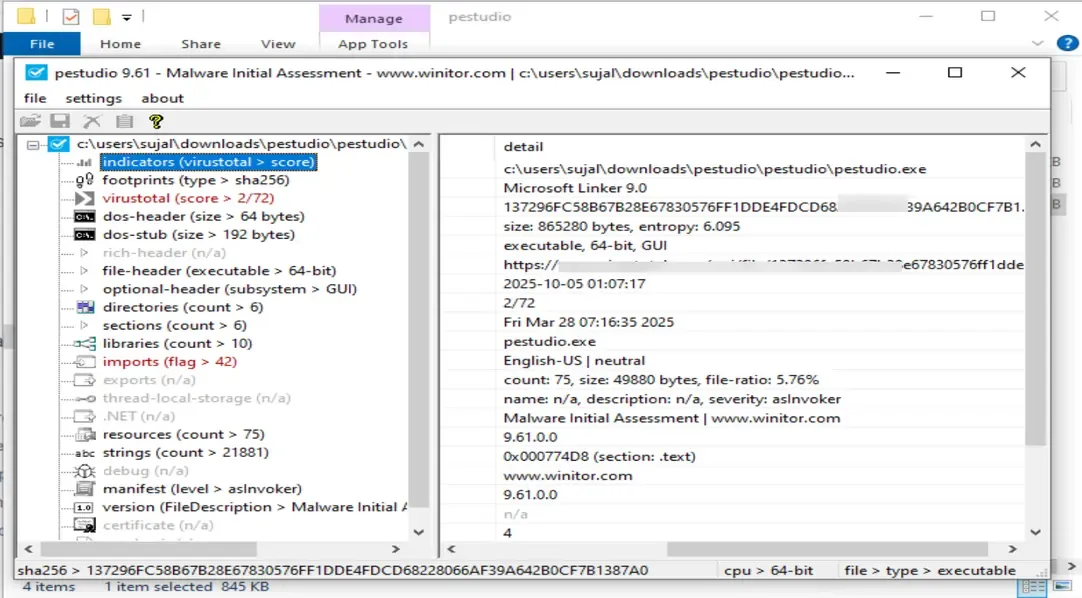
- The “Strings” section helps spot URLs, IPs, or commands embedded inside the binary.
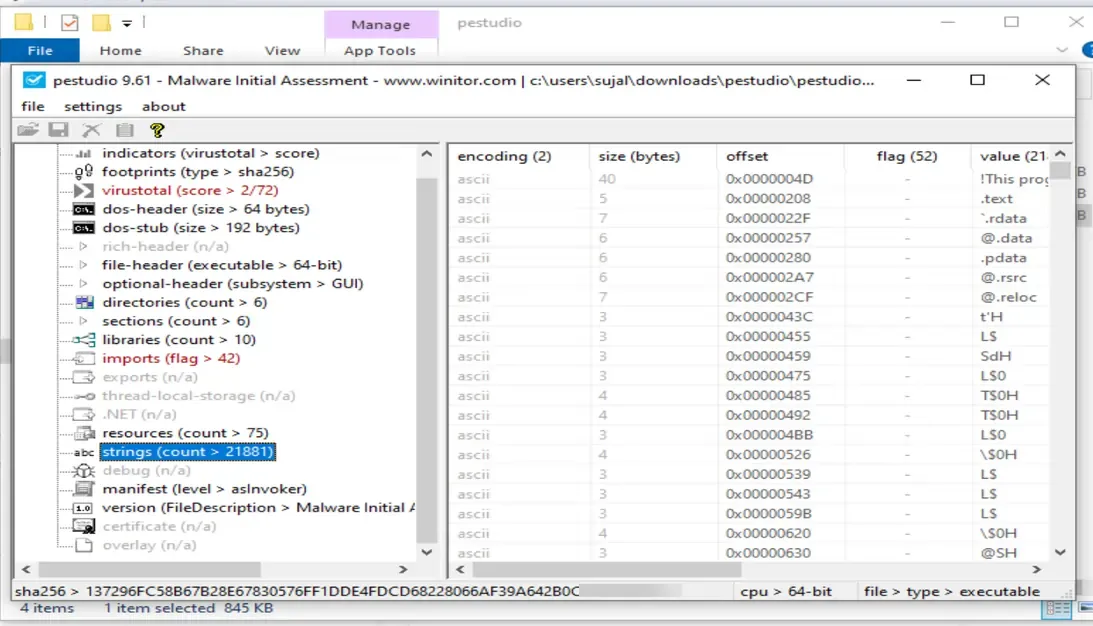
It gives a quick overview of a file’s structure and suspicious behavior indicators before deeper analysis.
2. **PEview
PEview is a lightweight utility to manually inspect the structure of Portable Executable (PE) files.
- Open the
.exeor.dllfile to view its internal headers. - Navigate through sections like DOS Header, File Header, and Optional Header.
- Check fields like TimeDateStamp, EntryPoint, and NumberOfSections — anomalies here may indicate file manipulation or packing.
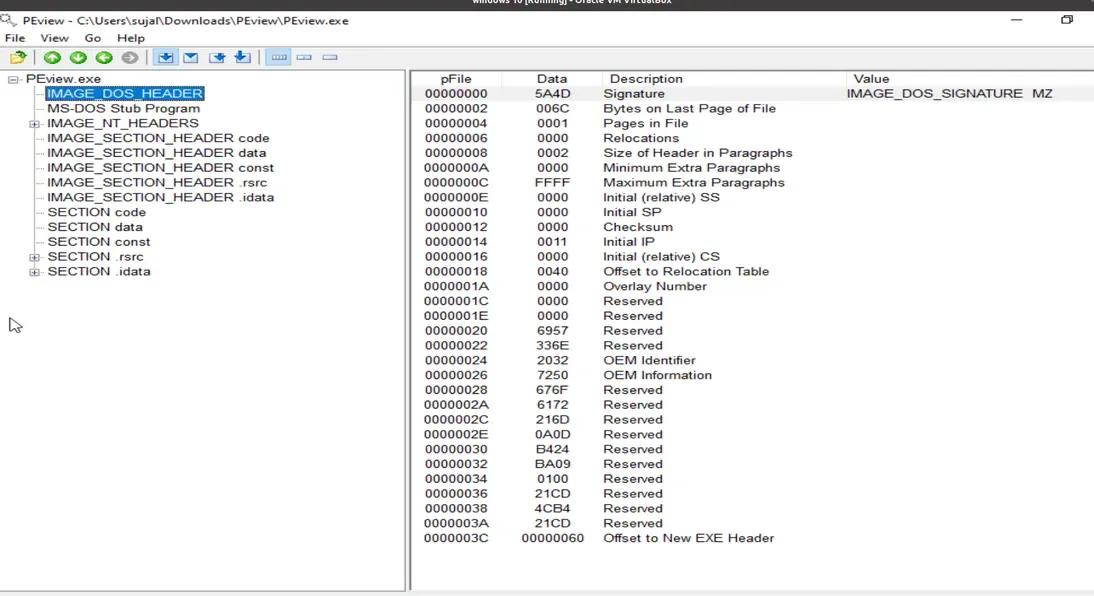
It helps analysts manually confirm metadata and detect unusual values that may be hidden by packers.
**3. Detect It Easy (DIE)
Detect It Easy (DIE) identifies file types, compilers, and packers used in executables.
- Launch DIE and open the sample file.
- It immediately shows the file type, compiler, and packer name (like UPX or Themida).
- Analysts can switch to the Entropy tab to check if the file is packed (high entropy usually means compression or encryption).
Quickly determines if a sample has been packed or obfuscated and what unpacking method might be needed.