File Uploading in Node (original) (raw)
Last Updated : 11 Oct, 2025
To upload files in Node.js you can use the **Multer module, which is a very good module for working with file uploads. By using **file upload functionality with Node.js, you can easily manage **file uploads from users and store those files on your server.
The Multer module can be downloaded and installed using NPM.
npm i multer
After you have downloaded the Multer module, you can include the module in any application:
const multer = require("multer");
**Steps To Implement File Upload in Node
**Step 1: Create a project folder and initialize the node application.
Create a project named nodejs
mkdir nodejs
cd nodejs
npm init -y
**Step 2: Install the required Modules
Installing express, ejs, and multer
npm install express ejs multer
**Project Structure
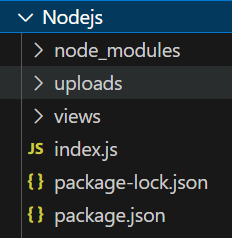
Project Structure
Updated Dependencies
"dependencies": {
"express": "^4.18.2",
"ejs": "^3.1.9",
"multer": "^1.4.5-lts.1",
}
The "**uploads" folder stores submitted files, while Multer enriches the request object with a `****file**` or `****files**` object for uploaded files and a `****body**` object containing form text field values upon submission.
**Step 3: Configure Multer for File Upload
- Set up Multer with
diskStorageto handle file uploads. - Specify the destination folder and filename.
- Define a maximum file size (1 MB) and a file filter for allowed types (jpeg, jpg, png).
// Multer disk storage setup
const storage = multer.diskStorage({
destination: function (req, file, cb) {
cb(null, "uploads");
},
filename: function (req, file, cb) {
cb(null, file.fieldname + "-" + Date.now() + ".jpg");
}
});
// Define maximum upload file size (1 MB)
const maxSize = 1 * 1000 * 1000;
// Configure Multer
const upload = multer({
storage: storage,
limits: { fileSize: maxSize },
fileFilter: function (req, file, cb) {
const filetypes = /jpeg|jpg|png/;
const mimetype = filetypes.test(file.mimetype);
const extname = filetypes.test(path.extname(file.originalname).toLowerCase());
    if (mimetype && extname) {
        return cb(null, true);
    }

    cb("Error: File upload only supports the following filetypes - " + filetypes);
}
}).single("mypic");
**Step 4: Setup the routes
- Create routes for GET and POST requests.
- Establish a route for rendering a signup page (GET request).
- Set up a route for handling file uploads (POST request).
// Route for rendering signup page
app.get("/", function (req, res) {
res.render("Signup");
});
// Route for handling file uploads
app.post("/uploadProfilePicture", function (req, res, next) {
// Use Multer middleware to handle file upload
upload(req, res, function (err) {
if (err) {
// Handle errors during file upload
res.send(err);
} else {
// Success message after a successful upload
res.send("Success, Image uploaded!");
}
});
});
**Step 5: Setup the server configuration.
- Start the server on port 5000.
- Handle errors during file upload and respond with success or error messages.
// Start the server on port 5000
app.listen(5000, function (error) {
if (error) throw error;
console.log("Server created Successfully on PORT 5000");
});
**Example: Below is the complete code for uploading the file using NodeJS
HTML `
FILE UPLOAD DEMOSingle File Upload Demo
<form action="/uploadProfilePicture"
enctype="multipart/form-data" method="POST">
    <span>Upload Profile Picture:</span>
    <input type="file" name="mypic" required/> <br>
    <input type="submit" value="submit">
</form>
JavaScript
const express = require("express"); const path = require("path"); const multer = require("multer"); const app = express();
// View Engine Setup app.set("views", path.join(__dirname, "views")); app.set("view engine", "ejs");
// const upload = multer({ dest: "Upload_folder_name" }) // If you do not want to use diskStorage then uncomment it
const storage = multer.diskStorage({ destination: function (req, file, cb) { // Uploads is the Upload_folder_name cb(null, "uploads"); }, filename: function (req, file, cb) { cb(null, file.fieldname + "-" + Date.now() + ".jpg"); } });
// Define the maximum size for uploading // picture i.e. 1 MB. it is optional const maxSize = 1 * 1000 * 1000;
const upload = multer({ storage: storage, limits: { fileSize: maxSize }, fileFilter: function (req, file, cb) { // Set the filetypes, it is optional const filetypes = /jpeg|jpg|png/; const mimetype = filetypes.test(file.mimetype);
    const extname = filetypes.test(
        path.extname(file.originalname).toLowerCase()
    );

    if (mimetype && extname) {
        return cb(null, true);
    }

    cb(
        "Error: File upload only supports the " +
            "following filetypes - " +
            filetypes
    );
}

// mypic is the name of file attribute
}).single("mypic");
app.get("/", function (req, res) { res.render("Signup"); });
app.post("/uploadProfilePicture", function (req, res, next) { // Error MiddleWare for multer file upload, so if any // error occurs, the image would not be uploaded! upload(req, res, function (err) { if (err) { // ERROR occurred (here it can be occurred due // to uploading image of size greater than // 1MB or uploading different file type) res.send(err); } else { // SUCCESS, image successfully uploaded res.send("Success, Image uploaded!"); } }); });
// Take any port number of your choice which // is not taken by any other process app.listen(5000, function (error) { if (error) throw error; console.log("Server created Successfully on PORT 5000"); });
`
**To strat the application run the following command.
node index.js
**Output: