Flutter Bloc Basic Search (original) (raw)
Last Updated : 23 Jul, 2025
In this article, we are going to develop a Basic Search App using Flutter Bloc and Clean Architecture. In Flutter applications, the Flutter BLoC (Business Logic Component) is used to manage the state. It helps separate business logic from UI. It ensures that the user interface is not strongly liaison to the business logic, making the app more versatile.
**Note: To know more about **Flutter- Business Logic Component (BLoC).
Let's see a demo video of what we are going to develop.
**Demo Video:
Step-by-Step Implementation
Step 1: Create a new Flutter Application
Create a new Flutter application using the command Prompt. To create a new app, write the following command and run it.
flutter create app_name
To know more about it refer this article: Creating a Simple Application in Flutter
**Step 2: Add Dependencies
To add the dependency to the **pubspec.yaml file, add flutter_bloc as a dependency in the dependencies part of the pubspec.yaml file__,_ as shown below:
Dart `
dependencies: flutter: sdk: flutter flutter_bloc: ^8.1.6 cupertino_icons: ^1.0.6
`
Now, run the below command in the terminal.
flutter pub get
**Or
Run the below command in the terminal.
flutter pub add flutter_bloc
Step 3: Install the Bloc Extension
Install the following bloc extension in VSCode.
**Note: If You are not using Vs Code or Don't want to automate the folder structure then, Skip this step and do it manually by creating every file.

It will help you to generate the boilerplate code and folder structure automatically, for that follow the steps below.
**- **Create a folder
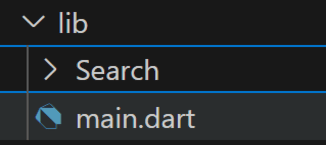
After installing the VSCode extension, create a new folder inside the **lib folder and name it **Search.
**- **Select New Bloc
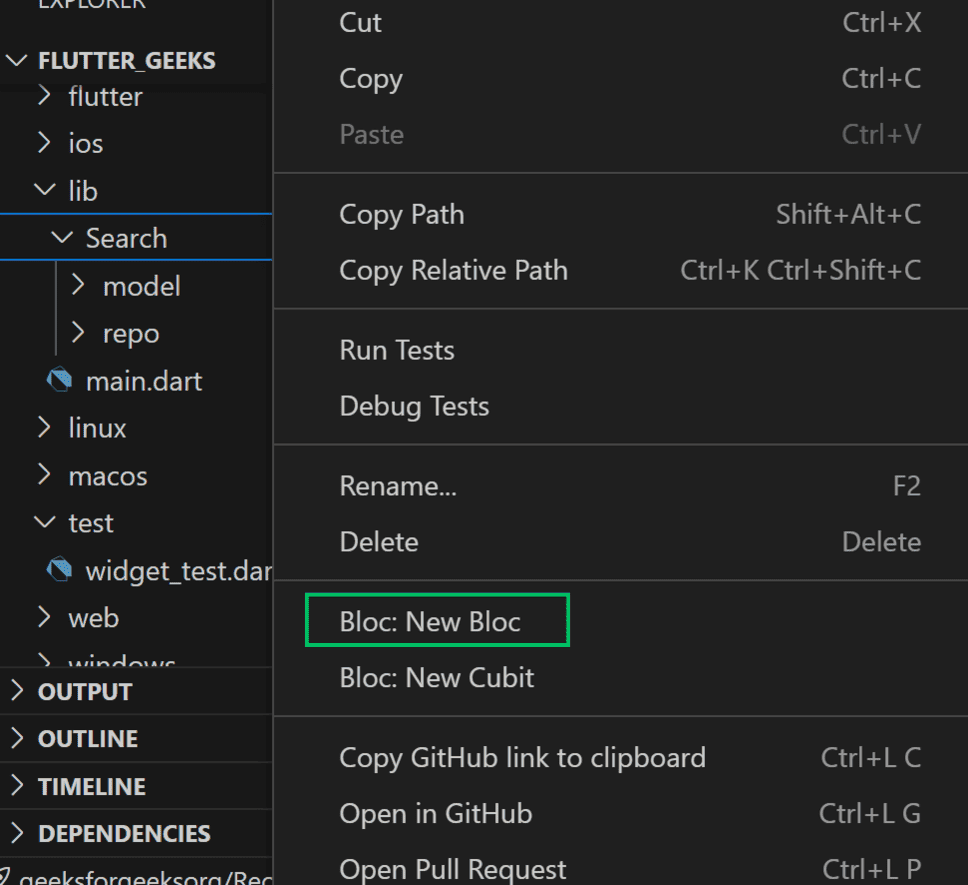
Now, right click on **Search folder, it will display an option named '**Bloc: New Bloc', select that option.
- **Enter Bloc Name
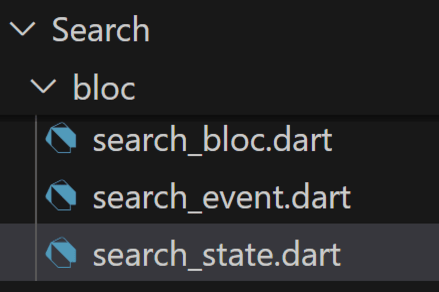
After selecting New Bloc, it will ask for the name of the Bloc. Enter the New Bloc name as '**Search' and click on Enter!.

Then, it will create a new folder in your **Search folder named bloc with all required files as image below.
**Step 4: Clean Architecture
**Note: If you are not following step3 create a folder structure manually as the image located above the Step 4.
To maintain your codebase clean and interesting, use Clean Architecture. For that, follow the folder structure as mentioned in below image.
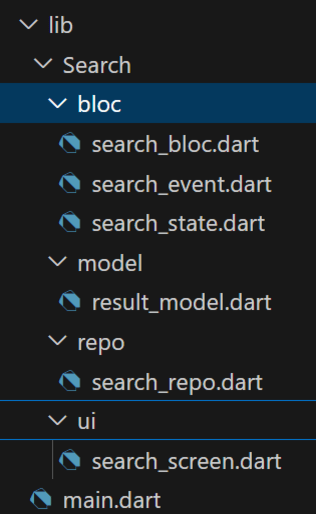
Here we created 3 folders and 3 files inside every folder, respectively.
- **model: To store all kinds of models, for example result_model.
- **result_model.dart: This model file describes how the result of the search is going to be.
- **repo: repo is nothing but a repository means it contains important logic files, for example logic file for searching (search_repo).
- **search_repo.dart: This repo file has the logic code for searching.
- **ui: ui is nothing but User Interface means this folder contains all ui code files in it, for example search_screen file.
- **search_screen.dart: This ui file has the UI code.
Step 5: Working with the Search folder
Note: If you did not watched Demo Video, Watch it carefully once again otherwise you won't understand what we are going to discuss.
In the Search folder we have 3 files:
- **search_event.dart: Triggers the event from UI and passes the current state, Nothing but user interacting with UI.
- **Example: After entering some text on the TextField user will tap on the **search icon or submits the TextField by tapping on done in keyboard, then we are triggering the **SearchEventLoadData event and passing that input (Ex: hi, food in demo video) as state.
- **search_bloc.dart: Catches the triggered event with the state (Ex:hi, food in demo video) and updates the state.
- **Example: After catching the triggered event with the state (Ex:hi, food in demo video), it passes that input (state) to repo, and when it gives the result then it emits that through **SearchStateLoaded.
- **search_state.dart: Used to emit the state in **search_bloc.dart and catch the state and categorize, and display UI according to that.
- **Example: After updating the state in **search_bloc.dart it throws the state to UI, then it is categorizes and showing the result as **Result for "hi".. or Result for "food".
- **search_event.dart:
search_event.dart ``
import 'package:flutter/material.dart'; import 'package:flutter_geeks/Search/model/result_model.dart';
/// Base class for all search events. /// This class is immutable and sealed, meaning no other classes can extend it /// outside of this file. @immutable sealed class SearchEvent {}
/// Event to load data for the search functionality.
/// Contains a list of strings (strList) and a list of ResultModel objects (dataList).
class SearchEventLoadData extends SearchEvent {
// List of strings to be used in the search.
final List strList;
// List of data models for the search results.
final List dataList;
/// Constructor for initializing the `SearchEventLoadData` event.
/// Both `strList` and `dataList` are required.
SearchEventLoadData({required this.strList, required this.dataList});

List<Object> get props => [strList, dataList];
}
``
- **search_state.dart:
search_state.dart `
import 'package:flutter/material.dart'; import 'package:flutter_geeks/Search/model/result_model.dart';
/// Base class for all search states, marked as immutable. @immutable sealed class SearchState {}
/// Initial state of the search, before any action is taken. final class SearchInitial extends SearchState {}
/// State representing that the search has not been loaded yet. class SearchStateNotLoaded extends SearchState {}
/// State representing that the search is currently loading. class SearchStateLoading extends SearchState {}
/// State representing that the search has successfully loaded data. class SearchStateLoaded extends SearchState { // List of strings related to the search. final List strList; // List of result models from the search. final List dataList;
SearchStateLoaded(this.strList, this.dataList);

List<Object> get props => [strList, dataList];
}
/// State representing an error that occurred during the search process. class SearchStateError extends SearchState { // Error message describing the issue. final String message;
SearchStateError(this.message);

List<Object> get props => [message];
}
`
- **search_bloc.dart:
search_bloc.dart `
import 'package:flutter_bloc/flutter_bloc.dart'; import 'package:flutter_geeks/Search/bloc/search_event.dart'; import 'package:flutter_geeks/Search/bloc/search_state.dart'; import 'package:flutter_geeks/Search/repo/search_repo.dart';
/// Bloc class to handle search-related events and states class SearchBloc extends Bloc<SearchEvent, SearchState> { // Repository to fetch search details final SearchRepo _searchRepo;
/// Constructor to initialize the SearchBloc with the repository
SearchBloc(this._searchRepo) : super(SearchStateNotLoaded()) {
    // Registering the event handler for SearchEventLoadData
    on<SearchEventLoadData>(_onLoadData);
}

/// Event handler for loading data
///
/// Emits:
/// - [SearchStateLoading] while data is being fetched
/// - [SearchStateLoaded] when data is successfully fetched
/// - [SearchStateError] if an error occurs during data fetching
Future<void> _onLoadData(
    SearchEventLoadData event,
    Emitter<SearchState> emit,
) async {
    // Emit loading state
    emit(SearchStateLoading());
    try {
          // Fetch the details from the repository using the last string in the list
          final result = await _searchRepo.getDetails(event.strList.last);

          // Add the fetched result to the data list
          event.dataList.add(result);

          // Emit the loaded state with updated lists
          emit(SearchStateLoaded(event.strList, event.dataList));
    } catch (e) {
          // Emit an error state if an exception occurs
          emit(SearchStateError(e.toString()));
    }
}
}
`
Step 6: Working with the model
This file is used to represent the result data and the reason, why you are seeing the result as title and description in the demo video.
- **result_model.dart:
Dart `
/// A model class representing the result data. class ResultModel { /// The title of the result. final String title;
/// The description of the result.
final String description;

/// Constructor for creating a [ResultModel] instance.
///
/// Both [title] and [description] are required.
ResultModel({required this.title, required this.description});

/// Factory constructor to create a [ResultModel] instance from a JSON map.
///
/// Expects the JSON map to have keys 'title' and 'description'.
factory ResultModel.fromJson(Map<String, dynamic> json) {
    return ResultModel(
        title: json['title'], // Extracts the title from the JSON map.
        description: json['description'], // Extracts the description from the JSON map.
    );
}
}
`
Step 7: Working with repo
This file contains the Logic for Search, which we are using to get data for updating the state.
- **search_repo.dart:
search_repo.dart `
import '../model/result_model.dart';
// Repository class to handle search-related operations class SearchRepo { // Message to store error or status information String message = '';
// Method to fetch details based on a query // Simulates an API call and returns a ResultModel object Future getDetails(String query) async { try { // Simulate API Call (replace with actual HTTP logic) await Future.delayed(Duration(seconds: 1)); // Simulated delay for API response return ResultModel( title: 'Result for "$query"', // Title of the result description: 'Detailed information about "$query"', // Description of the result ); } catch (e) { // Handle any errors during the API call message = 'Failed to fetch data'; // Set error message throw Exception(message); // Throw an exception with the error message } } }
`
Step 7: Working with the main
Add the boilerplate code below in main.dart to initialize the **BlocProvider in the main file and create a basic structure with an MaterialApp.
-**BlocProvider: Wrap the home class **SearchScreen() with **BlocProvider, it is used to initialize the state, i.e, in UI it is showing a 'Search Something..' text in the center.
Dart `
home: BlocProvider( // Creates and provides the SearchBloc create: (_) => SearchBloc(SearchRepo()), // Child widget that consumes the bloc child: SearchScreen(), ),
`
- **main.dart:
Dart `
import 'package:flutter/material.dart'; import 'package:flutter_bloc/flutter_bloc.dart'; import 'package:flutter_geeks/Search/bloc/search_bloc.dart'; import 'package:flutter_geeks/Search/repo/search_repo.dart'; import 'package:flutter_geeks/Search/ui/search_screen.dart';
// Entry point of the Flutter application void main() { runApp(SearchWrapper()); }
// Wrapper widget to provide the SearchBloc to the SearchScreen class SearchWrapper extends StatelessWidget { @override Widget build(BuildContext context) { return MaterialApp( home: BlocProvider( // Creates and provides the SearchBloc create: (_) => SearchBloc(SearchRepo()), // Child widget that consumes the bloc child: SearchScreen(), ), ); } }
`
Step 8: Working with ui
The ui folder contains only one file, **search_screen.dart and it contains basics widgets like Scaffold, AppBar, TextFiled, Text, icon. But, to handle ui with respect to state. Follow the below process.
- **Initialization: Initialize required variables.
Dart `
// Controller for the search input field final TextEditingController _controller = TextEditingController(); // List to store search history List searchHistory = []; // List to store search results List resultHistory = [];
`
- **TextField: Used to take input from the user and when user taps on search icon or submits the textfield then calls _onSearch() method.
Dart `
// Search input field TextField( // Attach the controller controller: controller, onSubmitted: () => _onSearch(), // Trigger search on submit decoration: InputDecoration( hintText: 'Search...', suffixIcon: IconButton( icon: Icon(Icons.search), onPressed: _onSearch, // Trigger search on icon press ), enabledBorder: OutlineInputBorder( borderRadius: BorderRadius.circular(12), borderSide: BorderSide(color: Colors.grey), ), focusedBorder: OutlineInputBorder( borderRadius: BorderRadius.circular(12), borderSide: BorderSide(color: Colors.black54), ), ), ),
`
-**_onSearch(): Used to trigger the **SearchEventLoadData event.
Dart `
// Method to handle search action void _onSearch() { // Get the trimmed input text final query = _controller.text.trim(); // Do nothing if the input is empty if (query.isEmpty) return; // Add the query to search history searchHistory.add(query); // Trigger the SearchBloc to load data BlocProvider.of(context,) .add(SearchEventLoadData(strList: searchHistory, dataList: resultHistory)); // Clear the input field after search _controller.clear(); }
`
- **BlocBuilder: Used to catch the updated state and show UI according to that.
Dart `
BlocBuilder<SearchBloc, SearchState>( builder: (context, state) { if (state is SearchStateLoading) { // Show loading indicator while data is being fetched return Center( child: CircularProgressIndicator(color: Colors.black38), ); } else if (state is SearchStateLoaded) { // Display the latest search result final result = state.dataList.last; return ListView( children: [ ListTile( // Title of the result title: Text(result.title), // Description of the result subtitle: Text(result.description), ), ], ); } else if (state is SearchStateError) { // Display error message if an error occurs return Center(child: Text('Error: ${state.message}')); } else if (state is SearchStateNotLoaded) { // Default message when no search has been performed return Center(child: Text("Search something!")); } else{ // Default message when no state matches return Center(child: Text("No results found!")); } }, ),
`
Full UI Code:
**Search_screen.dart:
Dart `
import 'package:flutter/material.dart'; import 'package:flutter_bloc/flutter_bloc.dart'; import 'package:flutter_geeks/Search/bloc/search_event.dart'; import 'package:flutter_geeks/Search/bloc/search_state.dart'; import 'package:flutter_geeks/Search/model/result_model.dart'; import '../bloc/search_bloc.dart';
// Main SearchScreen widget class SearchScreen extends StatefulWidget { @override _SearchScreenState createState() => _SearchScreenState(); }
// State class for SearchScreen class _SearchScreenState extends State { // Controller for the search input field final TextEditingController _controller = TextEditingController(); // List to store search history List searchHistory = []; // List to store search results List resultHistory = [];
// Method to handle search action void _onSearch() { // Get the trimmed input text final query = _controller.text.trim(); // Do nothing if the input is empty if (query.isEmpty) return; // Add the query to search history searchHistory.add(query); // Trigger the SearchBloc to load data BlocProvider.of( context, ).add(SearchEventLoadData(strList: searchHistory, dataList: resultHistory)); // Clear the input field after search _controller.clear(); }
@override Widget build(BuildContext context) { return Scaffold( appBar: AppBar( title: Text("Search UI"), backgroundColor: Colors.black38, foregroundColor: Colors.white, ), body: Padding( padding: const EdgeInsets.all(12.0), child: Column( children: [ // Search input field TextField( // Attach the controller controller: controller, onSubmitted: () => _onSearch(), // Trigger search on submit decoration: InputDecoration( hintText: 'Search...', suffixIcon: IconButton( icon: Icon(Icons.search), onPressed: _onSearch, // Trigger search on icon press ), enabledBorder: OutlineInputBorder( borderRadius: BorderRadius.circular(12), borderSide: BorderSide(color: Colors.grey), ), focusedBorder: OutlineInputBorder( borderRadius: BorderRadius.circular(12), borderSide: BorderSide(color: Colors.black54), ), ), ), const SizedBox(height: 20), // Spacing between input and results // BlocBuilder to handle state changes in SearchBloc Expanded( child: BlocBuilder<SearchBloc, SearchState>( builder: (context, state) { if (state is SearchStateLoading) { // Show loading indicator while data is being fetched return Center( child: CircularProgressIndicator(color: Colors.black38), ); } else if (state is SearchStateLoaded) { // Display the latest search result final result = state.dataList.last; return ListView( children: [ ListTile( // Title of the result title: Text(result.title), // Description of the result subtitle: Text(result.description), ), ], ); } else if (state is SearchStateError) { // Display error message if an error occurs return Center(child: Text('Error: ${state.message}')); } else if (state is SearchStateNotLoaded) { // Default message when no search has been performed return Center(child: Text("Search something!")); } else{ // Default message when no state matches return Center(child: Text("No results found!")); } }, ), ), ], ), ), ); } }
`
Program Flow:
When the App started with the help of **BlocProvider, it is showing ****'search something..'.**
BlocProvider(
create: (context) => **SearchBloc(SearchRepo()),
.....
)
As we are calling **SearchBloc() class in **search_bloc.dart and that calling **SearchStateNotLoaded( ):
**SearchBloc() : (this._searchRepo) : super(SearchStateNotLoaded()) {
...
}
When it comes to UI, after that, **BlocBuilder catches that state, i.e, it will display ****'search something..'.** At the start of the app.
**BlocBuilder<SearchBloc, SearchState>(
builder: (context, state) {
if (state is SearchStateLoading) {
// Code
} else if (state is SearchStateLoaded) {
// Code
} else if (state is SearchStateError) {
// Code
} **else if (state is SearchStateNotLoaded) {
// Default message when no search has been performed
return Center(child: Text("Search something!"));
}
else{
// Code
}
},
),
When the user enters something and taps on the search icon or submits the textfield, it triggers the event with the help of **_onSearch() method.
TextField(
// Attach the controller
controller: controller,
onSubmitted: () => ****_onSearch(),** // Trigger search on submit
decoration: InputDecoration(
hintText: 'Search...',
suffixIcon: IconButton(
icon: Icon(Icons.search),
onPressed: _onSearch, // Trigger search on icon press
),
),
),
// Method to handle search action
void ****_onSearch**() {
......
BlocProvider.of(
context,
).add(SearchEventLoadData(strList: searchHistory, dataList: resultHistory));
......
}
Then it is taking the current state like **searchHistory and resultHistory value and going to **search_bloc.dart and searches for the right **on catch(Ex: here on(_onLoadData); ****)**,
**on(_onLoadData);
Future _onLoadData(
SearchEventLoadData event,
Emitter emit,
) async {
// Emit loading state
emit(SearchStateLoading());
try {
// Fetch the details from the repository using the last string in the list
final result = await _searchRepo.getDetails(event.strList.last);
  // Add the fetched result to the data list
  ****event.dataList.add(result);**

  // Emit the loaded state with updated lists
   **emit(SearchStateLoaded(event.strList, event.dataList));**
} catch (e) {
  // Emit an error state if an exception occurs
  emit(SearchStateError(e.toString()));
}
}
if it finds then it will emit the **emit(SearchStateLoading()); , then it will come to the UI file **search_screen.dart categorizes the state, andbecause of it, we can see the circular progress bar first.
emit(SearchStateLoading());
if (**state is SearchStateLoading) {
// Show loading indicator while data is being fetched
return Center(
child: **CircularProgressIndicator(color: Colors.black38),
);
}
And then it's calling the **getDetails method with **event.strList.last as previous state in **SearchRepo, and that returning below result Structured with the result model which is in result_model.dart.
final result = await _searchRepo.getDetails(event.strList.last);
import '../model/result_model.dart';
// Repository class to handle search-related operations
class **SearchRepo {
.....
Future **getDetails(String query) async {
try {
// Simulate API Call (replace with actual HTTP logic)
await Future.delayed(Duration(seconds: 1)); // Simulated delay for API response
return ResultModel(
title: 'Result for "$query"', // Title of the result
description: 'Detailed information about "$query"', // Description of the result
);
} catch (e) {
.....
}
}
}
And, we are getting the updated state as this Result, adding that to the **event and emitting that updated state to **SearchStateLoaded.
// Add the fetched result to the data list
**event.dataList.add(result);
// Emit the loaded state with updated lists
**emit(SearchStateLoaded(event.strList, event.dataList));
Then, **BlocBuilder in the main.dart catching that updated state and displaying it in the UI.
**BlocBuilder<SearchBloc, SearchState>(
builder: (context, state) {
if (state is SearchStateLoading) {
...
} **else if (state is SearchStateLoaded) {
// Display the latest search result
final result = state.dataList.last;
return ListView(
children: [
ListTile(
// Title of the result
title: Text(result.title),
// Description of the result
subtitle: Text(result.description),
),
],
);
} else if (state is SearchStateError) {
...
} else if (state is SearchStateNotLoaded) {
....
}
else{
.....
}
},
),
This is what is happening in the whole code.
Complete Source Code:
main.dart `
import 'package:flutter/material.dart'; import 'package:flutter_bloc/flutter_bloc.dart'; import 'package:flutter_geeks/Search/bloc/search_bloc.dart'; import 'package:flutter_geeks/Search/repo/search_repo.dart'; import 'package:flutter_geeks/Search/ui/search_screen.dart';
// Entry point of the Flutter application void main() { runApp(SearchWrapper()); }
// Wrapper widget to provide the SearchBloc to the SearchScreen class SearchWrapper extends StatelessWidget { @override Widget build(BuildContext context) { return MaterialApp( home: BlocProvider( // Creates and provides the SearchBloc create: (_) => SearchBloc(SearchRepo()), // Child widget that consumes the bloc child: SearchScreen(), ), ); } }
ui/search\_screen.dart
import 'package:flutter/material.dart'; import 'package:flutter_bloc/flutter_bloc.dart'; import 'package:flutter_geeks/Search/bloc/search_event.dart'; import 'package:flutter_geeks/Search/bloc/search_state.dart'; import 'package:flutter_geeks/Search/model/result_model.dart'; import '../bloc/search_bloc.dart';
// Main SearchScreen widget class SearchScreen extends StatefulWidget { @override _SearchScreenState createState() => _SearchScreenState(); }
// State class for SearchScreen class _SearchScreenState extends State { // Controller for the search input field final TextEditingController _controller = TextEditingController(); // List to store search history List searchHistory = []; // List to store search results List resultHistory = [];
// Method to handle search action void _onSearch() { // Get the trimmed input text final query = _controller.text.trim(); // Do nothing if the input is empty if (query.isEmpty) return; // Add the query to search history searchHistory.add(query); // Trigger the SearchBloc to load data BlocProvider.of( context, ).add(SearchEventLoadData(strList: searchHistory, dataList: resultHistory)); // Clear the input field after search _controller.clear(); }
@override Widget build(BuildContext context) { return Scaffold( appBar: AppBar( title: Text("Search UI"), backgroundColor: Colors.black38, foregroundColor: Colors.white, ), body: Padding( padding: const EdgeInsets.all(12.0), child: Column( children: [ // Search input field TextField( // Attach the controller controller: controller, onSubmitted: () => _onSearch(), // Trigger search on submit decoration: InputDecoration( hintText: 'Search...', suffixIcon: IconButton( icon: Icon(Icons.search), onPressed: _onSearch, // Trigger search on icon press ), enabledBorder: OutlineInputBorder( borderRadius: BorderRadius.circular(12), borderSide: BorderSide(color: Colors.grey), ), focusedBorder: OutlineInputBorder( borderRadius: BorderRadius.circular(12), borderSide: BorderSide(color: Colors.black54), ), ), ), const SizedBox(height: 20), // Spacing between input and results // BlocBuilder to handle state changes in SearchBloc Expanded( child: BlocBuilder<SearchBloc, SearchState>( builder: (context, state) { if (state is SearchStateLoading) { // Show loading indicator while data is being fetched return Center( child: CircularProgressIndicator(color: Colors.black38), ); } else if (state is SearchStateLoaded) { // Display the latest search result final result = state.dataList.last; return ListView( children: [ ListTile( // Title of the result title: Text(result.title), // Description of the result subtitle: Text(result.description), ), ], ); } else if (state is SearchStateError) { // Display error message if an error occurs return Center(child: Text('Error: ${state.message}')); } else if (state is SearchStateNotLoaded) { // Default message when no search has been performed return Center(child: Text("Search something!")); } else{ // Default message when no state matches return Center(child: Text("No results found!")); } }, ), ), ], ), ), ); } }
bloc/search\_bloc.dart
import 'package:flutter_bloc/flutter_bloc.dart'; import 'package:flutter_geeks/Search/bloc/search_event.dart'; import 'package:flutter_geeks/Search/bloc/search_state.dart'; import 'package:flutter_geeks/Search/repo/search_repo.dart';
/// Bloc class to handle search-related events and states class SearchBloc extends Bloc<SearchEvent, SearchState> { // Repository to fetch search details final SearchRepo _searchRepo;
/// Constructor to initialize the SearchBloc with the repository SearchBloc(this._searchRepo) : super(SearchStateNotLoaded()) { // Registering the event handler for SearchEventLoadData on(_onLoadData); }
/// Event handler for loading data /// /// Emits: /// - [SearchStateLoading] while data is being fetched /// - [SearchStateLoaded] when data is successfully fetched /// - [SearchStateError] if an error occurs during data fetching Future _onLoadData( SearchEventLoadData event, Emitter emit, ) async { // Emit loading state emit(SearchStateLoading()); try { // Fetch the details from the repository using the last string in the list final result = await _searchRepo.getDetails(event.strList.last);
  // Add the fetched result to the data list
  event.dataList.add(result);

  // Emit the loaded state with updated lists
  emit(SearchStateLoaded(event.strList, event.dataList));
} catch (e) {
  // Emit an error state if an exception occurs
  emit(SearchStateError(e.toString()));
}
} }
` bloc/search_event.dart ``
import 'package:flutter/material.dart'; import 'package:flutter_geeks/Search/model/result_model.dart';
/// Base class for all search events. /// This class is immutable and sealed, meaning no other classes can extend it /// outside of this file. @immutable sealed class SearchEvent {}
/// Event to load data for the search functionality.
/// Contains a list of strings (strList) and a list of ResultModel objects (dataList).
class SearchEventLoadData extends SearchEvent {
// List of strings to be used in the search.
final List strList;
// List of data models for the search results.
final List dataList;
/// Constructor for initializing the SearchEventLoadData event.
/// Both strList and dataList are required.
SearchEventLoadData({required this.strList, required this.dataList});
List get props => [strList, dataList]; }
`` bloc/search_state.dart `
import 'package:flutter/material.dart'; import 'package:flutter_geeks/Search/model/result_model.dart';
/// Base class for all search states, marked as immutable. @immutable sealed class SearchState {}
/// Initial state of the search, before any action is taken. final class SearchInitial extends SearchState {}
/// State representing that the search has not been loaded yet. class SearchStateNotLoaded extends SearchState {}
/// State representing that the search is currently loading. class SearchStateLoading extends SearchState {}
/// State representing that the search has successfully loaded data. class SearchStateLoaded extends SearchState { // List of strings related to the search. final List strList; // List of result models from the search. final List dataList;
SearchStateLoaded(this.strList, this.dataList);
List get props => [strList, dataList]; }
/// State representing an error that occurred during the search process. class SearchStateError extends SearchState { // Error message describing the issue. final String message;
SearchStateError(this.message);
List get props => [message]; }
repo/search\_repo.dart
import '../model/result_model.dart';
// Repository class to handle search-related operations class SearchRepo { // Message to store error or status information String message = '';
// Method to fetch details based on a query // Simulates an API call and returns a ResultModel object Future getDetails(String query) async { try { // Simulate API Call (replace with actual HTTP logic) await Future.delayed(Duration(seconds: 1)); // Simulated delay for API response return ResultModel( title: 'Result for "$query"', // Title of the result description: 'Detailed information about "$query"', // Description of the result ); } catch (e) { // Handle any errors during the API call message = 'Failed to fetch data'; // Set error message throw Exception(message); // Throw an exception with the error message } } }
model/result\_model.dart
/// A model class representing the result data. class ResultModel { /// The title of the result. final String title;
/// The description of the result. final String description;
/// Constructor for creating a [ResultModel] instance. /// /// Both [title] and [description] are required. ResultModel({required this.title, required this.description});
/// Factory constructor to create a [ResultModel] instance from a JSON map. /// /// Expects the JSON map to have keys 'title' and 'description'. factory ResultModel.fromJson(Map<String, dynamic> json) { return ResultModel( title: json['title'], // Extracts the title from the JSON map. description: json['description'], // Extracts the description from the JSON map. ); } }
`
Output: