Flutter Staggered Grid View (original) (raw)
Last Updated : 28 Feb, 2025
Staggered Grid View is a type of layout that is used to display images and posts. As you see in various social platforms such as Pinterest, Instagram and many more. The main feature of Staggered Grid View is that it makes the layout beautiful and develop a great User Experience. Staggered Grid View consists of containers present in Rows and columns of different sizes. Which displays images and posts of various sizes.
Features
- Set crossAxisCellCount & mainAxisCellCount to the Grid view
- Main_axis extent of tiles may be fixed or multiple of cell's length.
- Configurable main-axis and cross-axis margins between tiles.
- SliverStaggeredGrid for using in a CustomScrollView.
- Staggered and Spannable grid layouts.
Using the Staggered Grid View
In this article, we are going to see how to implement Staggered Grid View in our Flutter Application. To build this follow the below steps.
**Step 1: Add the dependency to _**pubspec.yaml_file.
For Implementing Staggered Grid View in your project first you have to add the dependency in your pubspec.yaml file.
dependencies:
flutter_staggered_grid_view: ^0.7.0
Now run the below command in terminal to update the _pubspec.yaml.
flutter pub get
Import the dependency to the **main.dart file
import 'package:flutter_staggered_grid_view/flutter_staggered_grid_view.dart';
**Step 2: Return Material App in main.dart() file.
First, create **MyApp() in StatelessWidget and in it return **MaterialApp(). Now in MaterialApp() give the title of the app and add **debugShowCheckModeBanner as false which will remove the debug banner in the app.
Now add the Theme as Dark theme and after that represent first screen home: **Homepage()
**main.dart:
main.dart `
import 'package:flutter/material.dart'; void main() { runApp(MyApp()); }
class MyApp extends StatelessWidget { // This widget is the root of your application. @override Widget build(BuildContext context) { return MaterialApp( debugShowCheckedModeBanner: false,
  //Title of an App
  title: 'GFG APP',

  //Theme of an App
  theme: ThemeData(
    primarySwatch: Colors.green,
  ),
  darkTheme: ThemeData.dark(),

 // First Screen of App
  home: HomePage(),
);
} }
`
**Step 3: Now Import dependencies for Staggered Grid View in _HomePage().
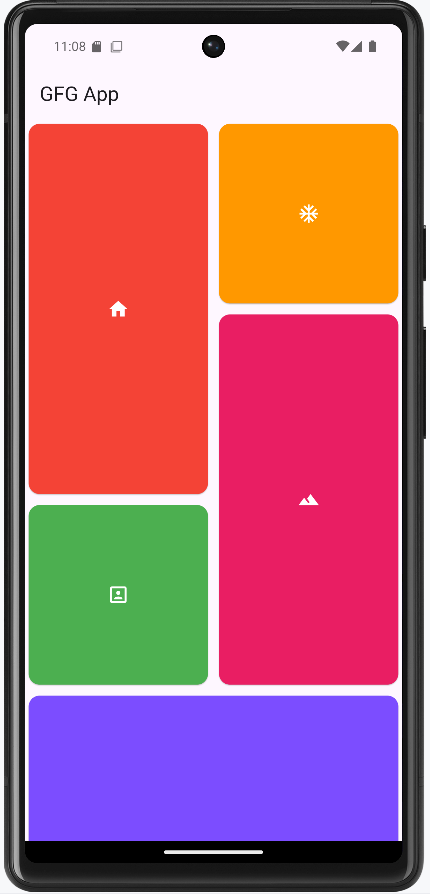
After Importing dependency create app bar inside the Scaffold. Now create a new Container() in the body. In that Container now implement Staggered Grid View as shown in the code below. Inside the Staggered Grid view, there is **StaggeredGridTile. For which we have declared a List of 10 **_cardTile which specify the size of your cards. After that, we have created a **class **BackGroundTile in **StatelessWidget. In which we have declared two final variables _backgroundColor and icon data. We have created a constructor for these variables. And returned Card which consists of _backgroundColor and _icondata. For which we have created a List which inherits properties from class _BackGroundTile. Which consist of _backgroundColor and _icondata.
**HomePage.dart:
HomePage.dart `
import 'package:flutter/material.dart'; import 'package:flutter_staggered_grid_view/flutter_staggered_grid_view.dart';
//List of Cards with size List _cardTile = [ StaggeredGridTile.count( crossAxisCellCount: 1, mainAxisCellCount: 2, child: BackGroundTile(backgroundColor: Colors.red, icondata: Icons.home), ), StaggeredGridTile.count( crossAxisCellCount: 1, mainAxisCellCount: 1, child: BackGroundTile(backgroundColor: Colors.orange, icondata: Icons.ac_unit), ), StaggeredGridTile.count( crossAxisCellCount: 1, mainAxisCellCount: 2, child: BackGroundTile(backgroundColor: Colors.pink, icondata: Icons.landscape), ), StaggeredGridTile.count( crossAxisCellCount: 1, mainAxisCellCount: 1, child: BackGroundTile(backgroundColor: Colors.green, icondata: Icons.portrait), ), StaggeredGridTile.count( crossAxisCellCount: 4, mainAxisCellCount: 2, child: BackGroundTile( backgroundColor: Colors.deepPurpleAccent, icondata: Icons.music_note), ), StaggeredGridTile.count( crossAxisCellCount: 4, mainAxisCellCount: 2, child: BackGroundTile( backgroundColor: Colors.blue, icondata: Icons.access_alarms), ), StaggeredGridTile.count( crossAxisCellCount: 4, mainAxisCellCount: 2, child: BackGroundTile( backgroundColor: Colors.indigo, icondata: Icons.satellite_outlined), ), StaggeredGridTile.count( crossAxisCellCount: 4, mainAxisCellCount: 2, child: BackGroundTile( backgroundColor: Colors.deepPurpleAccent, icondata: Icons.music_note), ), StaggeredGridTile.count( crossAxisCellCount: 4, mainAxisCellCount: 2, child: BackGroundTile( backgroundColor: Colors.deepPurpleAccent, icondata: Icons.music_note), ), ];
class HomePage extends StatelessWidget { @override Widget build(BuildContext context) { return Scaffold( appBar: AppBar( title: Text("GFG App"), ), body: Container(
    // Staggered Grid View starts here
    child: StaggeredGrid.count(
      crossAxisCount: 2,
      mainAxisSpacing: 4.0,
      crossAxisSpacing: 4.0,
      children: _cardTile,

    ),
  ),
);
} } class BackGroundTile extends StatelessWidget { final Color backgroundColor; final IconData icondata;
BackGroundTile({required this.backgroundColor, required this.icondata});
@override Widget build(BuildContext context) { return Card( color: backgroundColor, child: Icon(icondata, color: Colors.white), ); } }
`
**Output: