Delete a Git Branch Locally and Remotely (original) (raw)
Last Updated : 17 Mar, 2026
Git branches enable developers to work on features, bug fixes, or experiments without affecting the main codebase. Once a branch has served its purpose, deleting it helps keep the repository clean and organized.
- Allows safe and independent development without disturbing the main codebase.
- Commonly used for features, bug fixes, and experimental changes before merging.
- Deleting unused branches keeps the repository clean and well-organized.
Delete a Git Branch Locally
Before deleting a branch, ensure you are not currently on that branch, as Git does not allow deletion of the active branch. You must switch to another branch first.
Step 1: Switch to another branch
Use the following command to move to a different branch (e.g., main):
git checkout
**Example:
git checkout main

Step 2: Delete the branch locally
Use the following command to delete a branch:
git branch -d
**Example:
git branch -d my-test-branch

Force Delete a Branch (if needed)
If the branch has not been merged, Git will prevent deletion using -d. In such cases, you can force delete it:
git branch -D
**Example:
git branch -D my-test-branch
- **-d: Deletes the branch only if it has been safely merged
- **-D: Force deletes the branch, even if it is not merged (--delete --force)
**Note: Always switch to another branch before deleting, otherwise Git will throw an error.
Delete a Git Branch Remotely
To delete a remote branch, you cannot use git branch. Instead, you must use the git push command with the --delete flag, along with the remote name (usually origin).
**Syntax:
git push --delete
**Example:
git push origin --delete my-test-branch

This command will delete the branch remotely.
Shorthand Syntax
You can also delete a remote branch using this shorter command:
git push :
**Example:
git push origin :my-test-branch
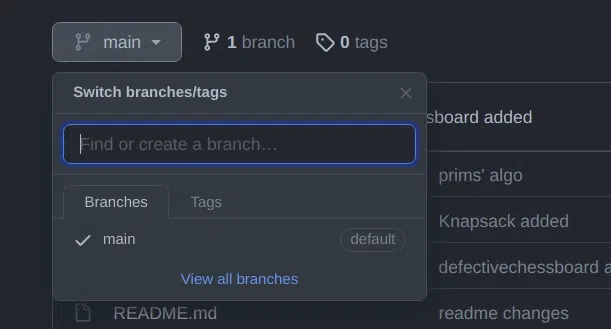
As you can see my remote branch is no more in my GitHub repo:
Common Error
error: unable to push to unqualified destination: remoteBranchName The destination refspec neither matches an existing ref on the remote nor begins with refs/, and we are unable to guess a prefix based on the source ref. error: failed to push some refs
**Reason: The branch may have already been deleted on the remote
**Fix: Sync Local Branch List
To update your local repository and remove references to deleted remote branches:
git fetch -p
- -p stands for prune in Git.
- It removes remote-tracking branches that no longer exist on the remote repository.
**Note: Always sync remote-tracking branches that no longer exist on the remote repository.
Local Deletion Vs Remote Deletion
Here are some differences:
| Local Deletion | Remote Deletion |
|---|---|
| Deletes a branch from your local machine only | Deletes a branch from the remote repository (e.g., GitHub) |
| Command: git branch -d branch-name | Command: git push origin --delete branch-name |
| Force delete using git branch -D branch-name | Shorthand: git push origin :branch-name |
| Safer with -d as it prevents deleting unmerged branches | No safety check so make sure the branch is not needed before deleting |
| Does not affect other developers’ copies | Affects all collaborators using the remote repository |