Git Merge (original) (raw)
Last Updated : 9 May, 2026
Git Merge combines changes from different branches into a single branch, integrating work while preserving history. It helps unify development without losing progress.
- Preserves commit history and creates a merge commit when needed.
- Performs fast-forward or automatic merges unless conflicts occur.
- Commonly used to integrate feature branches into the main branch.
Working
Using the diagrams below, we will see how git merge works what the repository looks like before the merge and how Git creates a new merge commit to combine histories.
Before Merge
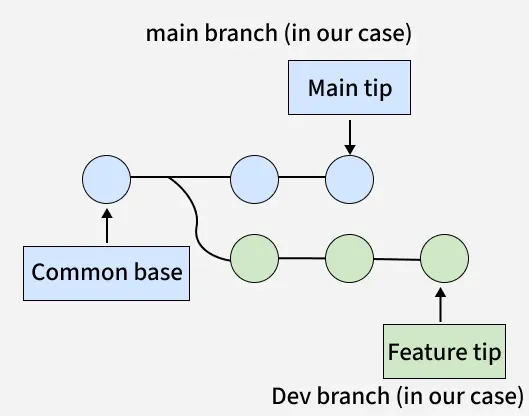
This image shows the state of the repository before the merge takes place.
**Elements
- The common base is the original commit where both branches split.
- The main branch contains stable code.
- The feature branch contains new development work.
- The main tip is the latest commit on the main branch.
- The feature tip is the latest commit on the feature branch.
**Interpretation
- Development has occurred independently on both branches.
- Both branches have diverged from a shared starting point.
- The feature branch is ready to be merged into the main branch.
After Merge

Git - Merge
This image shows what happens after executing a git merge.
**Elements
- The common base remains the shared starting point for both branches.
- The main branch now includes changes from the feature branch.
- The feature branch remains unchanged after the merge.
- The main tip becomes the new merge commit.
- The feature tip becomes part of the merged history.
**Interpretation
- Git compares the latest commit of both branches with the common base.
- Git automatically merges changes if no conflicts are found.
- Git creates a merge commit when branches have diverged.
Types of Merging in Git
Git supports several types of merging. The two most common types are:
1. Fast-forward merging
Occurs when Git advances the current branch pointer to the latest commit without creating a merge commit.
- Happens when the target branch is directly ahead of the current branch.
- Git moves the branch pointer forward instead of creating a new commit.
- Fast-forward merging only possible when branches have not diverged.

Git - Merge
2. Three-way merging
Occurs when branches have diverged, so Git creates a new merge commit by combining their changes.
- Happens when the base branch has new commits after branching.
- Git compares both branches with a common base commit.
- A new merge commit is created to combine changes.

Git - Merge
**Note: Git also supports recursive and octopus merging, where recursive is the default strategy for complex histories and octopus merge combines multiple branches in a single commit.
Steps to Perform Git Merge
To ensure smooth merging, follow these steps:
Step 1: Switch to the Target Branch
git checkout
Step 2: Pull the Latest Changes
git pull origin
Step 3: Merge the feature Branch
git merge
If conflicts occur, resolve them manually and then commit.
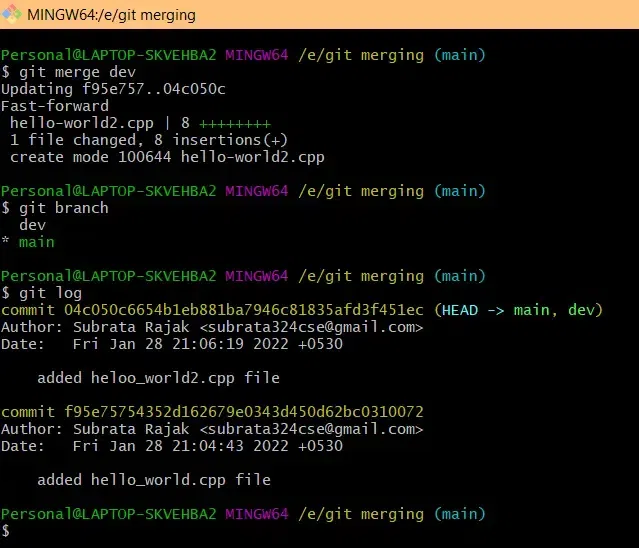
Step 4: Test the Merged Code
Verify that the application works correctly after merging.
Step 5: Push the change
git push origin
Git Merge Vs Rebase
Git merge combines branch histories with a merge commit, while rebase rewrites commits to create a linear history.
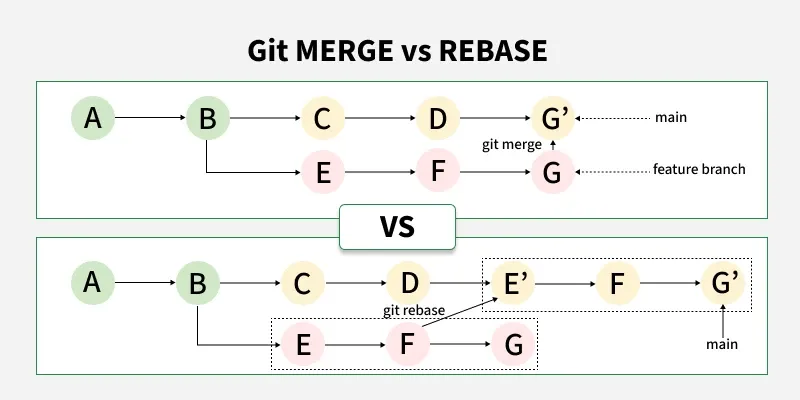
Git Merge vs Git Rebase
| Git Merge | Git Rebase |
|---|---|
| Combines changes from one branch into another with a merge commit. | Applies commits from one branch onto another by rewriting history. |
| Preserves the complete commit history. | Creates a linear history by removing merge commits. |
| Useful for integrating feature branches. | Ideal for a clean, simplified project history. |
| Does not alter existing commits. | Rewrites commit hashes and order. |