Git Stash (original) (raw)
Last Updated : 16 Jan, 2026
Git stash allows you to temporarily save uncommitted changes so you can switch tasks without committing incomplete work or losing progress.
- Stores unfinished changes safely and restores them later.
- Keeps commit history clean by avoiding partial commits.
- Useful when switching branches or pulling updates.
Characteristics of Git Stash
Here are the key characteristics of Git Stash:
- **Temporarily Saves Changes: Stores both staged and unstaged changes
- **Non-Disruptive: Does not modify branch or commit history
- **Stack-like Storage: Saves stashes with indexes for easy management
- **Context Switching: Allows switching tasks or branches without losing work
Git Stash Commands
Here are the basic and advanced commands we can use with Git stash:
1. Stashing Changes
To stash our current changes, use:
git stash
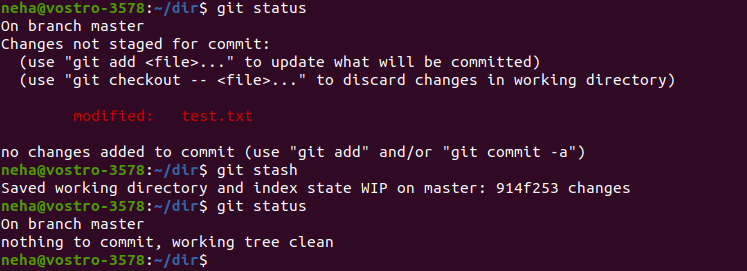
git stash
This saves modifications in tracked files and clears the working directory. Untracked and ignored files are not included by default.
**Stashing with a Message: we can add a description to our stash, which is useful if we have multiple stashes:
git stash push -m "Work in progress on feature X"
**Stashing Including Untracked Files: To include untracked files in our stash, use the -u (or --include-untracked) option:
git stash -u
2. Listing Stashes
To see all stashes saved in our repository, use
git stash list

git stash list
3. Applying Stashes
- To apply the most recent stash, use:
git stash apply

Applying Stashes
- Apply a specific stash
git stash apply stash@{1}
- Apply and remove the stash simultaneously
git stash pop

git stash pop
This applies the latest stash and removes it from the list.
4. Dropping a Stash
- To delete a specific stash:
git stash drop stash@{0}
- To remove the most recent stash:
git stash drop
5. Clearing All Stashes
- To delete all stashes permanently:
git stash clear

git stash clear
Use with caution, as this action cannot be undone.
6. Creating a Branch from a Stash
- If we want to preserve stashed changes in a new branch:
git stash branch new-branch-name
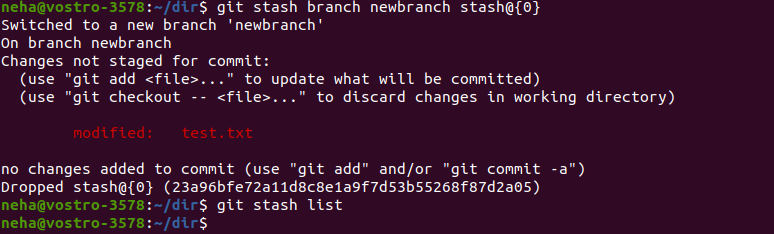
git stash branch new-branch-name
Common Use Cases for Git Stash
The below are the common use cases of git stash:
- **Switching Branches: Save uncommitted changes and switch branches without losing work.
- **Pulling Latest Changes: Stash local changes before pulling updates to avoid conflicts.
- **Temporary Task Switching: Pause current work, handle another task, and restore changes later.
Best Practices for Using Git Stash
- **Use Descriptive Messages: Helps in identifying different stashes easily.
- **Regularly Clean Up Stashes: Apply or drop stashes to avoid unnecessary clutter.
- **Be Mindful of Conflicts: Applying a stash may lead to conflicts that need manual resolution.
- **Stash Untracked Files When Necessary: Use -u if we need to save untracked files.
- **Check our Work Before Stashing: Ensure we don’t stash incomplete or unnecessary changes.