Exporting a Git Project (original) (raw)
Last Updated : 26 Mar, 2026
Git export means creating a copy of a repository without the .git folder, containing only project files. It is done using git archive since no direct export command exists.
- Git export is performed using git archive and does not include the .git directory, so version history is removed.
- Only committed files are exported, while uncommitted changes are not included.
- Supports multiple formats (tar, zip, bz2) and can exclude files like .gitignore using .gitattributes
Using git archive for Export
There is no direct command called git export in Git. Instead, we use the git archive command.
Syntax
git archive [--format=] [--list] [--prefix=/] []
[-o | --output=] [--worktree-attributes]
[--remote= [--exec=]]
[
**Example 1: Export to another directory (tar format)
git archive master | tar -x -C /somewhere/else
- Extracts repository files directly into the specified directory
- Does not create any compressed file (direct extraction)
- Exported files do not include .git folder (not a Git repo)
**Example 2: Export as compressed file (bz2 format)
git archive master | bzip2 > source-tree.tar.bz2
- Saves the archive in bzip2 compressed format.
- File name: source-tree.tar.bz2
**Example 3: Export as ZIP file
git archive --format zip --output /full/path/to/zipfile.zip master
- Creates a compressed .zip file at the specified location.
- Easy to share and extract on any system.
Note: By default, git archive creates a tar file, which can be compressed (gzip/bzip2), and the export includes only project files without the .git folder.
Even though .git is excluded, some hidden files may still be present:
- .gitignore
- .gitattributes
To exclude them, add in .gitattributes:
/test export-ignore
.gitattributes export-ignore
.gitignore export-ignore
Exporting from Index
To export files from the staging area (index):
git checkout-index -a -f --prefix=/destination/path/
Exporting a Repository
Exporting a repository means creating a copy of project files without Git history.
Step 1: Navigate to Repository
- Open Git Bash
- Go to the repository you want to export
- Example: Repository name is Ada August-a Challenge (main branch)

Step 2: Export the Repository
- Export the repository to your preferred format and location
- Example (export in .bz2 format in same location):
git archive master | bzip2 > Ada-August-a-Challenge.tar.bz2
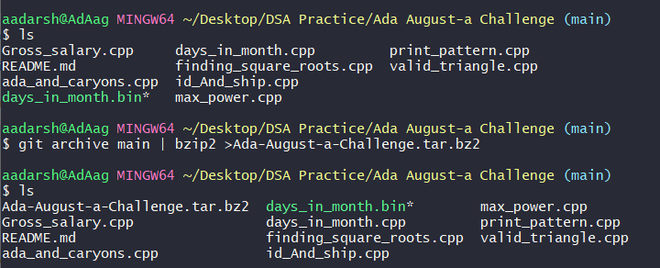
- A new file Ada-August-a-Challenge.tar.bz2 will be created.
- This file is the archived version of your repository.
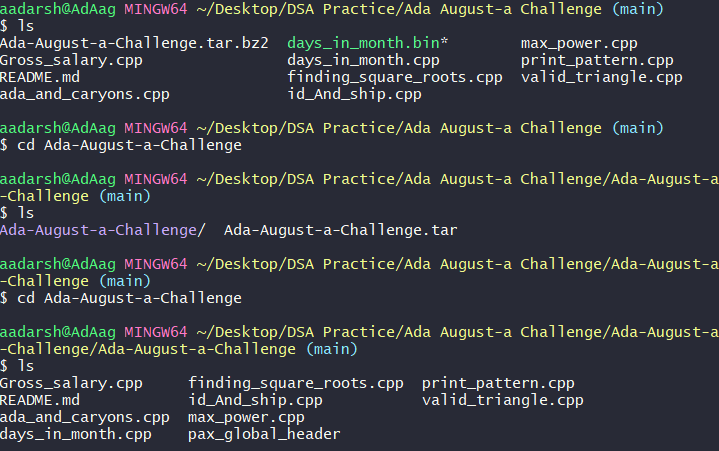
- Unzip the .bz2 file: It generates a .tar file.
- Extract the .tar file: You will get all project files.