Installing Git Using npm (original) (raw)
Last Updated : 11 May, 2026
NPM is a package manager for Node.js used to install and manage JavaScript packages. It helps in:
- Accessing the npm registry, the largest collection of software packages.
- Installing and managing modules through the command-line client.
- Sharing and distributing JavaScript libraries.
- Supporting development workflows by handling dependencies.
**Note: npm does not verify or vet packages uploaded to its repository, therefore, one must carefully select only well-maintained, updated, and popular packages, to prevent security risks.
Steps to Install Git by NPM
Here are the steps for Git installation using npm package.
**Step 1: Search for PowerShell, right-click on it, and select Run as Administrator.
**Step 2: Verify if npm is Installed
Type the following command in the PowerShell terminal:
npm
- If a version number appears, then npm is installed
- If the command is not recognised, then npm is not installed

If the output displayed on the console is of the following type:

Then npm is not installed in your system.
**Step 3: Type the following command in the Powershell Terminal.
npm install git
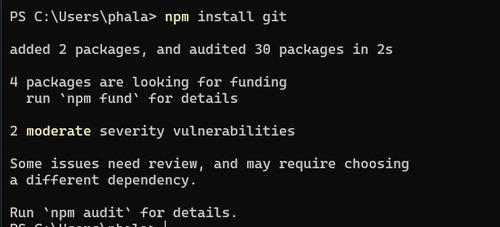
**Step 4: To verify if git is installed, check the packages installed under npm by typing the following command in the Powershell Terminal.
npm list

- If git appears in the list, the installation was successful.
- The npm registry contains millions of packages available for installation.
- Use npm uninstall package_name to remove a package from the directory.