Introduction to Git Branch (original) (raw)
Last Updated : 15 Jan, 2026
A Git branch is a separate workspace used to make changes without affecting the main project. Once the work is complete, the changes can be merged back into the main or master branch.
Branches make it easy to:
- Manage different tasks or features independently
- Test changes without affecting live code
- Collaborate with others efficiently
Working of Git Branch
Git branches allow you to manage different tasks or features in isolation without affecting the main project. Here’s how it works:
- **Main Branch: Holds stable, production-ready code and remains deployable at all times.
- **Feature Branch: Created to develop new features or fix bugs without affecting the main branch.
- **Commits: Changes are saved as commits, each recording a snapshot of work and maintaining history.
- **Merging: Completed work from the feature branch is merged into the main branch to update the project.
Types of Branches in Git
Git uses different types of branches to keep things organized and allow you to work on different tasks without disturbing the main project. Here are the most common types of branches you will work with:
- **Main (or Master) Branch: Stores the final, stable, and production-ready code.
- **Hotfix Branch: Used to quickly fix critical production issues and then merged back into main.
- **Release Branch: Prepares a new version for release, allowing final testing and minor fixes before merging.
- **Develop Branch: Combines all completed features for integration, testing, and ongoing development.
- **Feature Branch: Created to develop a specific feature and merged back into the develop or main branch once complete.
Basic Git Branching Commands
Below are some essential Git branching commands that everyone should learn when starting to work with Git branching:
1. git branch
Lists all local branches or creates a new branch when used with a name means it displays a list of all local branches or creates a new branch if a name is specified.

git branch
2. git branch
Creates a new branch with the specified name without switching to it, allowing you to stay on your current branch.

git branch
3. git checkout
Switches to an existing branch in the repository, allowing you to continue working from where it was last updated.

git checkout
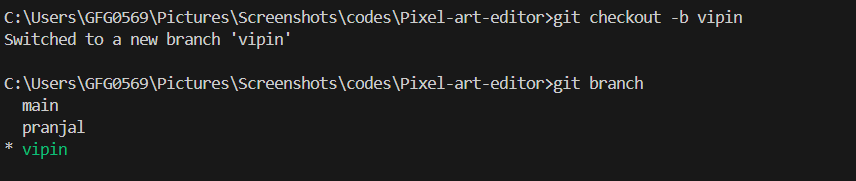
4. git checkout -b
Creates a new branch with the specified name and immediately switches to it, allowing you to start working on it right away.
git checkout -b
5. git switch
A modern alternative to the checkout command, primarily used for switching branches more efficiently and intuitively.

git switch
6. git switch -c
Creates a new branch with the specified name and switches to it immediately, allowing you to start making changes right away.

git switch -c
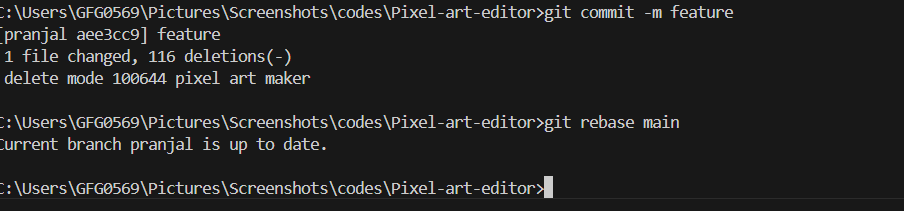
7. git rebase
git rebase main rewrites the feature branch commits so they appear as if they were created from the latest commit of main.
**Before rebase
main: A --- B --- C
\
feature: D --- E
**After rebase
main: A --- B --- C
\
feature: D' --- E'
git rebase
8. git branch -d
Deletes the specified branch, but only if it has been fully merged into its upstream branch, ensuring no unmerged changes are lost.

git branch -d
9. git branch -D
Forcefully deletes the specified branch, even if it contains unmerged changes or has not been fully updated, potentially leading to data loss.

git branch -D