States of a File in Git Working Directory (original) (raw)
Last Updated : 13 Mar, 2026
In Git, files in the working directory move through different states during the development process, helping track and manage changes before they are committed.
- **Modified: The file has been changed but not yet staged for commit.
- **Staged: The modified file is added to the staging area and is ready to be committed.
- **Committed: The file changes are permanently recorded in the repository history.
Git Workflow
Git workflow describes how changes move through different areas of Git before being permanently stored in the repository.
- **Working Directory: The current state of your project files.
- **Staging Area (Index): A place where you can group changes before committing them.
- **Repository (HEAD): The history of your project, including all committed changes.
Git File States
Git tracks files through different states in the working directory as they move from modification to staging and finally to being committed in the repository.
1. Untracked state
Untracked files are files in the working directory that Git is not currently tracking because they were not included in the previous commit.
- New files added to the working directory are treated as untracked by Git.
- These files are not part of the staging area or the last commit snapshot.
- The git status command shows untracked files in the repository.
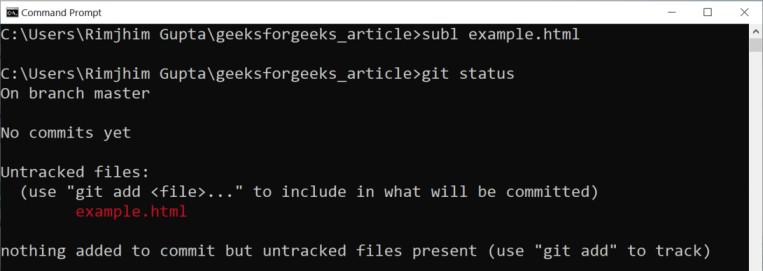
Untracked State in Git
2. Tracked state
Tracked files are files that Git already knows about because they were included in the last commit snapshot.
- These files are monitored by Git for any changes.
- A tracked file can exist in different states during development.
3. Modified State
A modified file is a tracked file whose contents have been changed but the changes have not yet been committed.
- Changes may include adding, editing, or deleting content in the file.
- These changes are detected by Git but are not yet staged for commit.
- The git status command shows files that are in the modified state.
.jpg)
Modified States in Git
4. Staging State
A staged file is a file that has been prepared and marked by Git to be included in the next commit.
- Files are added to the staging area using the git add command.
- Both untracked and modified files can be moved to the staging state.

Staging State
Now, stage our modified tracked example.html file and run the git status command.
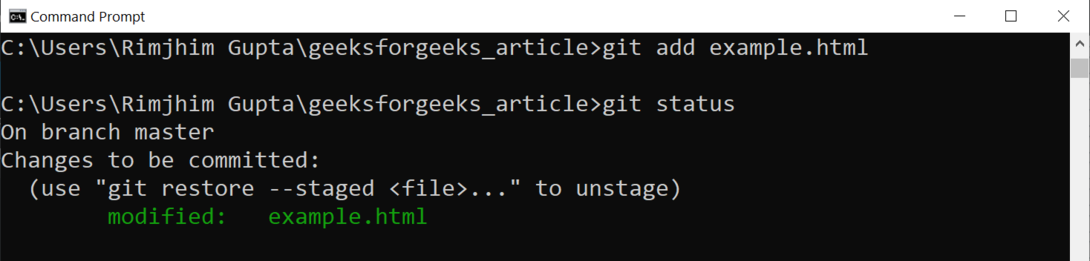
Modified Tracked file
5. Committed State
A committed file is a file whose changes are permanently saved as a snapshot in the Git repository.
- Files are committed using the git commit command.
- Each commit creates a new snapshot of the changes in the Git directory.
.png)
Git Commit