Git Undo Operations (original) (raw)
Last Updated : 7 May, 2026
Undoing in Git refers to reversing changes in a repository, similar to an undo operation in a text editor. It helps restore previous states and correct mistakes efficiently.
- Fix errors by reverting unwanted changes.
- Restore files or commits to a previous state.
- Manage and control commit history safely.
Common Scenarios for Undoing the Changes
Common scenarios include undoing staged, unstaged, committed, or merged changes to restore the desired project state.
- **Unstaging Changes: Remove changes from the staging area.
- **Discarding Local Changes: Revert changes in the working directory.
- **Amending the Last Commit: Modify the most recent commit.
- **Reverting Commits: Create a new commit that undoes previous changes.
- **Resetting Commits: Move HEAD to a previous commit (with/without changes).
Git Undo Operations
Return to a Previous Commit
Allows moving HEAD to an earlier commit to revisit or modify history.
- Navigate to any past commit state.
- Optionally preserve or discard changes.
- Useful for reworking recent commits.
**1. Move to a Specific Commit (Detached HEAD)
Moves HEAD to a specific commit without affecting branches.
git checkout
- Moves HEAD to a specific commit
- Creates a detached HEAD state
- New commits won’t affect any branch
**Example:
git checkout B
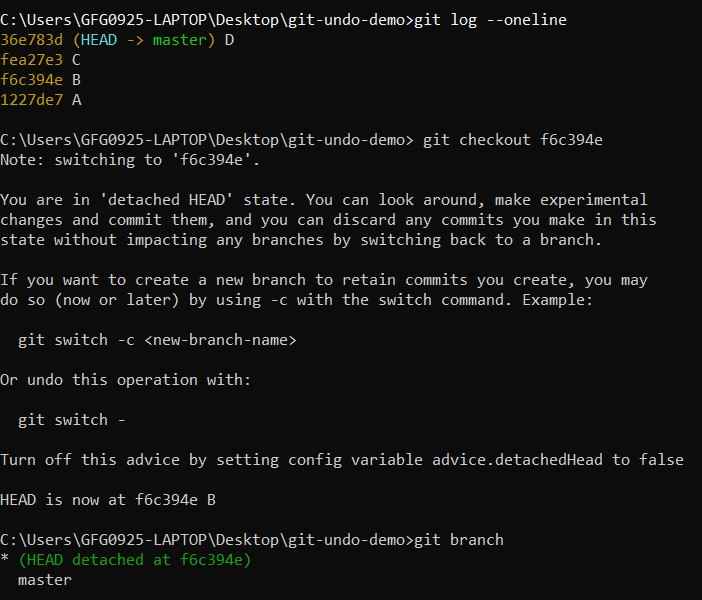
Output
**2. Create a Branch from That Commit
Creates a new branch from a previous commit to continue work safely.
git checkout -b
**Example:
git checkout -b new-branch B

Output
**3. Reset While Keeping Changes Staged
Moves HEAD back while keeping changes in the staging area.
git reset --soft
**Example:
git reset --soft C
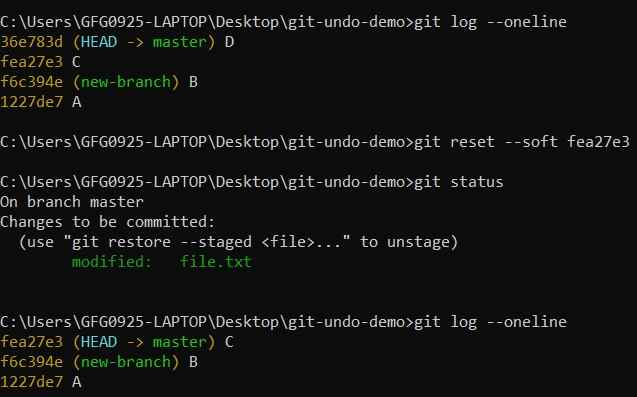
Output
**4. Reset and Keep Changes Unstaged
Moves HEAD back and keeps changes in working directory.
git reset HEAD~
**Example:
git reset HEAD~2

Output
**5. Reset and Discard Changes Completely
Moves HEAD back and deletes all changes after that commit.
git reset --hard
**Example:
git reset --hard C
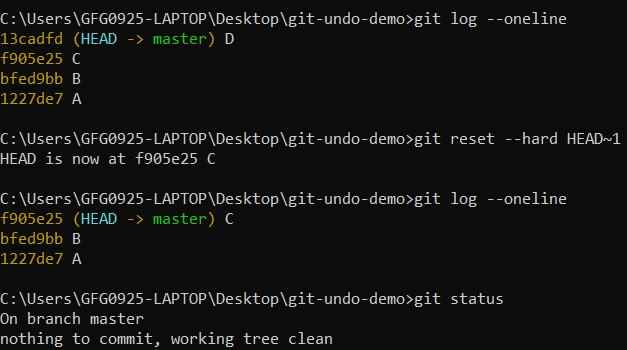
Output
Undoing Local Changes
Reverts modifications in the working directory before committing.
- Discard unwanted file changes.
- Restore files to last committed state.
- Clean working directory quickly.
**1. Undo Changes in a File
Restores a specific file to its last committed version.
git checkout --
**Example:
git checkout -- file.txt
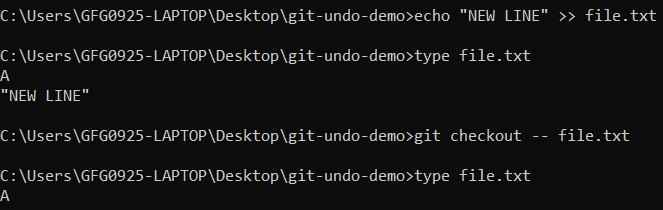
Output
**2. Undo All Local Changes
Discards all changes in the working directory.
git checkout -- .
**Example:
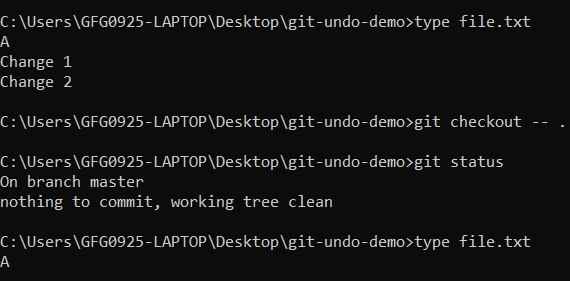
Output
Using Reflog (Recovery Mechanism)
Tracks all HEAD movements and helps recover lost commits.
- Maintains history of actions (~90 days).
- Recovers deleted or reset commits.
- Useful safety mechanism.
**1. View Reflog History
Displays history of HEAD changes.
git reflog
**Example:
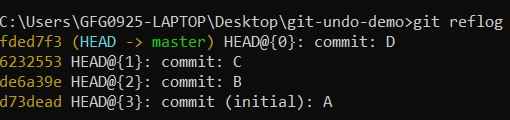
Output
**2. Restore Previous State
Moves repository back to a previous state.
git reset --hard
**Example:
git reset --hard HEAD@{1}
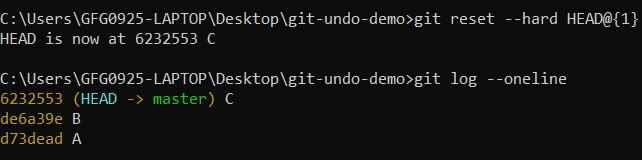
Output
Undoing Merge
A merge combines changes from one branch into another. Undoing it depends on whether the merge has been pushed and whether you want to keep history intact.
**1. Not Pushed
Removes merge commits before pushing to remote.
- Fix incorrect merges locally.
- Removes merge commit completely.
- Affects local history only.
**Undo Merge Commit
Removes the latest merge commit.
git reset --hard HEAD~
**Example:
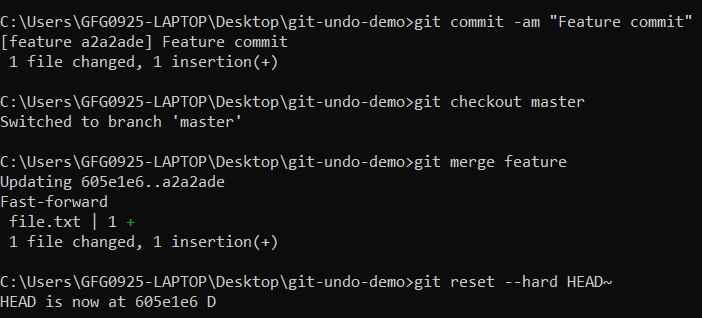
Output
**2. Already Pushed
Safely reverses a merge commit without rewriting history.
- Safe for shared repositories.
- Creates a new commit and preserves history.
**Revert Merge Commit
Reverses the changes introduced by a merge.
git revert - m 1
**Example:
git revert -m 1 M
**Note: Running git revert opens an editor to edit the commit message. You can accept the default message or use --no-edit to skip the editor.
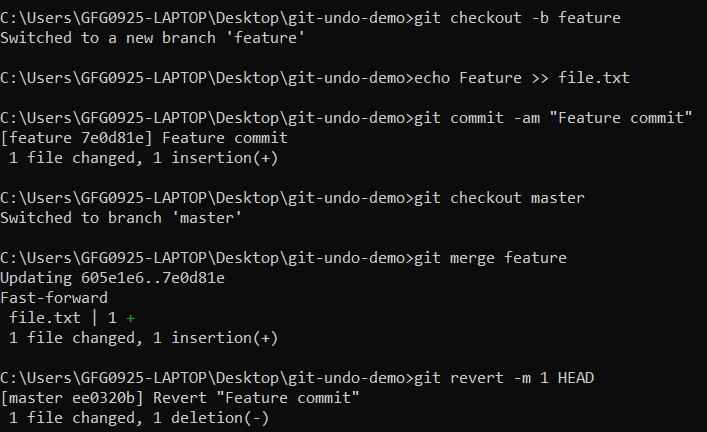
Output
Reverting Commits
Creates a new commit to undo changes from previous commits.
- Does not delete history and safe for remote repositories.
- Preferred for shared work.
**1. Revert Last Commit
Creates a new commit undoing the latest commit.
git revert HEAD
**Example:
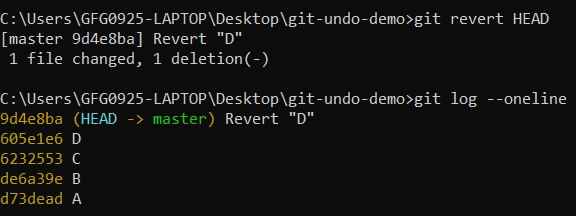
Output
**2. Revert Specific Commit
Reverses changes from a selected commit.
git revert
**Example:
git revert B
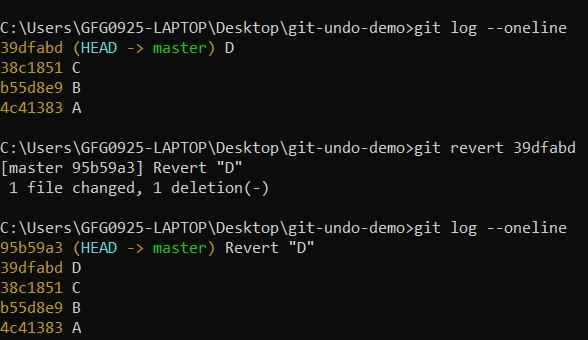
Output