Git Add (original) (raw)
Last Updated : 14 Mar, 2026
git add is a Git command used to move changes from the working directory to the staging area, preparing them for the next commit.
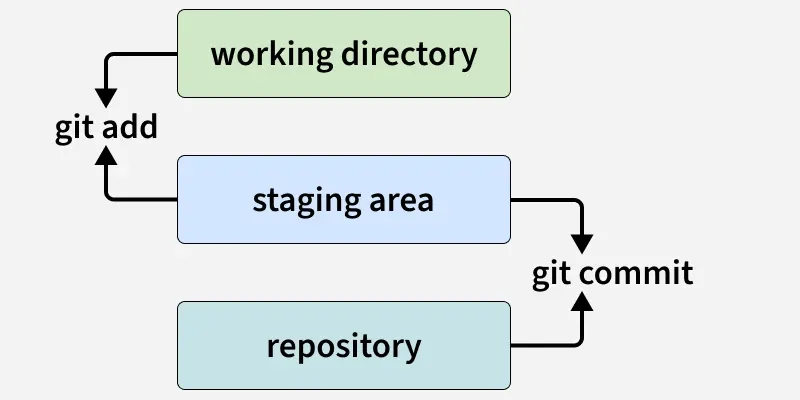
- **Stages Changes: Moves modified or new files to the staging area.
- **Selective Staging: You can add individual files, multiple files, or all files at once.
- **Prepares for Commit: Only staged files are committed when running git commit.
- **Supports Partial Changes: With options, you can stage only certain parts of a file.
Using git add
The git add command stages specific files or changes so they can be included in the next commit.
1. Add a Single File
Stages filename.txt for the next commit.
git add filename.txt
2. Add Multiple Files
Stages file1.txt and file2.txt.
git add file1.txt file2.txt
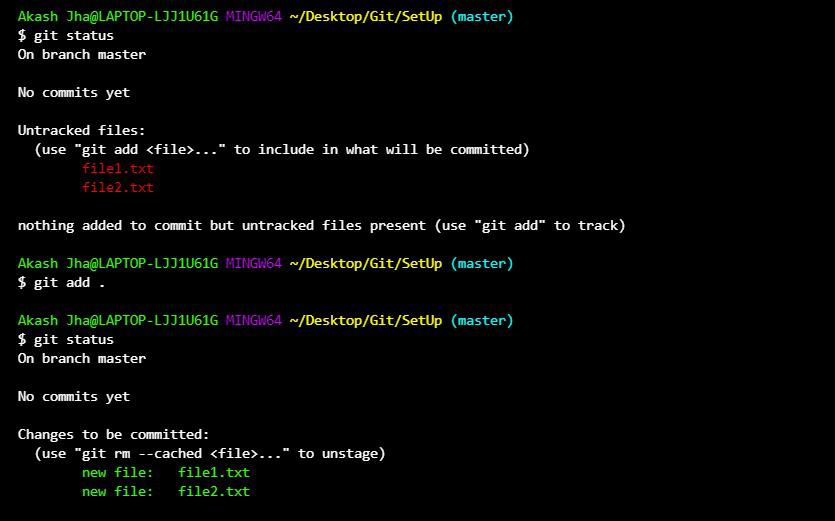
3. Add All Files in the Directory
Stages all modified, new, and deleted files in the current directory and its subdirectories.
git add .
4. Add Specific Patterns
Stages all .txt files in the current directory.
git add *.txt
5. Stage Parts of a File
Allows you to interactively select hunks of changes to stage.
git add -p filename.txt
Common Options for git add
Common options for git add allow you to stage files and changes in different ways depending on your workflow.
| Option | Description |
|---|---|
| . | Stage all changes in current directory |
| -A | Stage all changes including deletions |
| -u | Stage modified and deleted files, ignore untracked files |
| -p | Stage changes interactively by hunk |
| -n | Show what would be staged without actually staging |
Untracked Files Vs Tracked Files
Here are the differences between untracked and tracked files:
| Untracked Files | Tracked Files |
|---|---|
| Files that Git is not yet monitoring. | Files that Git is already monitoring (after being added once). |
| Created newly in the project but never staged or committed. | Already committed at least once in the past. |
| Need to be added using git add before they can be committed. | Changes must be staged again with git add before committing. |
| Example: A new file notes.txt you just created. | Example: Editing app.js that was already in the repo. |