Git Init (original) (raw)
Last Updated : 11 May, 2026
Git init is a command used to initialize a new Git repository. It creates a hidden .git folder in your project directory, which allows Git to start tracking changes, manage versions, and support collaboration.
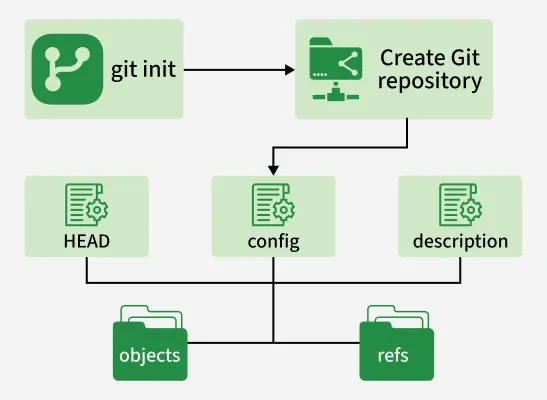
- **HEAD: Points to the current branch (usually main).
- **config: Stores repository settings like username, email, and Git preferences.
- **description: Contains a short description of the repository (optional).
- **objects folder: Stores Git data such as file versions, commits, and snapshots.
- **refs folder: Holds references to branches and tags that point to commits.
Characteristics of Git init
git init prepares a directory to be tracked by Git by creating the necessary repository structure and configuration.
- **Create a Repository: Initializes a new Git repository in the current directory.
- **Hidden .git Folder: Stores all metadata, history, and configuration for the repository.
- **Start Tracking Files: After git init, you can stage (git add) and commit (git commit) files.
- **Works on New or Existing Projects: Can initialize Git in an empty folder or an existing project.
- **Optional Remote Connection: Can link to GitHub, GitLab, or other remote repositories.
- **Foundation for Branching: Enables creating and managing branches for parallel development.
- **No Automatic Tracking: Only tracks files you explicitly add to the staging area.
Using git Init
git init sets up a new Git repository by creating the necessary files and directories required for version control.
1. Navigate to Your Project Directory
Use the terminal to move to the folder where you want the repository:
cd path/to/your/project
2. Initialize the Repository
Run the following command:
git init
This creates a .git folder in your project directory. You can check its presence with:
ls -a
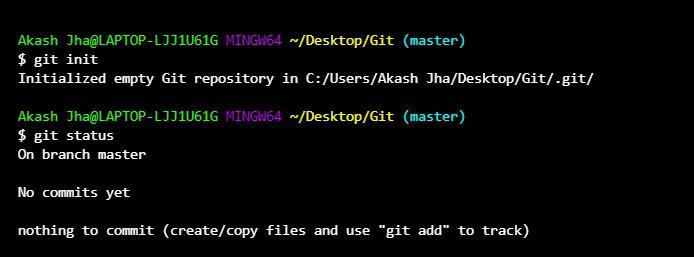
git init
3. Start Tracking Files
After initializing, you can start adding files:
git add .
git commit -m "Initial commit"
4. Optional: Connect to a Remote Repository
If you want to push your project to GitHub or another Git host, add the remote repository:
git remote add origin
git push -u origin main
Git init Options
The following are some commonly used options with the git init command.
**Initialize in a specific directory:
git init
**Create a bare repository:
git init --bare
**Quiet mode:
git init -q
**Shared repository:
git init --shared
Allows multiple users to access and collaborate on the repository.
Bare Repositories
A bare repository does not contain a working directory. It only stores Git metadata and version history.
**Syntax:
git init --bare
Git bare repositories are mainly used as the central repository from where the other developers can push and pull the repositories.
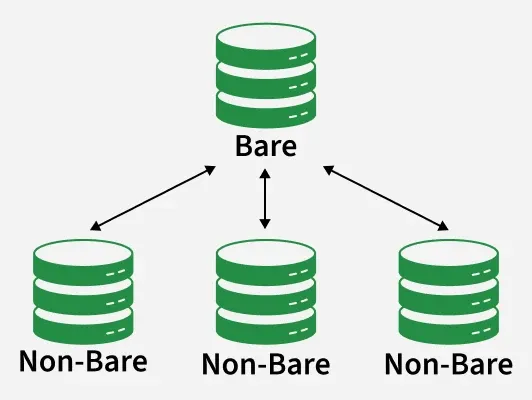
**Use Case: Bare repositories are commonly used as central repositories where developers push and pull changes.
Git init Templates
Git init templates allow predefined files and settings to be automatically added when a new Git repository is initialized. They help maintain a consistent repository setup.
- Template files are copied into the .git directory when git init is executed.
- Used to include default hooks, configuration files, or directory structures.
- A custom template directory can be specified using git init --template=.
Git init Vs Git clone
Here are the differences between git init and git clone.
| Git init | Git clone |
|---|---|
| Initializes a new Git repository in a local directory. | Creates a copy of an existing remote repository on the local machine. |
| Used when starting a new project locally. | Used to download an existing project from a remote repository. |
| Creates a .git directory containing Git configuration and metadata. | Copies all files, commits, branches, and history from the remote repository. |
| Repository starts empty and files must be added and committed manually. | Repository is ready to use immediately after cloning. |
| Command: git init | Command: git clone <repository_url> |