README.md File (original) (raw)
Last Updated : 11 May, 2026
A README.md is an important document in a repository that introduces the project and explains its purpose, setup, and usage to help users and developers understand and contribute to it.
- Uses Markdown (.md) for formatted documentation and is usually the first file users read in a project.
- Provides a project overview, installation instructions, configuration details, and usage examples such as code or command-line commands.
- May include license information, contributor credits, and appears well-formatted on platforms like GitHub.
Basic Structure of README.md
A typical README.md may include the following sections:
- **Project Title : The name of project, usually written as a main heading in Markdown to clearly identify the repository.
- **Description: A short explanation of what the project does and its purpose.
- **Installation: Steps required to set up and install the project locally.
- **Usage: Examples showing how to run or use the project.
- **Contributing: Guidelines for developers who want to contribute to the project.
- **License: Information about the software license (e.g., MIT License, Apache License).
- **Contact: Maintainer’s email or other contact information for support or queries.
Markdown
Markdown is a lightweight markup language used to format text files like README.md in GitHub repositories. GitHub supports an extended version called GitHub Flavored Markdown (GFM) with extra features for developers.
1. Headings
Headings in Markdown are used to organize content and divide text into clear sections.
- Headings make your text more readable and help to break up the topics.
- In Markdown, headings are formatted with hashes (#) in front of the line containing your heading.
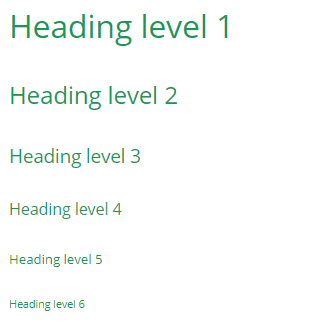
- You can use up to six hashes, with the number of hashes corresponding to a heading level.
**Syntax:
Heading level 1
Heading level 2
Heading level 3
Heading level 4
Heading level 5
Heading level 6
**Formatted text:
2. Paragraphs
Paragraphs separate blocks of text to improve readability and structure in a document.
- To split your information up into paragraphs (with a noticeable gap between each paragraph).
- Paragraphs are divided by a blank line (a line containing no characters) between consecutive paragraphs.
**Syntax:
Paragraph 1
Paragraph 2
3. Line breaks
Line breaks are used to move text to a new line without creating a new paragraph.
- Creates a new line with less space than a paragraph.
- Added by placing two spaces at the end of a line.
- Press Enter after the spaces to render the line break.
**Syntax:
Line 1
Line 2
4. Text Formatting
Text formatting in Markdown is used to emphasize or modify the appearance of text.
- **Italic: *italic*
- **Bold: **bold**
- **Bold + Italic: ***text***
- **Strikethrough: ~~text~~
5. Links
Links in Markdown are used to connect text to external webpages or resources.
- Created using two sets of brackets.
- Place the link text in [ ] and the URL in ( ).
6. Images
- Inserting an image into your Markdown file is similar to the formatting for links.
- Begin your image formatting with an exclamation mark. Next, use square brackets to wrap your image alt text, next to parentheses containing the URL for your image.
- Ensure there are no spaces between the exclamation mark, square brackets, or parentheses.
- When your Markdown file renders to HTML, it will embed the image directly into the body text.
**Example:
, hyphens (-), or plus signs (+).
- It's up to you to choose which symbol you prefer. The result you get is the same.
- Item 1
- Item 2
- Sub-item
**Ordered lists
- Format your ordered lists by preceding each list item with a number, followed by a full stop and then a space.
- In Markdown, it doesn't matter which numbers you use to format your list, as the list will always render as 1, 2, 3, and so on.
- First
- Second
8. Blockquotes
Blockquotes in Markdown are used to display quoted text or references from external sources.
- Created by placing a > symbol at the beginning of a line.
- Used to highlight quotations or referenced text.
This is a blockquote
9. Horizontal rules
Horizontal rules are used to visually separate sections of content in a Markdown document.
- Created using three or more -, *, or _ symbols on a line.
- Used to divide blocks of text for better readability.
10. Code snippets
Code snippets in Markdown are used to display short pieces of code within text.
- Created using backticks (`) around the code.
- The first backtick opens and the second backtick closes the snippet.
This is a code snippet.
11. Code blocks
Code blocks are used to display larger sections of code in a Markdown document.
- Created by indenting each line with one tab or four spaces.
- Used for displaying multiple lines of code.
- Language can be specified to enable syntax highlighting.
if (isAwesome){
 return true
}
GitHub Flavored Markdown
GitHub Flavored Markdown is an extension of standard Markdown used on GitHub that provides additional formatting features for better documentation and collaboration.
- Supports tables, task lists, and strikethrough formatting.
- Allows syntax highlighting for code blocks.
- Improves readability and structure in GitHub repositories.
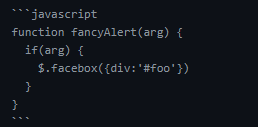
1. Syntax highlighting
This highlights the syntax.
**Example:
2. Task Lists
Task lists in GitHub Flavored Markdown are used to track tasks or progress in issues and pull requests.
- Created using - [ ] for incomplete and - [x] for completed tasks.
- Displays a progress indicator when used in the first comment of an Issue.
- Works in Issues and Pull Requests on GitHub.
- @mentions, #refs, links, formatting, and
tagssupported - list syntax required (any unordered or ordered list supported)
- this is a complete item
- this is an incomplete item
3. Tables
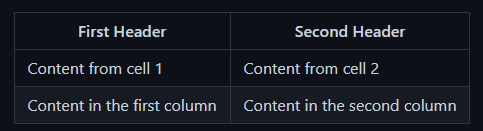
Tables in Markdown are used to organize information into rows and columns for better readability.
- Created using hyphens (-) for the header separator and pipes (|) to separate columns.
- Useful for displaying structured data in a tabular format.
**Formatted text:
4. Username @mentions
@mentions in GitHub notify a user or team when they are referenced in a comment or discussion.
- Created by typing @ followed by a username.
- Can also mention teams within an organization.
5. Automatic linking for URLs
GitHub automatically converts URLs in Markdown into clickable links.
- Any URL written in the text becomes a clickable link automatically.
- Works without needing Markdown link syntax [ ]( ).
- Example: https://github.com/ will automatically appear as a clickable link.
6. Mathematical expressions
Markdown can display mathematical formulas or equations using special syntax.
- Written using ......... around the mathematical expression.
- Used to display mathematical formulas or equations in documents.
**Syntax: <>∗∗∗∗Example:∗∗**Example:∗∗∗∗Example:∗∗\sqrt{3}+1$$
**Output:
√3+1
Example of README.md
My First Project
Description
This project helps users manage tasks efficiently.
Installation
- Clone the repository
- Run
npm install - Start the server with
npm start
Usage
Visit http://localhost:3000 in your browser to use the application.
Contributing
Feel free to submit pull requests or open issues.
License
MIT License
Contact
Email: example@domain.com
Purpose of README.md
The primary purpose of a README.md file is to provide essential information about the project. This includes:
- **Project Overview: Explains what the project is about and its main features.
- **Installation Instructions: Guides users on how to install and set up the project.
- **Usage Instructions: Shows how to use the project effectively.
- **Contributing Guidelines: Provides instructions for developers who want to contribute.
- **License Information: Specifies the license under which the project is released.
- **Contact Information: Details on how to reach the maintainer or team.