Channel in Golang (original) (raw)
Last Updated : 20 Nov, 2019
In Go language, a channel is a medium through which a goroutine communicates with another goroutine and this communication is lock-free. Or in other words, a channel is a technique which allows to let one goroutine to send data to another goroutine. By default channel is bidirectional, means the goroutines can send or receive data through the same channel as shown in the below image: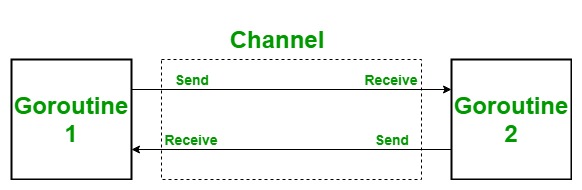
Creating a Channel
In Go language, a channel is created using chan keyword and it can only transfer data of the same type, different types of data are not allowed to transport from the same channel. Syntax:
var Channel_name chan Type
You can also create a channel using make() function using a shorthand declaration.Syntax:
channel_name:= make(chan Type)
Example:
C `
// Go program to illustrate // how to create a channel package main
import "fmt"
func main() {
// Creating a channel
// Using var keyword
var mychannel chan int
fmt.Println("Value of the channel: ", mychannel)
fmt.Printf("Type of the channel: %T ", mychannel)

// Creating a channel using make() function
mychannel1 := make(chan int)
fmt.Println("\nValue of the channel1: ", mychannel1)
fmt.Printf("Type of the channel1: %T ", mychannel1)
}
`
Output:
Value of the channel:
Type of the channel: chan int
Value of the channel1: 0x432080
Type of the channel1: chan int
Send and Receive Data From a Channel
In Go language, channel work with two principal operations one is sending and another one is receiving, both the operations collectively known as communication. And the direction of <- operator indicates whether the data is received or send. In the channel, the send and receive operation block until another side is not ready by default. It allows goroutine to synchronize with each other without explicit locks or condition variables.
- Send operation: The send operation is used to send data from one goroutine to another goroutine with the help of a channel. Values like int, float64, and bool can safe and easy to send through a channel because they are copied so there is no risk of accidental concurrent access of the same value. Similarly, strings are also safe to transfer because they are immutable. But for sending pointers or reference like a slice, map, etc. through a channel are not safe because the value of pointers or reference may change by sending goroutine or by the receiving goroutine at the same time and the result is unpredicted. So, when you use pointers or references in the channel you must make sure that they can only access by the one goroutine at a time.
Mychannel <- element
The above statement indicates that the data(element) send to the channel(Mychannel) with the help of a <- operator. - Receive operation: The receive operation is used to receive the data sent by the send operator.
element := <-Mychannel
The above statement indicates that the element receives data from the channel(Mychannel). If the result of the received statement is not going to use is also a valid statement. You can also write a receive statement as:
<-Mychannel
Example:
C `
// Go program to illustrate send // and receive operation package main
import "fmt"
func myfunc(ch chan int) {
fmt.Println(234 + <-ch)} func main() { fmt.Println("start Main method") // Creating a channel ch := make(chan int)
go myfunc(ch)
ch <- 23
fmt.Println("End Main method")
}
`
Output:
start Main method 257 End Main method
Closing a Channel
You can also close a channel with the help of close() function. This is an in-built function and sets a flag which indicates that no more value will send to this channel.Syntax:
close()
You can also close the channel using for range loop. Here, the receiver goroutine can check the channel is open or close with the help of the given syntax:
ele, ok:= <- Mychannel
Here, if the value of ok is true which means the channel is open so, read operations can be performed. And if the value of is false which means the channel is closed so, read operations are not going to perform.Example:
C `
// Go program to illustrate how // to close a channel using for // range loop and close function package main
import "fmt"
// Function func myfun(mychnl chan string) {
for v := 0; v < 4; v++ {
    mychnl <- "GeeksforGeeks"
}
close(mychnl)
}
// Main function func main() {
// Creating a channel
c := make(chan string)

// calling Goroutine
go myfun(c)

// When the value of ok is
// set to true means the
// channel is open and it
// can send or receive data
// When the value of ok is set to
// false means the channel is closed
for {
    res, ok := <-c
    if ok == false {
        fmt.Println("Channel Close ", ok)
        break
    }
    fmt.Println("Channel Open ", res, ok)
}
}
`
Output:
Channel Open GeeksforGeeks true Channel Open GeeksforGeeks true Channel Open GeeksforGeeks true Channel Open GeeksforGeeks true Channel Close false
Important Points
- Blocking Send and Receive: In the channel when the data sent to a channel the control is blocked in that send statement until other goroutine reads from that channel. Similarly, when a channel receives data from the goroutine the read statement block until another goroutine statement.
- Zero Value Channel: The zero value of the channel is nil.
- For loop in Channel: A for loop can iterate over the sequential values sent on the channel until it closed.Syntax:
for item := range Chnl {
// statements..
}
Example: C// Go program to illustrate how to // use for loop in the channel package main import "fmt" // Main function func main() { // Creating a channel // Using make() function mychnl := make(chan string) // Anonymous goroutine go func() { mychnl <- "GFG" mychnl <- "gfg" mychnl <- "Geeks" mychnl <- "GeeksforGeeks" close(mychnl) }() // Using for loop for res := range mychnl { fmt.Println(res) } }Output:
GFG
gfg
Geeks
GeeksforGeeks - Length of the Channel: In channel, you can find the length of the channel using len() function. Here, the length indicates the number of value queued in the channel buffer. Example: C
// Go program to illustrate how to // find the length of the channel package main import "fmt" a // Main function func main() { // Creating a channel // Using make() function mychnl := make(chan string, 4) mychnl <- "GFG" mychnl <- "gfg" mychnl <- "Geeks" mychnl <- "GeeksforGeeks" // Finding the length of the channel // Using len() function fmt.Println("Length of the channel is: ", len(mychnl)) }Output:
Length of the channel is: 4 - Capacity of the Channel: In channel, you can find the capacity of the channel using cap() function. Here, the capacity indicates the size of the buffer.Example: C
// Go program to illustrate how to // find the capacity of the channel package main import "fmt" // Main function func main() { // Creating a channel // Using make() function mychnl := make(chan string, 5) mychnl <- "GFG" mychnl <- "gfg" mychnl <- "Geeks" mychnl <- "GeeksforGeeks" // Finding the capacity of the channel // Using cap() function fmt.Println("Capacity of the channel is: ", cap(mychnl)) }Output:
Capacity of the channel is: 5 - Select and case statement in Channel: In go language, select statement is just like a switch statement without any input parameter. This select statement is used in the channel to perform a single operation out of multiple operations provided by the case block.